How to Connect the Retell AI MCP Server to Claude Code, Cursor and Other AI Assistants



Retell AI runs a hosted MCP server at mcp.retellai.com. Connect an MCP client such as Claude Code, Cursor, Claude Desktop or Codex to it with a Retell API key, and your AI assistant can create voice agents, assign phone numbers, run tests and review calls by calling the Retell API for you. Setup is one command or one short config block.
Updated November 10, 2026. This guide now covers Retell's hosted MCP server and replaces the earlier local setup. Retell AI publishes this guide about its own MCP server.
What the Retell MCP server does
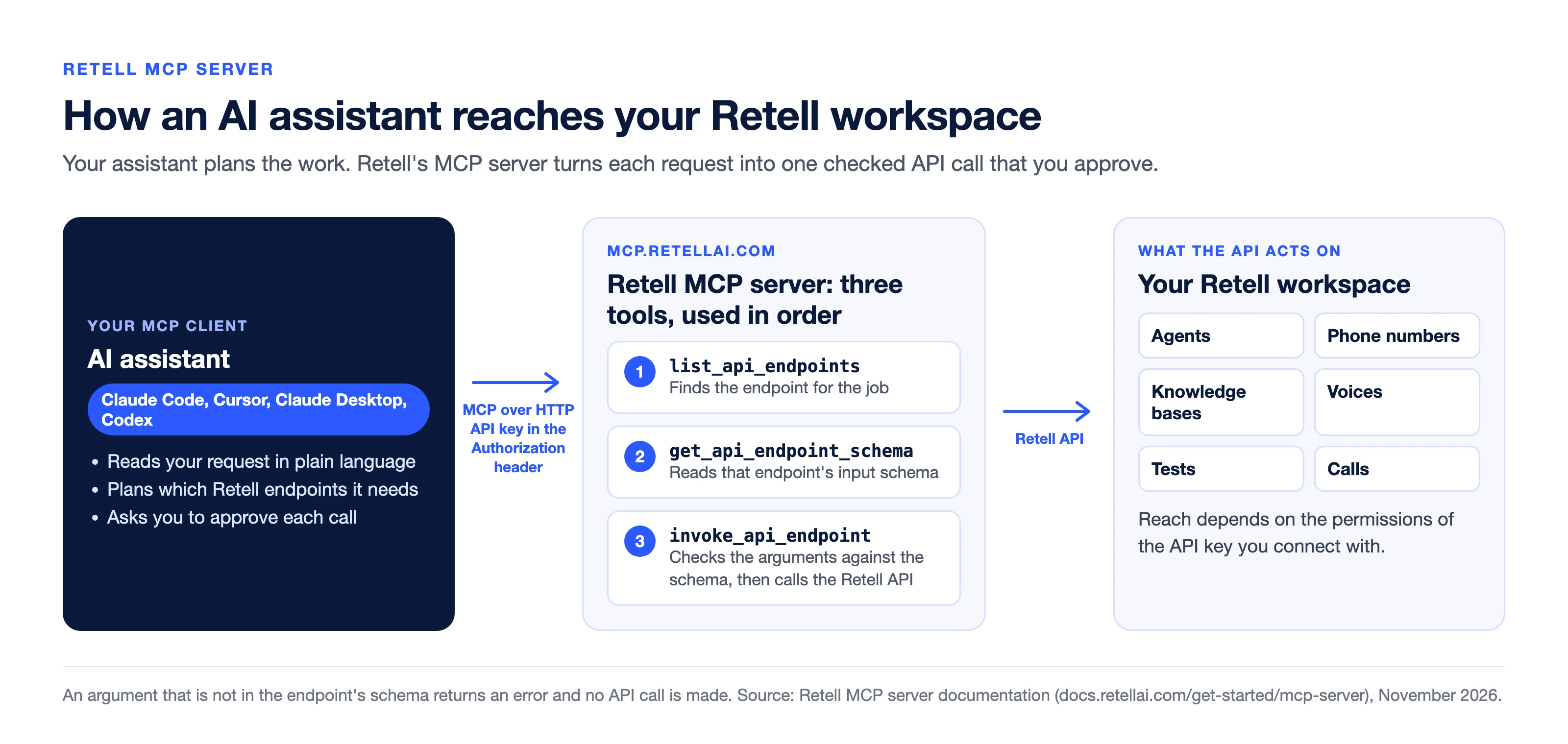
The Model Context Protocol (MCP) is a standard way for an AI assistant to use outside tools. Retell's MCP server gives an assistant access to the Retell platform through one connection. Depending on the permissions of your API key, the assistant can work with:
- Agents. Create, update, publish and list agents and their versions.
- Calls. Create phone and web calls, list calls and fetch call details.
- Phone numbers. Import, provision and list numbers.
- Knowledge bases. Create them and add or remove sources.
- Voices. List voices and search community voices.
- Chats. Create chat agents and chats.
- Tests. Create test cases and run them.
This is different from letting a voice agent use an outside MCP server during a call. For that, see how to connect a voice agent to MCP with the MCP node.
How the connection works
Your MCP client connects to the hosted server over HTTP and sends your Retell API key in the Authorization header. The server lists three tools instead of one tool per API endpoint, so the tool list stays small enough for the assistant's context window. The assistant uses them in order: list_api_endpoints to find the endpoint, get_api_endpoint_schema to read its input schema, and invoke_api_endpoint to check the arguments against that schema and call the Retell API.
Deprecated endpoints are not available. If a call includes an argument that is not in the endpoint's schema, the server returns an error that names the argument and does not call the API.
Set up the Retell MCP server in your client
You need a Retell API key and an MCP client. The server URL is https://mcp.retellai.com and the header is Authorization: Bearer followed by your key.
| Client | Where to add it | What you add |
|---|---|---|
| Claude Code | Your terminal | One claude mcp add command |
| Cursor | Cursor Settings, MCP, Add new global MCP server | A JSON block with the URL and header |
| Claude Desktop | Settings, Developer, Edit Config | The same JSON block |
| Codex | The config.toml file in your .codex folder | A server entry and an environment variable |
| Lovable | Connectors, MCP server | The URL and your key as a bearer token |
| Other MCP clients | The client's MCP settings | The URL and the Authorization header |
Source: Retell's MCP server documentation, read November 10, 2026.
Claude Code
claude mcp add --transport http retell https://mcp.retellai.com \
  --header "Authorization: Bearer <RETELL_API_KEY>"
For a full walkthrough of building and testing an agent this way, see how to build a voice agent with Claude Code and Claude Fable 5.2.
Cursor and Claude Desktop
Both use the same block. In Cursor, add it as a new global MCP server. In Claude Desktop, open Settings, then Developer, then Edit Config.
{
  "mcpServers": {
    "retell": {
      "url": "https://mcp.retellai.com",
      "headers": {
        "Authorization": "Bearer <RETELL_API_KEY>"
      }
    }
  }
}
Codex
Add this to config.toml in your .codex folder, then set RETELL_API_KEY as an environment variable.
[mcp_servers.retell]
url = "https://mcp.retellai.com"
bearer_token_env_var = "RETELL_API_KEY"
Claude and ChatGPT without an API key
If you would rather sign in with your Retell login than manage a key, Retell also has a connector for Claude, which signs in over OAuth and shows build, deploy and test steps as widgets inside the chat, and separate setup for ChatGPT. For more on the ChatGPT side, see our guide to AI phone calling with ChatGPT.
Prompts to try once you are connected
Start with a read so you can see the connection working before anything changes.
- "List my agents and summarize what each one does."
- "Create a new agent for inbound sales qualification and publish it."
- "Show me the last 20 calls and tell me which ones ended badly and why."
- "Create a knowledge base, attach these sources, then update my agent to use it."
- "Import this phone number and assign it to my agent."
- "Write simulation test cases for my receptionist agent and run them."
A call the assistant places reaches a real phone and is billed like any other call, so check the destination number before you approve it.
Keep approvals on
An assistant with an API key can do whatever the key allows, and the text it reads can try to steer it. Call transcripts, user messages and knowledge base documents can all contain instructions aimed at the model.
- Approve each call. Every API call goes through invoke_api_endpoint. If you always allow that tool, you allow every endpoint your key can reach, including delete and publish. Approve each call separately and check its endpoint and arguments.
- Use least privilege. Retell API keys can be limited by permission group, so a key used only to review calls needs read access to call history and nothing else.
- Keep keys out of prompts. Store the key in your client's settings, never in the chat.
- Read before you write. Have the assistant fetch the current agent before it updates or deletes it.
- Be careful with personal data. Call logs and transcripts can hold sensitive information. Ask for summaries when you do not need the full text.
Troubleshooting the connection
| Problem | What to check |
|---|---|
| Tools do not show up | The server URL, the Authorization header, and that your client can reach the endpoint |
| 401 Unauthorized | The header reads Authorization: Bearer followed by your key, and the key is active |
| Tool call errors | Rerun with smaller inputs, then read the error the server returned |
| An unknown field error | The argument is not in the endpoint's schema, so the API was not called. Ask the assistant to fetch the schema again and retry with only the listed fields |
| An old server address | The legacy server at retell.stlmcp.com was removed on July 20, 2026. Point your client to mcp.retellai.com |
Video walkthrough
This video was recorded with an earlier local setup. The steps above, using the hosted server, replace its setup section. The way you prompt the assistant once it is connected is the same.
Frequently asked questions
What is the Retell AI MCP server?
It is a hosted server at mcp.retellai.com that lets an MCP-capable AI assistant manage a Retell account by calling the Retell API. The assistant can create and update agents, work with phone numbers and knowledge bases, run tests, and create and review calls, within the permissions of the API key you connect with.
Which AI assistants work with the Retell MCP server?
Any client that supports remote MCP servers over HTTP with custom headers. Retell's documentation gives setup steps for Claude Code, Cursor, Claude Desktop, Codex and Lovable. Claude and ChatGPT also have their own Retell connectors that sign in without an API key.
How do I connect Claude Code to Retell AI?
Run claude mcp add with the HTTP transport, the name retell, the URL https://mcp.retellai.com, and a header carrying your Retell API key as a bearer token. Then start Claude Code and run /mcp to confirm the server is connected.
What does it cost to use the Retell MCP server?
What the assistant does through the MCP server is ordinary Retell API usage, so calls and tests are billed at the usual rates. Current rates are on the pricing page.
Is it safe to give an AI assistant my Retell API key?
It is as safe as the key's permissions and the approvals you keep on. Use a key limited to what the work needs, keep per-call approval on for invoke_api_endpoint, and review any delete or publish call before you approve it.
What is the difference between the Retell MCP server and the MCP node?
The MCP server lets your AI assistant manage your Retell account. The MCP node, and MCP tools on single-prompt agents, let one of your voice agents call an outside MCP server's tools during a live call.
Connect it and build one agent
Add the server to the client you already use, list your agents to confirm it works, then build one agent in Retell and place a call to your own phone. The MCP server documentation has the current setup for each client.
See how much your business could save by switching to AI-powered voice agents.
ROI Result
Total Human Agent Cost
AI Agent Cost
Estimated Savings
Estimate your monthly voice AI cost
Read Other Blogs


Revolutionize your call operation with Retell