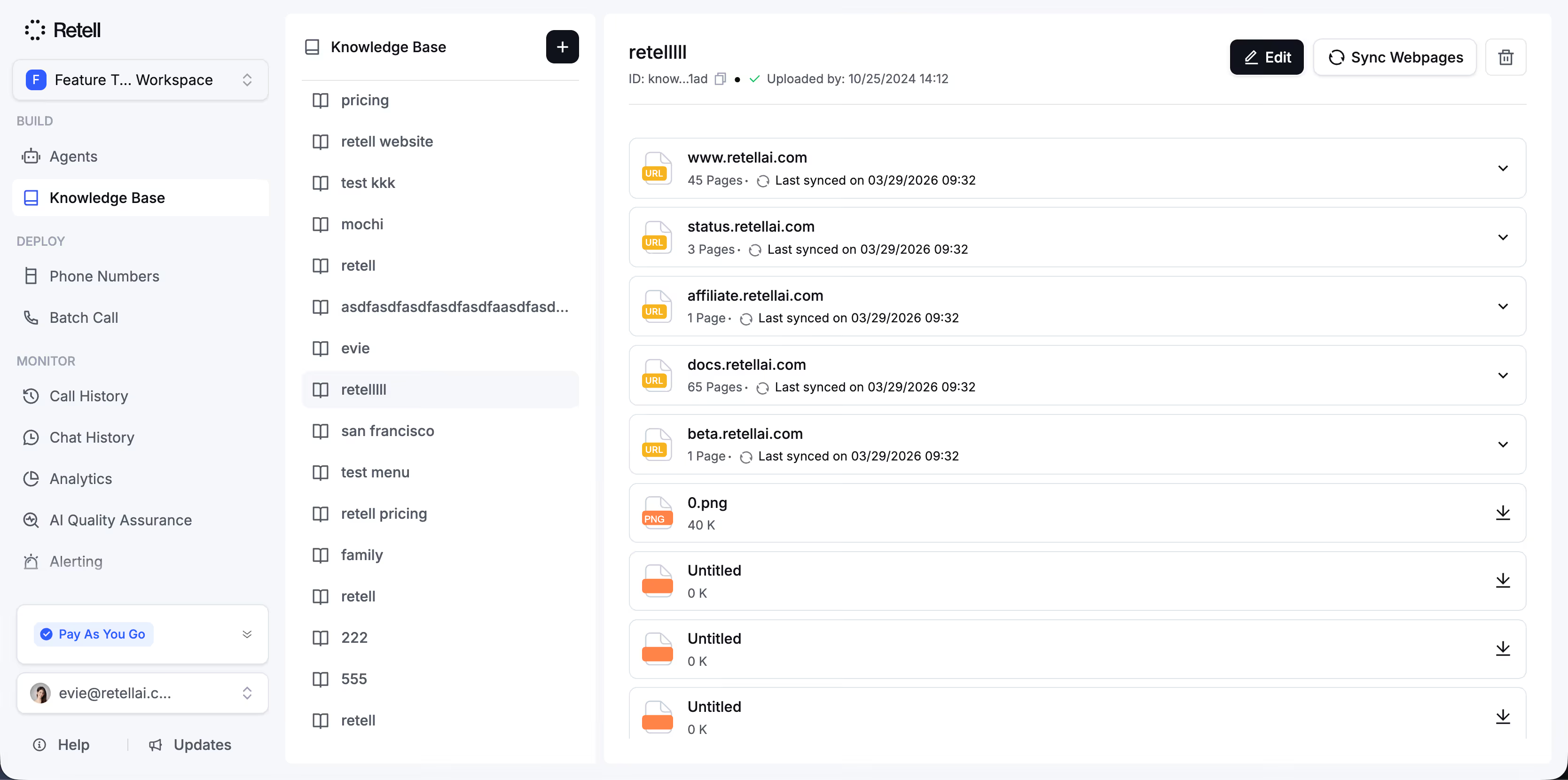
Knowledge Base
Smarter Call Transfers, Happier Customers
Discover  Feature
Seamlessly switch calls with AI-powered warm and cold transfers that save time, maintain context, and keep customers engaged.
Overview

Designed for Efficiency, 

Built for Trust

Retell's AI handles both cold and warm call transfers to fit any customer interaction. Whether speed or context is key, agents stay informed, and callers stay confident.

Cold Transfer
What it does
Instantly transfers calls to a live agent without added context.
How it Helps
Keeps things fast and efficient for low-complexity requests.
When to Use
Ideal for quick redirects, overflow routing, or after-hours escalation.
Key Points
Lightning-fast handoff
No pre-call briefing
Minimal system resources
Ideal for large call volumes
Warm Transfer
What it does
Transfers the caller with a contextual briefing to the next agent.
How it Helps
Builds trust and reduces repetition by keeping the next agent informed.
When to Use
Perfect for high-touch service, escalations, or critical handoffs.
Key Points
Contextual call introduction
Personalized handoff builds rapport
Reduces customer frustration
Increases first-contact resolution
Overview

Designed for Efficiency, 

Built for Trust

Retell's AI handles both cold and warm call transfers to fit any customer interaction. Whether speed or context is key, agents stay informed, and callers stay confident.

Overview

Designed for Efficiency, 

Built for Trust

Retell's AI handles both cold and warm call transfers to fit any customer interaction. Whether speed or context is key, agents stay informed, and callers stay confident.

Add the Call
Transfer Function
Connect Retell’s call transfer API to your existing voice flow or telephony setup. With just a few lines of code, your AI agent gains the ability to redirect calls to human agents or other departments seamlessly—keeping your infrastructure intact while improving the caller’s experience from the very first handoff.
60 minutes free trial
Define Routing Logic & Experience
Connect Retell’s call transfer API to your existing voice flow or telephony setup. With just a few lines of code, your AI agent gains the ability to redirect calls to human agents or other departments seamlessly—keeping your infrastructure intact while improving the caller’s experience from the very first handoff.
60 minutes free trial
Test, Refine
& Launch
Simulate real scenarios to ensure your call transfer logic performs perfectly. Adjust parameters, preview transitions, and verify response latency before launch. Once ready, deploy instantly and monitor performance through your Retell dashboard to keep every transfer fast, contextual, and reliable.
60 minutes free trial
Product Highlights

Built to Handle
the Real World

Truly Humanlike Experience
Natural turn-taking, low latency, and contextual language generation make every transfer feel effortless.
Multichannel Support
Use Retell across voice, SMS, and chat — all transfers work seamlessly across channels.
Warm Transfer Intelligence
Automatically summarize caller context before connecting, improving agent readiness.
Enterprise-Grade Reliability
No dropped handoffs, 99.9%+ uptime, and fallback systems ensure smooth transitions.
Use Cases

Proven Impact Across 

Industries

Matic Insurance
Matic routes high-value leads via warm transfers, increasing trust and improving conversion rates.
Our numbers show that 45-50% of calls are completely resolved by Retell AI without ever touching a human.
Jonathan Adly
Senior Engineer, GiftHealth
GiftHealth
Cold transfers helped GiftHealth scale support without sacrificing speed or quality.
Retell enabled us to streamline 60% of calls with zero agent involvement.
Jonathan Adly
Senior Engineer, GiftHealth
Matic Insurance
Matic routes high-value leads via warm transfers, increasing trust and improving conversion rates.
Our numbers show that 45-50% of calls are completely resolved by Retell AI without ever touching a human.
Jonathan Adly
Senior Engineer, GiftHealth
Integrations

Seamless

Integrations with Your
Tech Stack

View All Integrations
  • Hubspot
  • Twillio
  • Vonage
  • Go High Level
  • 8n8
  • Hubspot
  • Twillio
  • Vonage
  • Go High Level
  • 8n8
  • Hubspot
  • Twillio
  • Vonage
  • Go High Level
  • 8n8
  • Hubspot
  • Twillio
  • Vonage
  • Go High Level
  • 8n8
  • Hubspot
  • Twillio
  • Vonage
  • Go High Level
  • 8n8
  • Hubspot
  • Twillio
  • Vonage
  • Go High Level
  • 8n8
  • Hubspot
  • Twillio
  • Vonage
  • Go High Level
  • 8n8
  • Hubspot
  • Twillio
  • Vonage
  • Go High Level
  • 8n8
Learn More

Discover More
Features

Explore how Retell AI can transform every part of your call operations. See the full range of capabilities designed for smarter automation, better efficiency, and enhanced customer experience.

View All Product Features
Retell vs Vapi
Depth Comparison to Find the Right Alternative
Retell vs Thoughtly
Smarter, Scalable AI Voice Agents for Business
Retell Feature

Power your AI agent With Knowledge Base

Ensure your AI agent delivers precise, up-to-date responses every time. Retell AI’s Knowledge Base feature seamlessly integrates webpages, documents, and custom content to keep your agent informed and efficient.

Webpages

check the available slots in calendar

Documents

book appointment in specific slot

Use Cases

What are retell's knowledge base features?

Upload Webpages

Easily import content from your website to keep your AI agent informed.

Supports single pages or entire websites
Real-Time Updates
Streamlined and Efficient
Get Started
How it works

Step by step to use a knowledge base?

1
Create a knowledge base

Navigate to the “Knowledge Base” tab and click the “Add” button. Choose your knowledge source from three options:

URL: Import content from web pages, either single pages or entire sites.File: Upload documents in supported formats, such as PDFs, TXT, or DOCX.Text: Add custom content directly to the Knowledge Base.

Try for free
60 minutes free trial
2
Add the Knowledge Base to Your Agent

In the agent editor, locate the “Knowledge Base” section and select the items you’ve added.

Your agent will now use this information to provide precise and relevant responses to related queries.

Try for free
60 minutes free trial
3
Test the Knowledge Base in the Playground

Test the knowledge base by asking related questions in the test LLM area.

No need to update your prompts—the agent automatically integrates the knowledge base content when responding.

Try for free
60 minutes free trial
F.A.Q

Questions & answers

All account has a 60-minutes free trial.

What formats are supported for document uploads?
Can I use the Knowledge Base for multiple agents?
How does the Knowledge Base affect response time?
How do I test the Knowledge Base?
More questions? Visit our docs

Time to hire your AI call center