Branded Call ID
Smarter Call Transfers, Happier Customers
Discover  Feature
Seamlessly switch calls with AI-powered warm and cold transfers that save time, maintain context, and keep customers engaged.
Overview

Designed for Efficiency, 

Built for Trust

Retell's AI handles both cold and warm call transfers to fit any customer interaction. Whether speed or context is key, agents stay informed, and callers stay confident.

Cold Transfer
What it does
Instantly transfers calls to a live agent without added context.
How it Helps
Keeps things fast and efficient for low-complexity requests.
When to Use
Ideal for quick redirects, overflow routing, or after-hours escalation.
Key Points
Lightning-fast handoff
No pre-call briefing
Minimal system resources
Ideal for large call volumes
Warm Transfer
What it does
Transfers the caller with a contextual briefing to the next agent.
How it Helps
Builds trust and reduces repetition by keeping the next agent informed.
When to Use
Perfect for high-touch service, escalations, or critical handoffs.
Key Points
Contextual call introduction
Personalized handoff builds rapport
Reduces customer frustration
Increases first-contact resolution
Overview

Designed for Efficiency, 

Built for Trust

Retell's AI handles both cold and warm call transfers to fit any customer interaction. Whether speed or context is key, agents stay informed, and callers stay confident.

Overview

Designed for Efficiency, 

Built for Trust

Retell's AI handles both cold and warm call transfers to fit any customer interaction. Whether speed or context is key, agents stay informed, and callers stay confident.

Add the Call
Transfer Function
Connect Retell’s call transfer API to your existing voice flow or telephony setup. With just a few lines of code, your AI agent gains the ability to redirect calls to human agents or other departments seamlessly—keeping your infrastructure intact while improving the caller’s experience from the very first handoff.
60 minutes free trial
Define Routing Logic & Experience
Connect Retell’s call transfer API to your existing voice flow or telephony setup. With just a few lines of code, your AI agent gains the ability to redirect calls to human agents or other departments seamlessly—keeping your infrastructure intact while improving the caller’s experience from the very first handoff.
60 minutes free trial
Test, Refine
& Launch
Simulate real scenarios to ensure your call transfer logic performs perfectly. Adjust parameters, preview transitions, and verify response latency before launch. Once ready, deploy instantly and monitor performance through your Retell dashboard to keep every transfer fast, contextual, and reliable.
60 minutes free trial
Product Highlights

Built to Handle
the Real World

Truly Humanlike Experience
Natural turn-taking, low latency, and contextual language generation make every transfer feel effortless.
Multichannel Support
Use Retell across voice, SMS, and chat — all transfers work seamlessly across channels.
Warm Transfer Intelligence
Automatically summarize caller context before connecting, improving agent readiness.
Enterprise-Grade Reliability
No dropped handoffs, 99.9%+ uptime, and fallback systems ensure smooth transitions.
Use Cases

Proven Impact Across 

Industries

Matic Insurance
Matic routes high-value leads via warm transfers, increasing trust and improving conversion rates.
Our numbers show that 45-50% of calls are completely resolved by Retell AI without ever touching a human.
Jonathan Adly
Senior Engineer, GiftHealth
GiftHealth
Cold transfers helped GiftHealth scale support without sacrificing speed or quality.
Retell enabled us to streamline 60% of calls with zero agent involvement.
Jonathan Adly
Senior Engineer, GiftHealth
Matic Insurance
Matic routes high-value leads via warm transfers, increasing trust and improving conversion rates.
Our numbers show that 45-50% of calls are completely resolved by Retell AI without ever touching a human.
Jonathan Adly
Senior Engineer, GiftHealth
Integrations

Seamless

Integrations with Your
Tech Stack

View All Integrations
  • Hubspot
  • Twillio
  • Vonage
  • Go High Level
  • 8n8
  • Hubspot
  • Twillio
  • Vonage
  • Go High Level
  • 8n8
  • Hubspot
  • Twillio
  • Vonage
  • Go High Level
  • 8n8
  • Hubspot
  • Twillio
  • Vonage
  • Go High Level
  • 8n8
  • Hubspot
  • Twillio
  • Vonage
  • Go High Level
  • 8n8
  • Hubspot
  • Twillio
  • Vonage
  • Go High Level
  • 8n8
  • Hubspot
  • Twillio
  • Vonage
  • Go High Level
  • 8n8
  • Hubspot
  • Twillio
  • Vonage
  • Go High Level
  • 8n8
Learn More

Discover More
Features

Explore how Retell AI can transform every part of your call operations. See the full range of capabilities designed for smarter automation, better efficiency, and enhanced customer experience.

View All Product Features
Retell vs Vapi
Depth Comparison to Find the Right Alternative
Retell vs Thoughtly
Smarter, Scalable AI Voice Agents for Business
Retell Feature

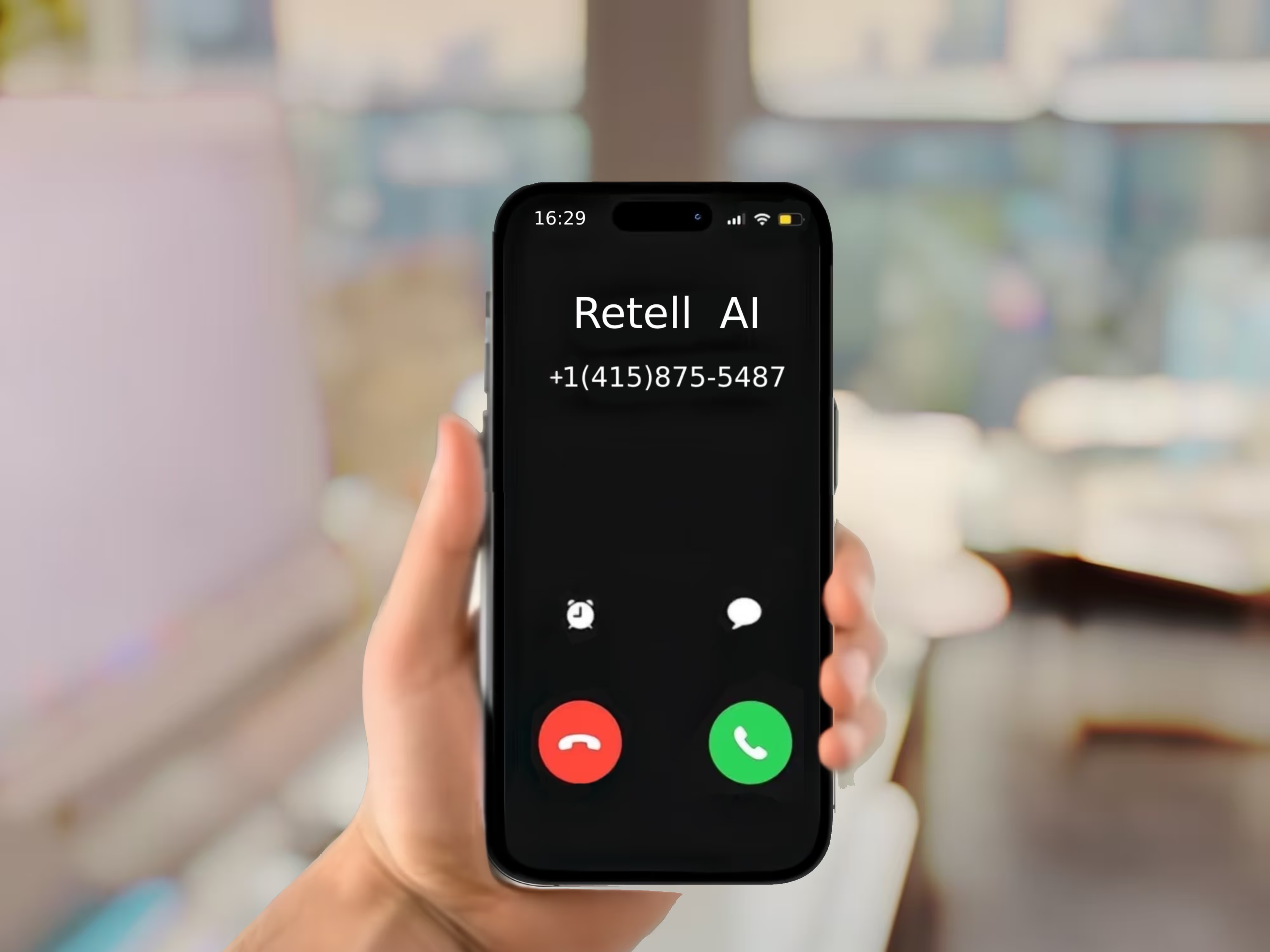
Make Every Call Recognizable with Branded Call ID

Stand out and build trust with Retell AI’s branded caller ID feature. Display your business name on outbound calls to boost credibility and increase answer rates.

Benfits

What are the benefits to use branded call id?

Increase Customer Confidence

Branded calls reassure recipients that they’re hearing from a trusted source.

Boost Answer Rates

Customers are more likely to pick up calls when they recognize the caller.

Cost-Effective Outreach

At $0.10/min, scale your productivity without breaking the bank.

Simple Setup

Easily apply for branded caller ID through the Retell AI dashboard.

Enhance Caller Trust

Display your business name on T-Mobile, AT&T, and Verizon networks.

Scalable Infrastructure

Handle hundreds of calls at once with Retell AI’s advanced platform.

How it works

How to Setup Our Branded Caller ID

1
Purchase a phone Number

From the Retell AI dashboard, select and purchase a phone number.

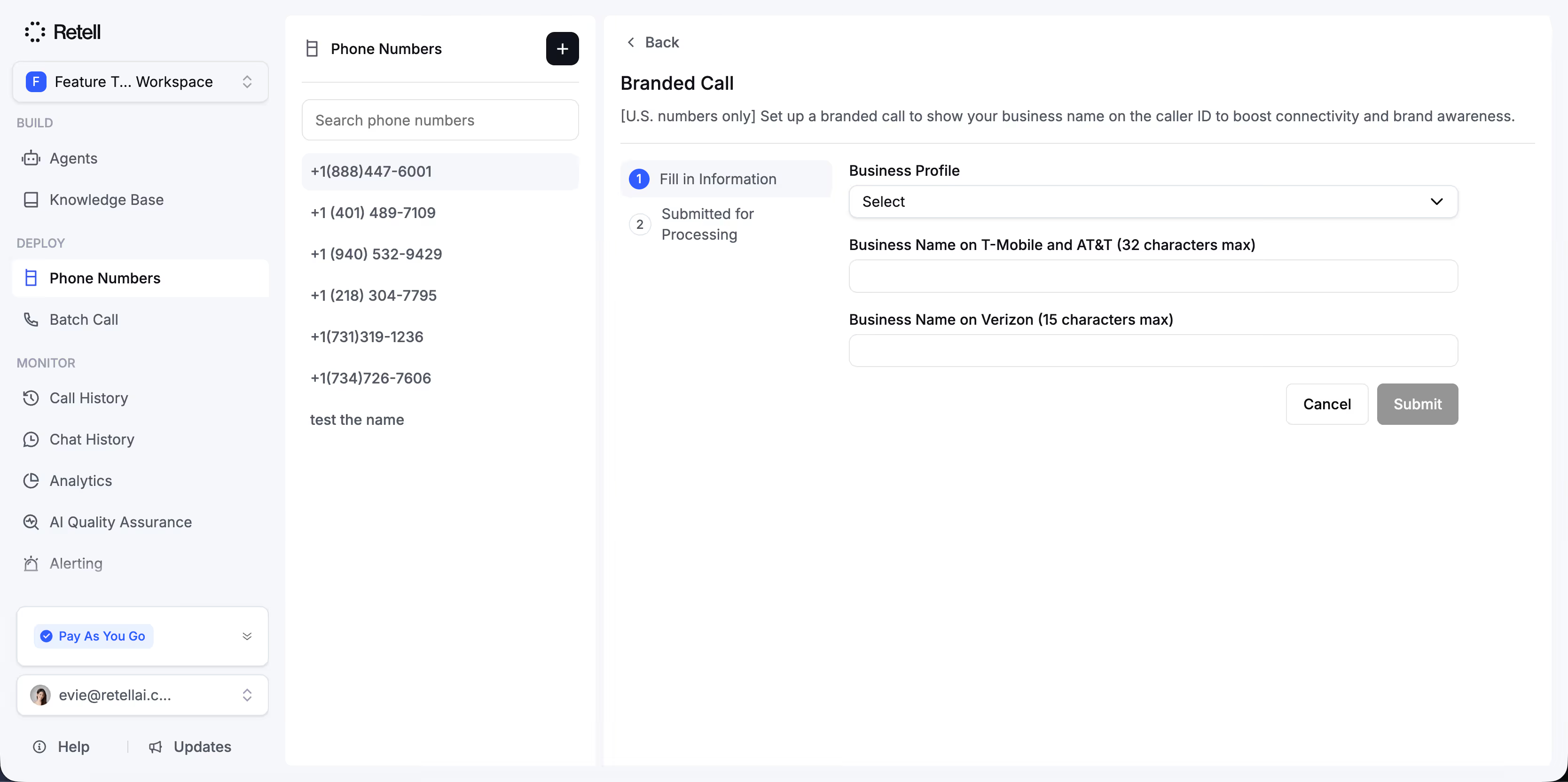
Look for the Advanced Add-Ons section, and click "Branded Call" to begin your application.

Try for free
60 minutes free trial
2
Submit Your Application

Complete your business profile by entering details such as your company name and the display name you want to show on T-Mobile, AT&T, and Verizon.

Submit your application—approval typically takes 1–2 weeks.

Try for free
60 minutes free trial
3
Start Making Branded Calls

Once your application is approved, you can begin making outbound calls with your brand name displayed. It’s that simple to boost trust and recognition with every call.

Try for free
60 minutes free trial
F.A.Q

Questions & answers

All account has a 60-minutes free trial.

Can I use branded caller ID with my existing phone system?
Is branded caller ID available internationally?
What happens if my application is rejected?
How much does branded caller ID cost?
More questions? Visit our docs

Time to hire your AI call center