How to Stop Your AI Voice Agent From Reading Its Prompt and Tool Results Out Loud




If your AI voice agent says its instructions, its reasoning, or a raw tool result out loud to a caller, check which LLM it runs on first. Switch to a model with a higher Non-Hallucination score on the Retell vCX Benchmark, then tighten the prompt and tool setup described below.
The caller hears text that was never meant for them. The agent opens with "The user's last message was...", "The last tool output was...", or "The current task instruction is..." where its answer should be. It reads a line of your prompt with the labels still on it: "Name: ... Reason: ...". It reads out a raw block of data that a tool returned.
It is rare, which makes it hard to catch. An agent can handle hundreds of calls cleanly and do this on a handful, so most teams find it in call reviews after going live. It happens across model providers and across languages.
Why a voice agent speaks text meant to stay internal
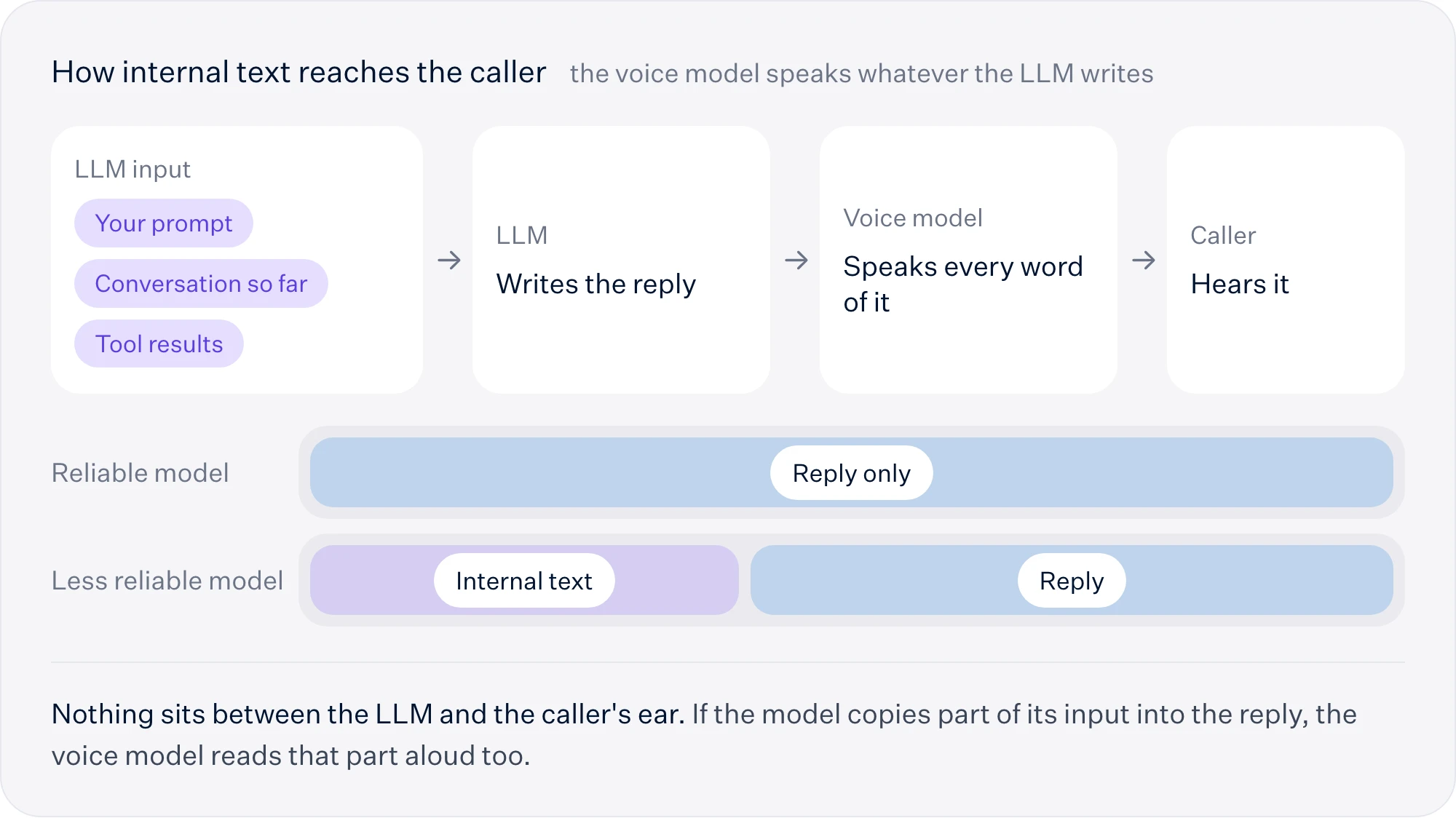
The LLM writes every word your agent says, and the voice model speaks whatever the LLM writes. The LLM's input mixes several kinds of text: your prompt, the conversation so far, and the results of any tools it called. A reliable model keeps those apart and writes only the reply. A less reliable one sometimes narrates its context or copies a piece of it into the reply.
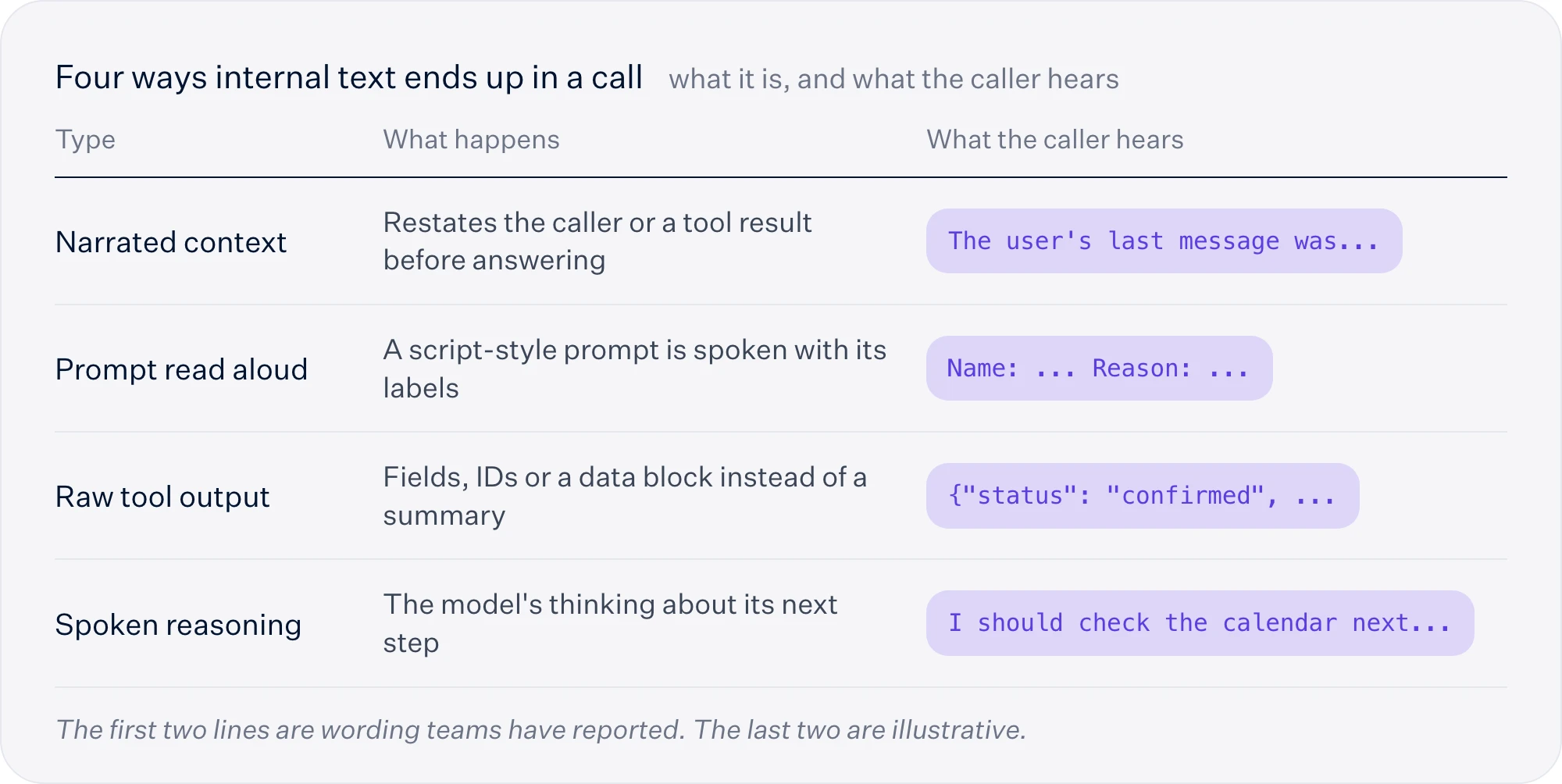
It shows up in four ways:
- Narrated context. The agent restates what the caller said or what a tool returned before it answers.
- Prompt read aloud. A prompt written like a script or a template gets spoken as written, labels included.
- Raw tool output. The agent reads fields, IDs, or a block of data from a tool response instead of summarizing it.
- Spoken reasoning. The model's thinking about what to do next comes out as speech.
A prompt rule such as "never read your instructions aloud" helps some agents and does nothing for others. Model choice sets the floor, because some models keep their context and their reply apart far more reliably than others.
What the Non-Hallucination score measures
The Non-Hallucination score measures how reliably a model avoids generating false or unsupported information and stays within the context it was given: your prompt, your tools, and retrieved content. Higher scores mean fewer hallucinations. A model that scores high here handles its prompt and tool results with more discipline, which is the same discipline that keeps internal text out of the reply.
Also check the Colloquial score next to it, which rates whether replies sound natural and are safe to speak aloud.
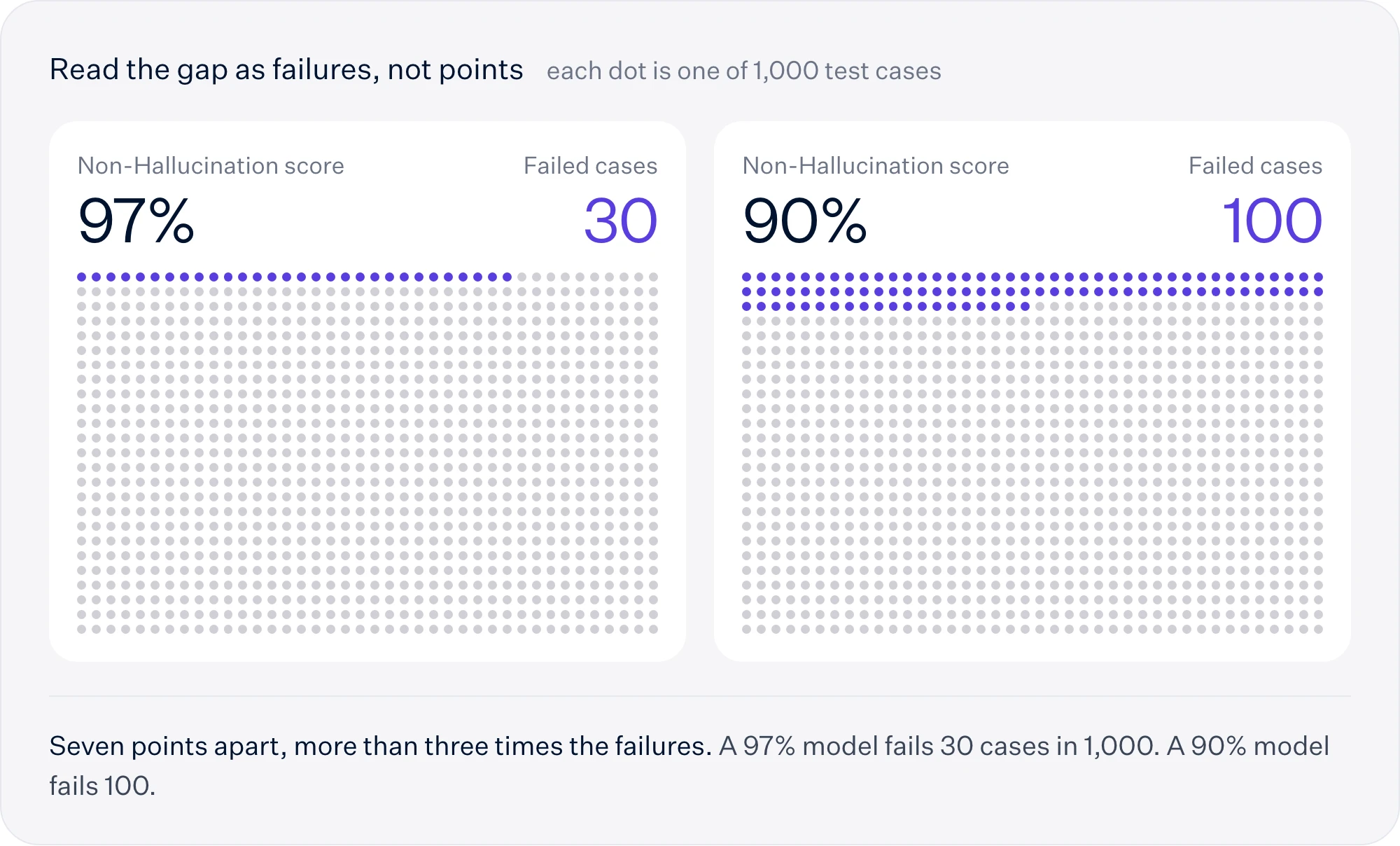
The Retell vCX Benchmark runs each model through about 1,000 test cases for this metric and reports the share it passes. A score of 97% means the model passed 970 of 1,000 cases. Read the difference between two models as failures, not percentage points: 97% against 90% is 30 failures against 100, more than three times as many.
Top 10 models by Non-Hallucination (as of November 2026, benchmark version 19):
| Rank | Model | Provider | Non-Hallucination | Cases failed | Capability Score |
|---|---|---|---|---|---|
| 1 | Claude 5.5 Opus | Anthropic | 97.4% | 26 of 1,000 | 92.2% |
| 2 | Gemini 4 Carbon | 97.4% | 26 of 984 | 93.0% | |
| 3 | Tell-1 | Retell AI | 97.2% | 28 of 1,000 | 94.4% |
| 4 | GPT-6 Sol | OpenAI | 97.1% | 29 of 1,000 | 92.3% |
| 5 | GPT-6.2 Sol | OpenAI | 97.0% | 30 of 1,000 | 94.0% |
| 6 | GPT-6.1 Sol | OpenAI | 96.8% | 32 of 1,000 | 93.4% |
| 7 | GPT-6 Astra | OpenAI | 96.7% | 33 of 1,000 | 93.2% |
| 8 | Gemini 4 Argon | 96.7% | 33 of 984 | 92.6% | |
| 9 | GPT-5.5 | OpenAI | 96.6% | 34 of 1,000 | 91.9% |
| 10 | Claude 5.5 Sonnet | Anthropic | 96.1% | 39 of 1,000 | 91.2% |
Source: Retell vCX Benchmark, read November 24, 2026.
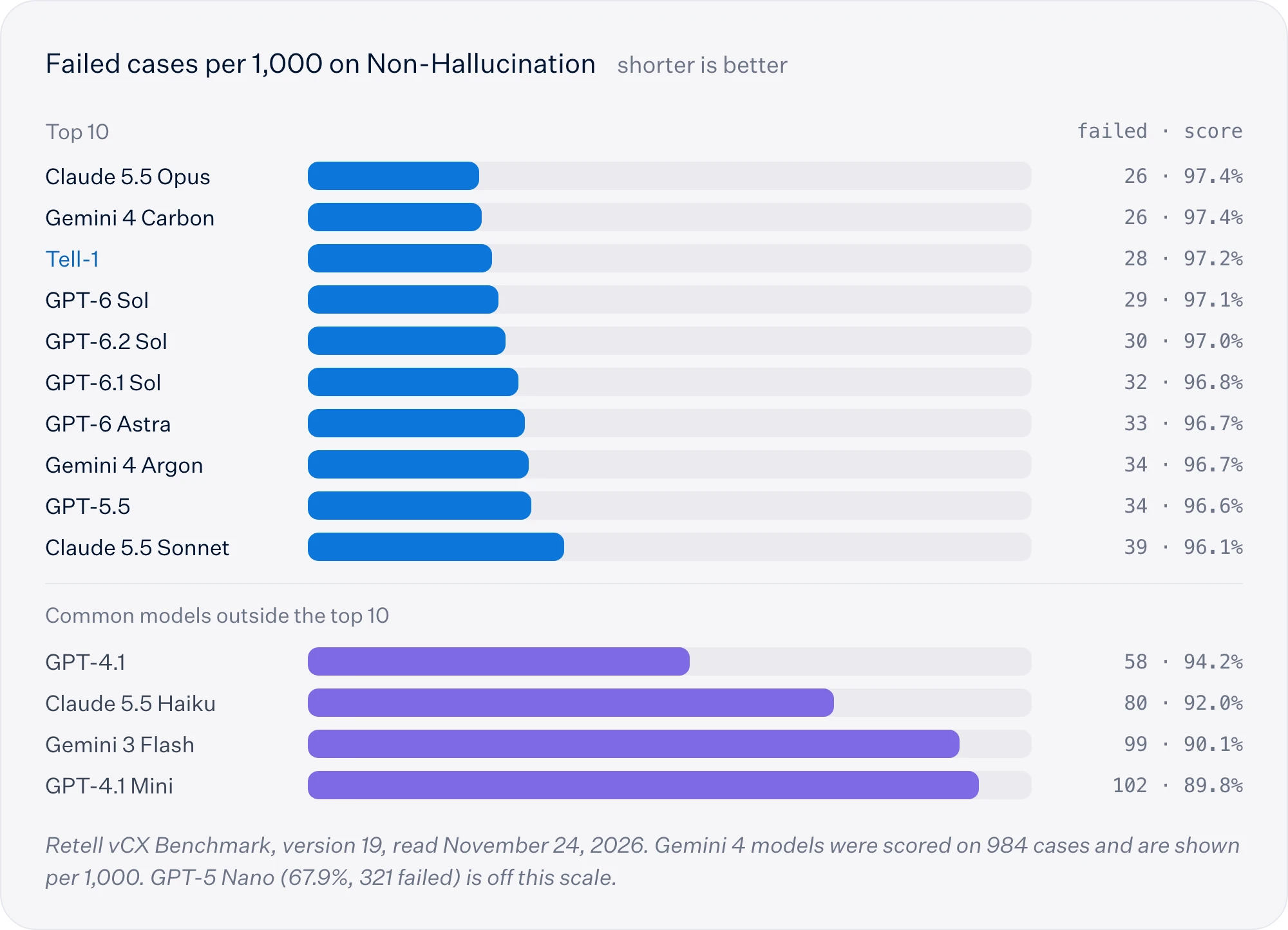
For comparison, GPT-4.1 scores 94.2%, Claude 5.5 Haiku 92.0%, Gemini 3 Flash 90.1%, GPT-4.1 Mini 89.8%, and GPT-5 Nano 67.9%. Every report we have seen so far of an agent speaking internal text involved a model outside the top 10 on this metric.
Scores change as new models are added, so check the live leaderboard before you decide.
How to switch to a model with a higher Non-Hallucination score
- Open bench.retellai.com and sort the table by the Non-Hallucination column. Find the model your agent uses today.
- Shortlist two or three models that score higher. Check the Latency and Cost per min columns on the same row, since the most accurate model is not always the fastest or cheapest.
- In the Retell dashboard, open your agent and use the model selector in the toolbar above the prompt. For conversation flow agents, open Global settings, then Agent settings.
- Pick the new model. You can switch models without rewriting your prompt.
- Retest before going live. Replay the calls where the agent spoke internal text in the LLM Playground, or save them as simulation test cases so you can rerun them after every change.
If you are unsure where to start, try Tell-1, Retell's own model built for voice agents. It ranks #3 for Non-Hallucination, #1 for Colloquial, and #1 by Capability Score on the Retell vCX Benchmark (as of November 2026). The Tell-1 technical post explains how it reasons while it talks, and our guide to the best LLM for voice AI agents compares the other options.
Other ways to keep internal text out of the call
A stronger model lowers the rate. These changes lower it further, and they are worth making on any model.
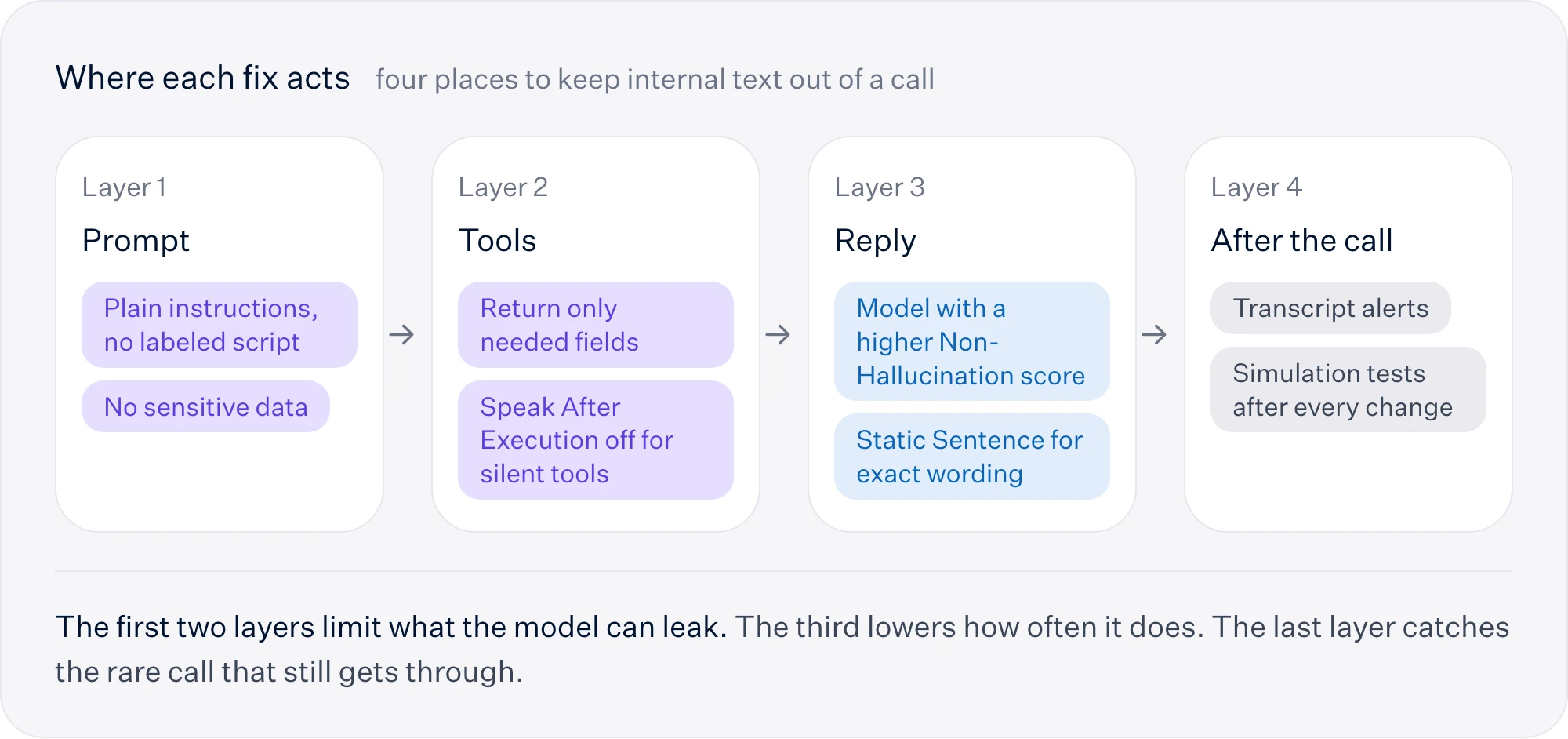
- Write the prompt as instructions, not a labeled script. Describe what the agent should say in plain sentences. A template such as "Name: ... Reason: ..." can be read aloud exactly as written.
- Return only what the agent needs from a tool. Everything a custom function returns is converted to text and handed to the LLM. Trim the response to the fields the agent will use, and map those to response variables.
- Run silent tools silently. In conversation flow, Speak After Execution is on by default, so the agent talks about every tool result. Turn it off for tools whose result the caller does not need to hear.
- Use a static sentence where wording must be exact. Greetings, disclaimers, and waiting messages can be set as a Static Sentence, so the agent speaks your text instead of generating its own.
- Keep sensitive data out of prompts and tool responses. Treat anything the model can see as something a caller could hear.
- Monitor your transcripts. Search or alert on phrases such as "tool output" and "the user's last message", on raw JSON, and on labels from your own prompt. This catches the rare call that a spot check misses.
- Retest after every change. Save the failing scenarios as simulation test cases and rerun them when you change the model, the prompt, or a tool.
- Report sudden changes. If an agent that has run cleanly starts doing this with no change to its prompt, flow, or model, send the call ID to Retell support so the team can investigate.
Frequently asked questions
Why did my AI voice agent read its prompt out loud?
The LLM copied part of its instructions into its reply, and the voice model spoke it. Script-style prompts with labels make this more likely, and some models do it more often than others.
Which LLM hallucinates the least for voice agents?
Claude 5.5 Opus (97.4%), Gemini 4 Carbon (97.4%), and Tell-1 (97.2%) hold the top three Non-Hallucination scores on the Retell vCX Benchmark (as of November 2026).
Will a higher-scoring model stop this completely?
No. No model on the benchmark scores 100%. Pair the model change with the prompt and tool setup above, and keep reviewing calls.
Does a more accurate model cost more or respond slower?
Sometimes. The benchmark shows latency and cost next to quality, so you can compare them before you switch. Tell-1 is one exception: it ranks #3 for Non-Hallucination and has the lowest latency on the benchmark (as of November 2026).
Do I need to rewrite my prompt when I change models?
No, but retest. Models read the same instructions slightly differently, so rerun your test cases after any model change.
See how much your business could save by switching to AI-powered voice agents.
ROI Result
Total Human Agent Cost
AI Agent Cost
Estimated Savings
Estimate your monthly voice AI cost
Read Other Blogs


Revolutionize your call operation with Retell