How to Increase Outbound Call Pickup Rates




Most outbound programs lose the call before anyone speaks. The contact sees an unknown number, a "Spam Likely" label, or a voicemail greeting, and the conversation never starts. Pickup rate, meaning how often a person actually answers, is the first number to fix.
Retell's Dialer is the current product for outbound campaigns. It calls or texts a contact list, retries on a schedule, and tracks who connected. Legacy batch calls are still available, but the Dialer is what you should use for this playbook. The steps below follow a simple order: make the number look familiar, retry immediately when you reach voicemail, leave a message later, then test the voice and the opening once people start answering. For that test, see how human an AI voice agent needs to sound before it can sell.
Use local presence so the number looks familiar
Local presence dialing is the Dialer's default. Each contact is called from a number assigned to their own area, so the caller ID looks local instead of like a number from another state. That is one of the documented ways to improve pickup rates.
On the Numbers tab of a campaign, keep Local presence dialing selected and add numbers for the regions where your contacts actually are. A contact keeps the caller ID they got first for later calls and texts, as long as that number stays in the pool. If you have no number for their area code, the campaign uses a Default phone number, or the contact fails with "No number available to call from." Retell does not automatically fall back to a nearby area code.
The other option is round robin, which spreads calls evenly across every number in the pool. That can fit a list in one area, or a few numbers your customers already know. For a list spread across many area codes, local presence is the better default.
Use enough numbers that no single line carries the whole list. The Dialer suggests one number per 50 contacts in a region. After you buy US numbers, you can turn on Daily spam check on the Phone Numbers page to see when carriers flag a number. Retell does not swap a flagged number out of a campaign automatically, so remove it and replace it yourself. For a fuller number-setup checklist, see The Outbound Voice AI Phone Number Checklist.
Show a branded caller ID, and verify the number
What the contact sees on the lock screen matters as much as the area code. Branded call displays your business name instead of a phone number. Verified phone numbers register the line with carriers so it is less likely to be marked "Spam Likely." Both are available for US numbers only, both need a verified business profile, and both can take one to two weeks to process.
They are separate services. Branded call shows the name; verification helps with spam labeling. Retell recommends enabling both, and the spam likely overview explains how each one raises pickup rates. Without a verified number, calls can still be marked "Spam Likely" even if you applied for branded calling.
Carrier name limits differ: T-Mobile and AT&T allow up to 32 characters, Verizon up to 15. You can provide a short name and a long name so the display fits each network.
Retell's docs describe branded call and verification as ways to raise trust and pickup rates, without promising a fixed percentage. Your own Connected rate in Dialer analytics is the measure that matters. For a deeper look at why the name on the phone builds trust, see Branded Caller IDs and Verified Phone Numbers.
When you reach voicemail, use double dial
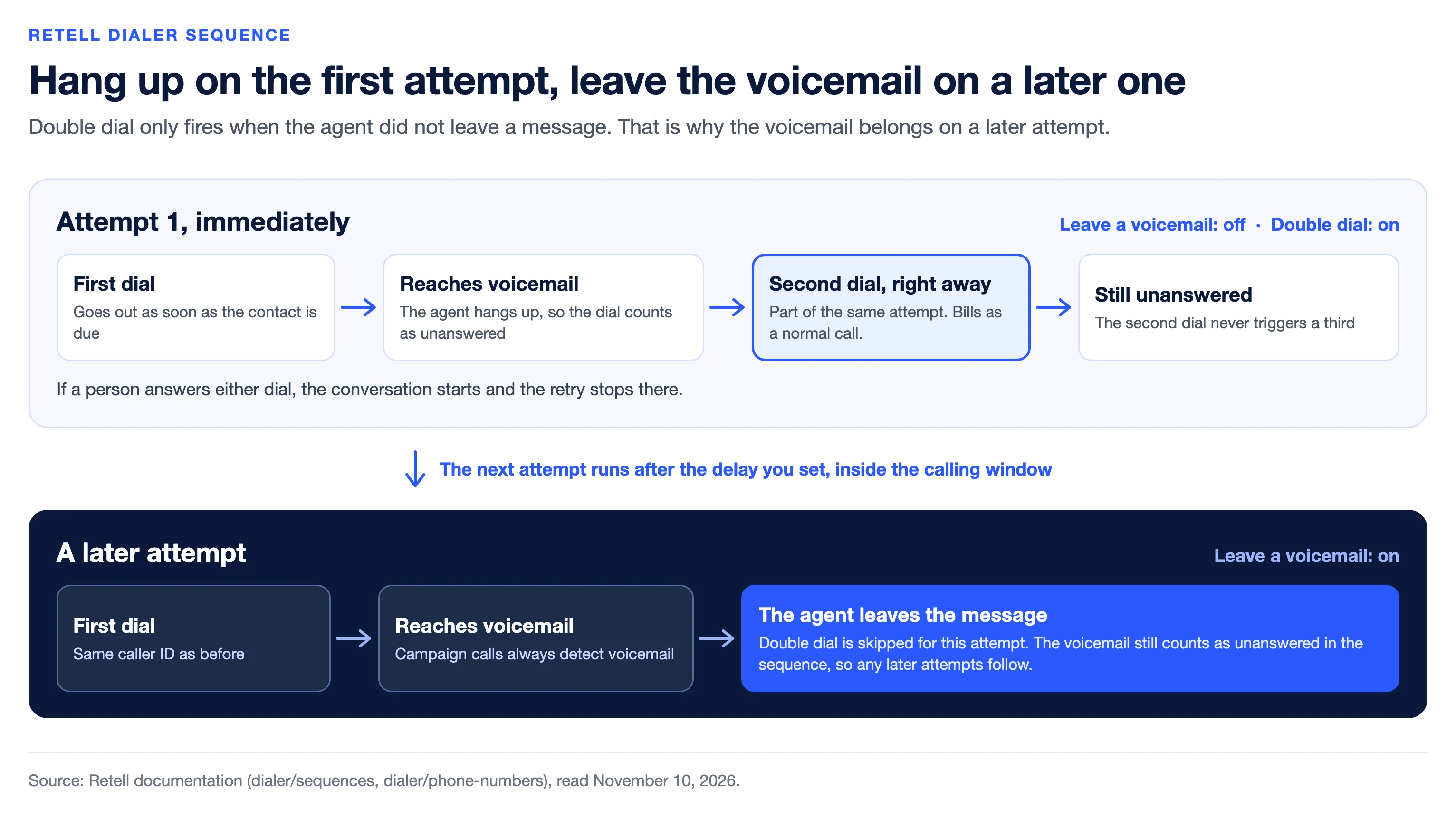
Double dial is a Dialer retry, not a workaround you have to build yourself. It is on by default under Automatic retries. When a dial goes unanswered, Retell places a second dial right away, as part of the same attempt. Each dial bills as a normal call. The second dial never triggers a third.
A voicemail that the agent hung up on counts as unanswered, so it gets that second dial. Retell skips the double dial when the agent already left a voicemail on the first dial, when the number does not exist or the carrier rejected it, when the campaign is paused or stopped, or when you stopped the call manually.
That skip rule is why the next step matters. If you leave a message on the first reach, you give up the immediate retry.
If the second dial also goes unanswered, the node's next attempt runs after the delay you set, inside the calling window. A voicemail always counts as unanswered in the sequence, even when the agent leaves a message, so later attempts still follow.
Leave the voicemail on a later attempt, not the first
Campaign calls always detect voicemail. On each phone-call attempt you can turn Leave a voicemail on or off. The setting is per attempt, not per dial inside a double dial. If it is on for that attempt and the first dial reaches voicemail, the agent leaves the message and the double dial is skipped.
The documented pattern is to hang up on earlier attempts and leave a message only on the last attempt or two. In practice, that often looks like this:
- Attempt 1, immediately, with Leave a voicemail off. If the call hits voicemail, the agent hangs up and double dial can fire right away.
- A later attempt (for many campaigns, attempt 2 after a short delay) with Leave a voicemail on.
You can use the agent's default voicemail behavior, a static sentence with variables such as {{first_name}}, or a prompt that writes the message. For more on how detection and messages work at the agent level, see Handle voicemail and IVR and 5 Best Voicemail Practices When Using AI Voice Agents.
This is not ringless voicemail drop, which is a different (and often tightly regulated) product category. Here the agent reaches a voicemail inbox after the call connects and, if you allow it, leaves a message.
Try different voices, and A/B test the opening
Caller ID, local presence, verification, and double dial affect whether someone picks up. The voice and the opening affect what happens after they do. A weak first line will not show up as a missed pickup, but it can still end the call in the first few seconds.
Platform voices are Retell's curated library for phone calls. In agent settings you can filter by gender or accent, preview a voice, and save it. Start with a few options that fit the campaign, then compare them rather than guessing.
To test openings and voices in production, use A/B testing. It is supported on outbound calls: bind two or more agents to a phone number, set a traffic split, and compare prompts, voices, or flows. Change one thing at a time: the first sentence or the voice, not both. In Analytics, filter to the agent versions in the test and compare call success rate and, for Dialer campaigns, Connected and conversion. A/B testing on a number is a percentage split of traffic. It is not the same as the Dialer's sequence, which assigns a specific agent to each conversation node. If you are comparing two campaign openings, keep the number pool, local presence, and retry settings the same so the test is about the script or the voice.
Put the playbook into a Dialer campaign
Here is each setting from this playbook, what it changes, and where to find it:
| Setting | What it changes | Where it lives | What to know |
|---|---|---|---|
| Local presence dialing | Calls each contact from a number assigned to their own area | Numbers tab of the campaign | On by default. With no number for an area code, the contact gets the Default phone number or fails. There is no fallback to a nearby area code. |
| Branded call | Shows your business name instead of a phone number | Application, with a verified business profile | US numbers only. Allow one to two weeks. Verizon shows up to 15 characters, T-Mobile and AT&T up to 32. |
| Verified phone number | Registers the line with carriers so it is less likely to be marked "Spam Likely" | Application, with a verified business profile | US numbers only. Allow one to two weeks. A separate service from branded call. |
| Double dial | Places a second dial right after an unanswered one | Sequence tab, under Automatic retries | On by default. Each dial bills as a normal call. Skipped when the agent left a voicemail on the first dial. |
| Leave a voicemail | Decides whether the agent leaves a message or hangs up on voicemail | Each attempt on a phone call node | Set per attempt. Keep it off on early attempts so double dial can fire. |
| A/B testing | Splits calls between two or more agents so you can compare openings or voices | Phone number configuration | A percentage split of traffic, separate from the Dialer sequence. Change one thing at a time. |
You can apply all of this in one campaign:
- On the Sequence tab, leave Double dial on. Set attempt 1 to hang up on voicemail, and turn Leave a voicemail on for a later attempt.
- Set a calling window in each contact's local time. Retell works that out from the area code of a US or Canadian number. Retell does not enforce legal calling hours such as TCPA windows; that part stays your responsibility.
- On the Numbers tab, use local presence, cover the regions on your list, and apply for branded call and number verification on US lines.
- Pick a platform voice, then A/B test a revised opening once you have enough live traffic to compare.
Dialer analytics reports Dialed, Connected, Converted, and conversion rate, plus how many attempts actually connected. Watch Connected as your pickup measure, and conversion for whether the new opening is doing its job. For the broader scorecard, see The 8 KPIs Every AI Outbound Calling Strategy Should Track. If you are still comparing dialer products rather than tuning a live campaign, see 8 Best Outbound and Predictive Dialers in 2026.
Frequently asked questions
What is double dial?
Double dial is a Dialer setting, on by default, that places a second call right after an unanswered one. The second dial is part of the same attempt, bills as a normal call, and never triggers a third. It is skipped if the agent already left a voicemail on the first dial.
Should I leave a voicemail on the first call?
Usually no. If you leave a message on the first reach, Retell skips the immediate double dial. Hang up on earlier attempts so the retry can fire, and leave a voicemail on a later attempt.
Does branded caller ID increase answer rates?
Branded call shows your business name on US numbers, which the docs describe as a way to increase trust and answer rates. Pair it with a verified phone number so carriers are less likely to label the call "Spam Likely." Measure the change in your Connected rate rather than assuming a fixed lift.
What is local presence dialing?
Local presence calls each contact from a number in their own area code. It is the Dialer's default number mode and is meant to improve pickup rates. Assign numbers to the regions on your list, and set a Default phone number for contacts with no match.
How do I A/B test outbound openings and voices?
Create two agents (or two versions) that differ only in the opening or the voice. On outbound calls, enable A/B testing on the phone number, split traffic, and compare results in Analytics. Keep caller ID and retry settings the same so you are testing the script or the voice, not the number.
How is the Dialer different from batch calls?
A batch call places one call to each row of a CSV. The Dialer adds retries, double dial, voicemail per attempt, local presence, calling windows, compliance checks, and per-contact tracking. Batch calls are deprecated but still available from Legacy batch calls on the Dialer page.
See how much your business could save by switching to AI-powered voice agents.
ROI Result
Total Human Agent Cost
AI Agent Cost
Estimated Savings
A Demo Phone Number From Retell Clinic Office
What results look like with Retell AI


Estimate your monthly voice AI cost
Read Other Blogs


Revolutionize your call operation with Retell