How Human Does an AI Voice Agent Need to Sound Before It Can Sell?




An AI voice agent needs to sound human enough that the prospect keeps talking, and how much that takes depends on the call: a reminder needs a clear, well-timed voice, while a cold sales call needs delivery that shifts with the moment. You find out which side of that line you are on by splitting real outbound calls between two voice setups and comparing conversion. Listening to a demo tells you what you like. It does not tell you what your prospects do.
This guide is for the person who owns outbound conversion. It separates what a prompt changes from what the voice and agent settings change, sets a bar by call type, and lays out a test for live calls.
What do buyers mean when they say the voice is not human enough?
They mean prosody: the pitch, pace, volume, pauses and stress a speaker uses, and how those shift with the situation. A good sales rep lowers their voice before a price, slows down when the prospect hesitates, and brightens when the answer is yes. An agent can say the right sentence in a flat or evenly cheerful way, and the prospect hears a script.
Teams that hit this wall have usually rewritten the prompt many times. The wording improved and the objection stayed, because wording and delivery come from different parts of the system.
What can a prompt change, and what can it not?
A prompt changes what the agent says. How it is said is decided by the voice you choose and the speech settings on the agent. If you keep editing the prompt to fix a delivery problem, you are working on the wrong layer.
On Retell, the layers look like this. Setting names are the ones used in the product docs.
| Layer | What it controls | Where you set it | What it will not fix |
|---|---|---|---|
| Words | Sentence length, phrasing, fillers, empathy language, how numbers are worded | The prompt, plus Agent Handbook presets: Default Tone (Professional + Conversational), Natural Filler Words, High Empathy, Speech Normalization | A flat or stiff delivery of well-written lines |
| Voice | Who is speaking: timbre, accent, age, baseline energy | Select Voice: Platform Voices, Custom Providers, or a voice clone | Wording, or when the agent talks |
| Delivery | Speed, loudness, emotion, emphasis, pauses | Voice Speed, volume, Expressive mode, pause and pronunciation controls | A voice that does not suit your audience |
| Timing | How long the agent waits, how easily it is interrupted, small listening sounds | Speech settings: Response Wait time, Interruption Sensitivity, Enable Backchanneling, Background sound | Emotional tone inside a sentence |
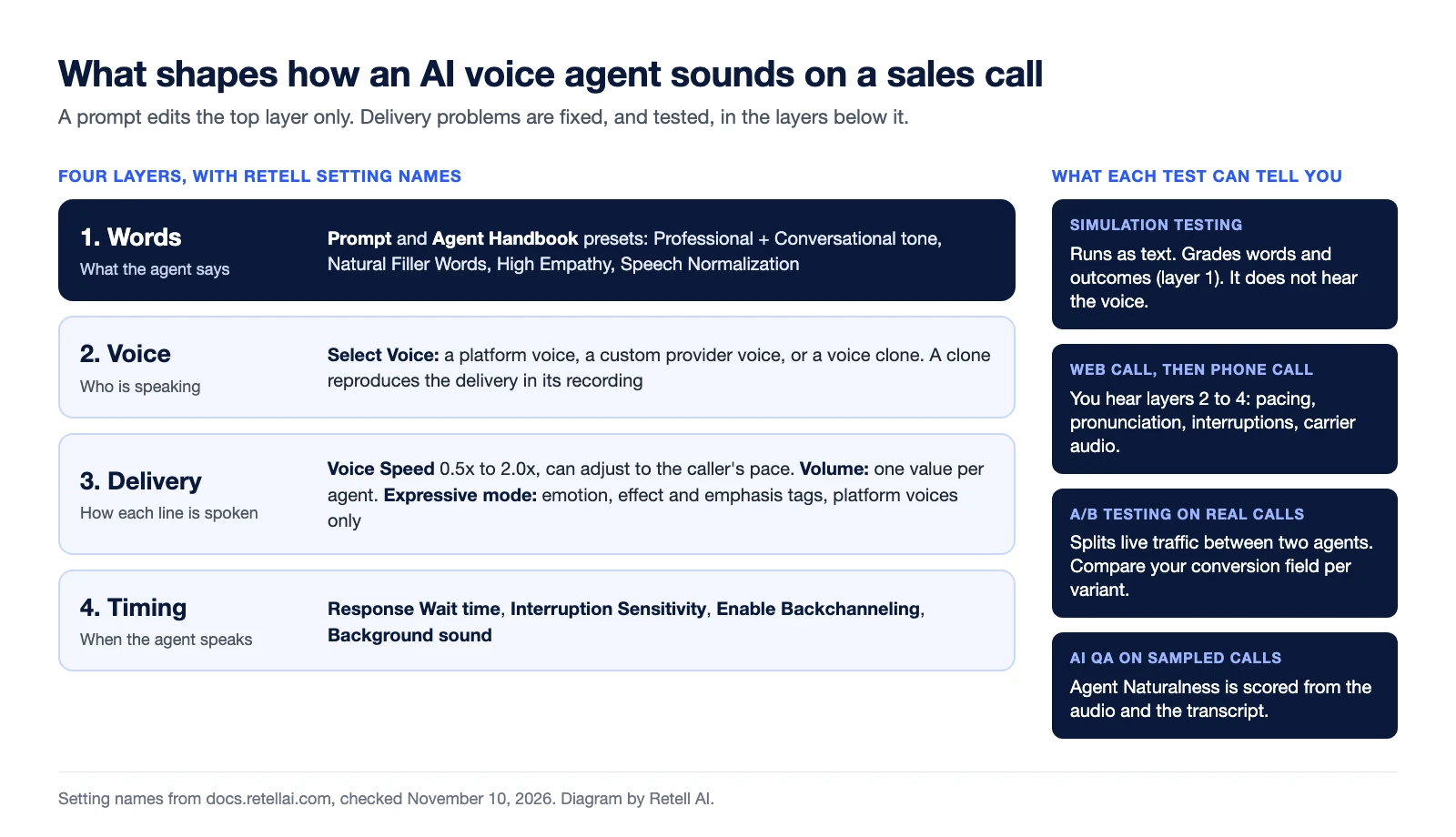
The Agent Handbook presets are still prompt-level tools. The docs describe Professional + Conversational as a tone with short turns and one question at a time, suited to sales. It changes the script, not the audio.
Which settings change how the voice sounds?
Four groups of settings change the audio itself, and each has a documented limit.
Voice choice. Platform voices are Retell's curated library, described in the docs as fine-tuned for conversational AI over the phone and calibrated for clarity at telecom bitrates. You can also add a voice from a custom provider or clone a voice. One line in the cloning docs matters for sales teams: the clone reproduces the delivery it hears, so record in the tone, pace, and energy you want on calls.
Speed and volume. Voice Speed runs from 0.5x to 2.0x. With "Dynamically adjust based on user input" checked, the agent tracks the prospect's words per minute and gradually shifts its own speed to match. Volume is one value for the agent. The docs do not describe a setting that raises or lowers volume from moment to moment inside a call, so do not plan around one.
Expressive mode. This is the closest documented control to situation-aware delivery. With it on, the agent adds expressive voice tags to the audio it generates and chooses them from the conversation. The tags cover emotions (empathetic, excited, happy, curious, surprised), effects (sigh, clear throat, pause, long pause), and emphasis on the word that matters. You pick which tags are allowed, you can rewrite the guidance for when each one applies, and you can place a tag by hand on a specific line such as the opener.
The limits are just as specific. Expressive mode works with platform voices only. Tags apply in 13 languages, and a multi-language agent needs every one of its languages on that list. The agent uses tags sparingly, and most lines have none. It never tags numbers, names, times, or prices, so do not expect a tagged change of delivery on the price itself.
Timing. A voice with good tone still sounds wrong if it answers too fast or talks over people. Response Wait time, Interruption Sensitivity, and backchanneling govern that, and turn-taking and interruption handling has its own guide.
None of these settings is documented as making an agent indistinguishable from a person. Treat each one as an input to test. Sounding human is also a separate question from disclosure: the AI Disclosure When Asked preset is on by default for new agents, and which disclosures your calls require is a question for your counsel or compliance lead.
If you sell in more than one language, the greeting carries even more weight. See the first 30 seconds of a multilingual AI voice agent.
How human does the voice need to be for your call type?
The bar rises with how much trust the prospect has to extend before saying yes. The table below is a starting point for your own test, based on what each call asks of the listener. It is not a benchmark.
| Outbound call type | What the prospect decides | Voice bar | Where to start |
|---|---|---|---|
| Reminders, confirmations, renewal notices | Confirm or reschedule | Clear and accurate on names, dates, and amounts | A platform voice, Speech Normalization, pronunciation entries for brand and product names |
| Follow-up to a lead who asked for a call | Whether to answer a few questions | Conversational wording and clean turn-taking matter more than emotion | Professional + Conversational tone, backchanneling, dynamic Voice Speed |
| Cold call to a list | Whether to stay on the line after the opener | High, and concentrated in the opening line | Add Expressive mode with a small tag set, hand-tag the opener, split test two voices |
| Consultative or high-value close | Whether to trust the seller with money or a sensitive decision | Higher than you should assume any setting meets | Let the agent qualify and book, then pass to a person with a warm transfer until your test says otherwise |
The last row is the honest one. If the sale depends on a closer reading the room, keep the closer. A warm transfer keeps the agent on the line to brief the person who picks up, so the prospect is not asked to repeat everything.
How do you test voice human-ness on real calls instead of by ear?
Run two agents that differ only in voice setup on the same outbound traffic, and score both on a conversion event you define before the first call. Your ear is one listener. Your prospects are the sample.
Use this checklist:
- Rule out reach problems first. If prospects are not answering, the voice is not the cause. Check outbound pickup rates and the outbound phone number checklist before you touch voice settings.
- Do not use text simulation to judge the voice. Simulation testing runs as a text conversation. It grades wording and outcomes and hears nothing.
- Listen on a web call, then a phone call. The docs point to web call testing for how the voice actually sounds (pacing, pronunciation, filler) and to phone call testing for carrier audio.
- Define conversion as a field, not an impression. Add a custom Post Call Extraction field, for example a Boolean for "meeting booked" or a Selector for the call outcome, so every call is labelled the same way.
- Change one layer. Clone the agent and change only the voice, or only Expressive mode. Keep the prompt identical, or you will not know what moved the number.
- Split live traffic. A/B Testing on the phone number sends a percentage of calls to each agent, for example 80/20 or 50/50, and is documented for outbound as well as inbound calls.
- Compare in Analytics. Filter by agent and version, and chart your custom field next to call counts, call success rate, and duration.
- Score the audio as well as the outcome. AI QA evaluates a sample of real calls, and its Agent Naturalness metric uses both the audio and the transcript to flag unnatural speed or intonation, mispronunciation, and glitches. The built-in
user_sentimentfield is inferred from the transcript only, so do not read it as a judgment of tone. - Set the stopping rule up front. Decide the minimum number of connected calls per variant and the difference that would change your decision. Write both down before launch.
If the more expressive variant does not convert better, the voice was not your constraint. Look at the list, the offer, and the opening question next. If it does, you have a number to defend the choice with. The same loop applies when you move from demo to production.
What should you ask a vendor about voice before you pilot?
Ask questions whose answers you can verify in the product during the pilot:
- Which settings change delivery, and which only change wording?
- Does expressive delivery work with the voice and languages we plan to use, including a cloned voice?
- Can volume, pace, or tone change within a call, and what triggers the change?
- Can we split real outbound traffic between two voice setups and see conversion per variant?
- Which quality metrics listen to the audio, and which read only the transcript?
- When a call needs a person, what does the handoff sound like to the prospect?
A vendor that answers with a polished demo recording has answered a different question.
Prove the voice on your own calls
Unlike systems optimized for realistic speech alone, Retell is built for the entire conversation: the voice, the timing around it, the handoff to a person, and the measurement that tells you whether any of it converted. See how the pieces fit on the AI voice agents page and how AI QA scores real calls. Then run a pilot on real calls with two voice setups and your own conversion event, and decide from that number before you sign anything.
See how much your business could save by switching to AI-powered voice agents.
ROI Result
Total Human Agent Cost
AI Agent Cost
Estimated Savings
A Demo Phone Number From Retell Clinic Office
What results look like with Retell AI


Estimate your monthly voice AI cost
Read Other Blogs

Revolutionize your call operation with Retell