From API Compatible to Production Ready: The Voice AI Integration Questions to Ask Before You Sign




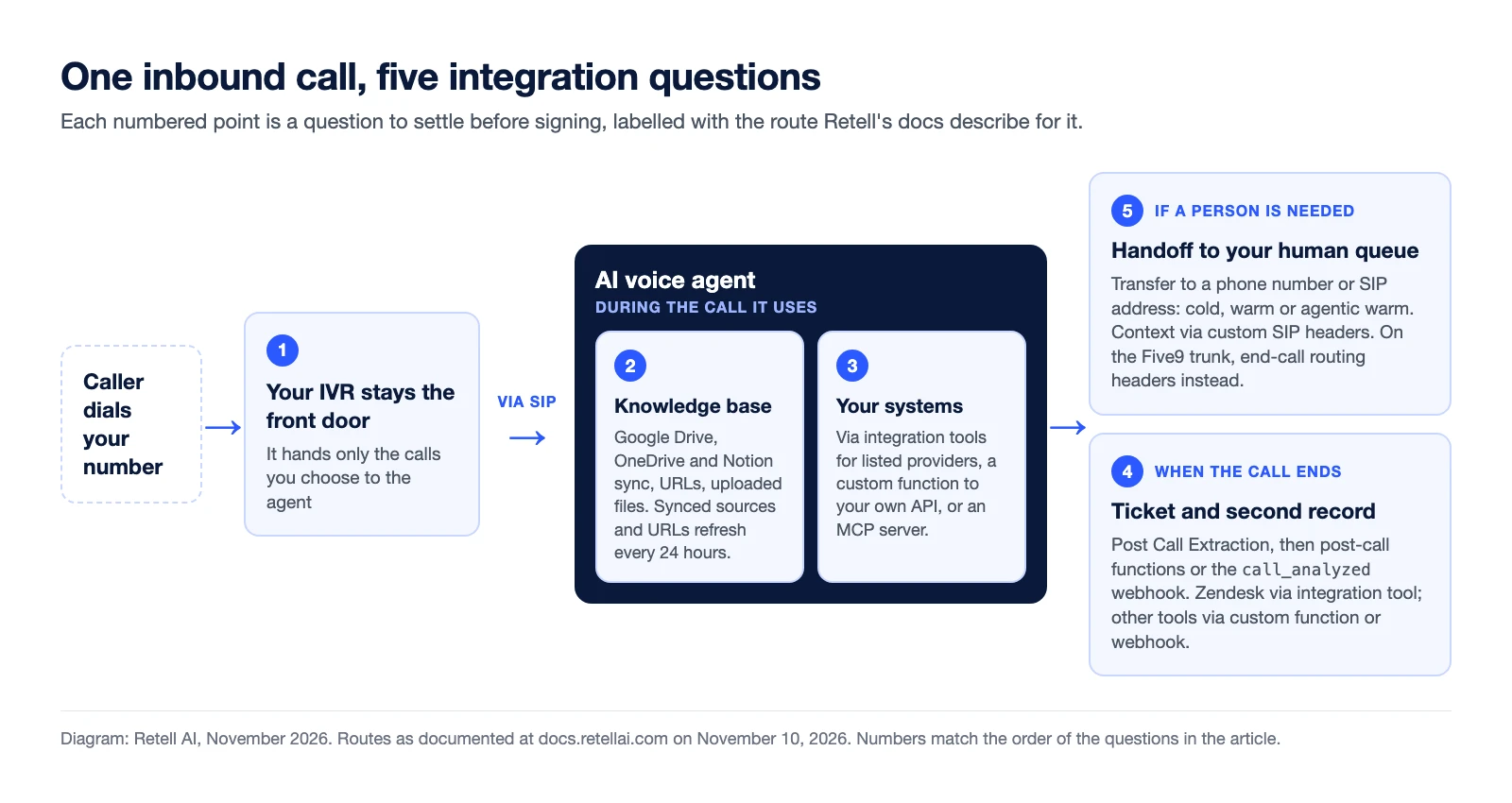
Before you sign for AI voice agents, get five integration questions answered in writing, one for each point on the path a call takes: how the call gets from your phone system and IVR to the agent, where the agent's knowledge comes from, what it can do in your systems during the call, how the ticket and any second record get written afterward, and how the caller gets back to a person. "We have an API" answers none of them. It says a connection is possible, not who builds it, which route it takes, or what breaks on a bad day.
This list is for the IT or contact center systems lead who has to make the agent work inside an existing stack. Retell AI's public documentation is the worked example; the questions apply to any voice AI vendor.
Which voice AI integration questions should you ask before signing?
Ask one question per stage of the call, and ask for each answer as a named route (SIP, a listed connector, a webhook, a function call) with a named owner.
| Stage of the call | Ask the vendor | What "answered" looks like | What is still a risk |
|---|---|---|---|
| Telephony and IVR | Exactly how does a call get from our IVR to the agent? | A documented setup for your platform, or a SIP method both sides confirm | Work only your platform's admin or support team can do |
| Knowledge | Can you connect our existing knowledge base, or do we re-upload it? | A named source type, with its refresh cycle and limits | Content in a tool with no sync, which goes stale between uploads |
| Actions during the call | Which of our systems can the agent read and write mid-call, and how? | A list split into prebuilt tools and endpoints you must build | Internal systems with no reachable API |
| Documentation after the call | How does the agent create our ticket and our second record? | A field-by-field map for each record, and the route each one takes | A failed write that nobody notices |
| Handoff to a human | How does the call reach our agents, and what do they see? | A transfer type and a context method tested on a real phone line | Context dropped by the carrier or platform in between |
How does an AI voice agent connect to our contact center phone system and IVR?
It connects over SIP, and your IVR stays the front door: it keeps answering and hands only the calls you choose to the agent. You do not have to funnel every call to it.
On Retell, custom telephony documents two methods. Elastic SIP trunking is the recommended one. Dial to SIP URI covers providers without it and more complex setups. Dedicated guides cover four contact center platforms, and the bridge works differently on each:
- Five9. A pre-built SIP trunk already exists between the two platforms. You import your Five9 number into Retell and add a ThirdPartyTransfer node at the point in the IVR script where the agent should take over.
- Genesys Cloud. You create a SIP phone trunk, then an inbound call flow in Architect with a Transfer to SIP action.
- Avaya Aura. The guide runs the trunk through Avaya SBCE as the border element.
- Amazon Connect. The docs say Retell supports multiple integration patterns and direct you to Retell support to pick one.
If your platform is not one of those four, ask its vendor whether it supports elastic SIP trunking or a transfer to a SIP address, then have both vendors confirm the method in writing.
Context can travel with the call: custom SIP headers that start with X- on an inbound call are extracted automatically and become variables the agent can use, so your IVR can pass an account ID or a menu choice.
Still a risk. Ask who does each task. The Five9 guide says Five9 Support must route the number over the trunk and that Retell staff have no access to your Five9 environment. Retell's SIP connection test does not verify routing or audio, per the docs, so only real inbound and outbound calls prove the path.
Can the agent use our existing knowledge base, or do we have to re-upload files?
It depends on where the knowledge base lives. Retell's knowledge base docs list three kinds of source:
- Synced sources. Google Drive, Microsoft OneDrive and Notion connect once and sync into a knowledge base.
- URLs. Website content is fetched from URLs you add, with optional auto-crawling of a path.
- Uploads and text. Documents in formats including .md, .pdf, .docx, .html and .xlsx, plus pasted text snippets.
With auto-refresh on, URLs and synced sources are re-fetched every 24 hours. Uploaded documents and pasted text cannot be refreshed. For content in an app without a native integration, the docs say to export it and re-upload after it changes. So the answer is a daily sync if the content sits in a listed source or on web pages, and an export with a manual update step if it does not.
Each knowledge base holds up to 500 URLs, 25 uploaded documents of up to 50 MB each, and 25 sources per connected provider. An agent can use more than one knowledge base.
Still a risk. A 24-hour refresh suits policies and product information, not data that changes during the day, which needs a live lookup (next section). If your articles sit behind a login, ask how they would be fetched, because the docs describe website URLs and do not describe authenticated crawling.
What can the agent do in our systems during the call?
It can read and write through three documented routes, and the vendor should say which one each of your systems uses:
- Integration tools. The integrations overview lists HubSpot, Salesforce, Microsoft Dynamics 365, GoHighLevel and Zoho CRM for CRM, Zendesk for support tickets, and Calendly and Cal.com for scheduling.
- Custom functions. The agent calls your own API mid-call and uses the response. This is the route for any system not on the list.
- MCP. The agent connects to a remote MCP server and calls the tools it exposes.
Still a risk. A custom function needs a publicly reachable URL; Retell blocks requests to localhost and private IP ranges. An internal-only system needs an endpoint your team builds and secures. If a tool call fails, the agent continues the conversation, so the prompt has to say what it tells the caller. For the CRM version of this loop, see the CRM-to-voice AI workflow.
How will the agent write the ticket and the second record our process requires?
Treat each record as a separate write with its own route. Many service processes need two: a ticket in the IT service tool, and a form or action log for the detail the ticket cannot hold.
The content comes from Post Call Extraction, which reads the transcript after the call and fills fields you define as boolean, text, number or selector. The writes then run as post-call functions, or from the call_analyzed webhook to a service you own.
- If the ticket tool is Zendesk, a Create Ticket tool is listed.
- For any other IT service tool or form tool, the integrations overview lists no prebuilt connector. The documented route is a custom function or webhook to an endpoint you run, which then calls that tool's API. Ask the tool's owner whether it accepts records by API at all.
- For two records from one call, add two post-call functions. A sequential function waits for the one above it and can use its output, so the ticket number can be written into the action log. A chain can be four functions deep (as of August 2026).
Still a risk. A function that fails is marked unsuccessful and everything waiting on it is skipped, so a failed ticket write also drops the log entry that needed its number. Decide who gets alerted when a write fails. Custom extraction fields are not filled for calls that never connected. For the fields a ticket needs, see after-hours calls: ticket, not transfer.
If those records hold patient data, the voice AI healthcare compliance checklist covers where it is stored and how it is deleted.
How does the call get back to a human, and what does the human see?
The agent transfers to a phone number or a SIP address, and the human sees only what you arrange to pass. Retell documents cold transfer (the agent drops off), warm transfer (the agent can brief the person first) and agentic warm transfer (a second AI agent screens the destination).
For data rather than speech, transfers can carry custom SIP headers with values from the conversation. The docs warn that headers are preserved only when transferring directly to a SIP endpoint and may be stripped on a transfer to a regular phone number.
The return path is platform-specific too. On the pre-built Five9 trunk, the docs say the trunk is inbound only and the transfer tools fail. The agent instead ends the call with routing headers that send the caller to a skill, an agent or an external number.
Still a risk. Showing the caller's own number to the destination depends on your provider; if it is not supported, the transfer fails. Test every handoff on a real phone line. How call transfers work between AI voice agents and human teams explains each type.
What should be in writing before you sign?
Each answer should name a route, an owner and a test. Use this as the sign-off list:
- The telephony method for our platform, with tasks split between our team, our platform vendor and the voice AI vendor
- Which IVR branches route to the agent first, and what context they pass
- Each knowledge source, how it syncs, and who owns any manual re-upload
- Each system the agent touches mid-call, marked prebuilt tool, custom function or MCP
- A field map for every record the process requires, and what happens when a write fails
- The transfer type per destination, and proof that context arrives on a real call
- One test call that crosses all five stages on our own numbers
None of this requires replacing what you run today. Start with one IVR branch, then add call types over time. For which layers to keep, see the voice AI stack buyers want to replace; for the rollout, see the 30-day pilot plan.
The way to turn these answers into evidence is a pilot on real calls: one call type, through your own IVR, writing to your own ticket queue, before you sign anything. To see which systems connect through a prebuilt tool and which need a custom function or webhook, start with the Retell AI integrations page.
See how much your business could save by switching to AI-powered voice agents.
ROI Result
Total Human Agent Cost
AI Agent Cost
Estimated Savings
A Demo Phone Number From Retell Clinic Office
What results look like with Retell AI


Estimate your monthly voice AI cost
Read Other Blogs

Revolutionize your call operation with Retell