How to Build a Voice Agent with Claude Code and Claude Fable 5.2




Claude Code can build a working phone agent from your terminal. You connect it to Retell AI's MCP server with one command, describe the agent in plain language, and Claude Code creates it, writes test cases for it, and reviews its calls through the Retell API. This guide walks through that loop with Claude Fable 5.2, the model Anthropic released on November 9, 2026, and covers what to approve by hand along the way.
Retell AI publishes this guide, and the MCP server it uses is Retell's own.
What the setup looks like
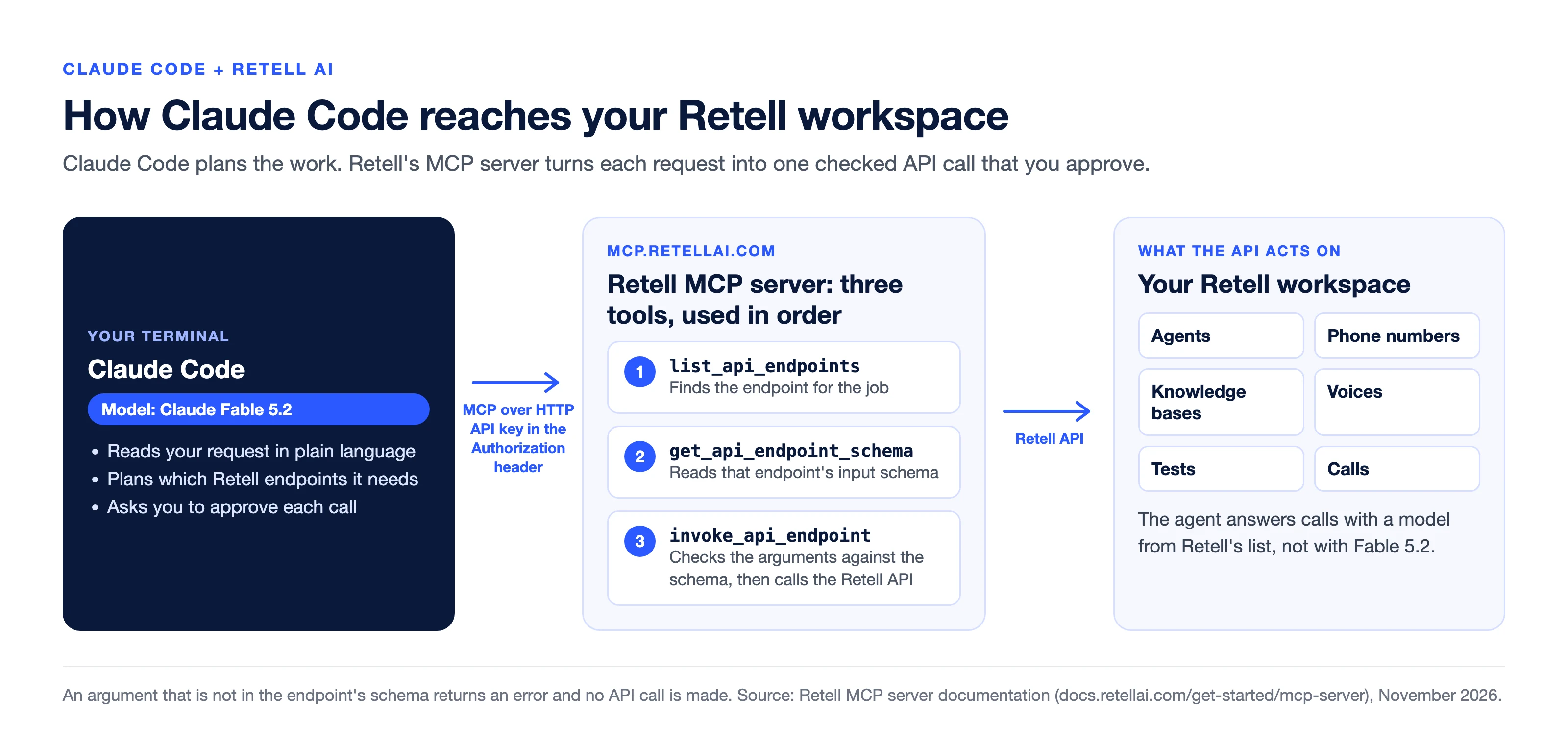
Three pieces are involved. Claude Code runs in your terminal and plans the work. Retell's MCP server, at mcp.retellai.com, gives it access to the Retell API. Your Retell workspace holds the agents, phone numbers, tests and call history that the API acts on.
The MCP server exposes three tools instead of one tool per API endpoint, which keeps the tool list small enough for the model's context window. Claude Code uses them in order: it lists the available endpoints, reads the input schema for the one it needs, then invokes it. If a call includes an argument that is not in the schema, the server returns an error that names the argument and does not call the API.
One thing to settle before you start: Claude Fable 5.2 is the model doing the building, not the model on the phone. The agent you create answers calls with a model from Retell's own list, and Fable 5.2 is not in that list as of November 10, 2026. We cover that split in Claude Fable 5.2 for voice agents: where it fits and where it doesn't.
Three ways to build a Retell agent with Claude
Claude Code with the MCP server is one of three routes. They suit different people.
| Claude Code + Retell MCP server | Retell AI connector in Claude | Retell dashboard | |
|---|---|---|---|
| Where you work | Your terminal or IDE | A chat in Claude on the web or Claude Desktop | A browser |
| Sign-in | A Retell API key in a request header | Your Retell login, over OAuth | Your Retell login |
| What it reaches | The Retell API endpoints your key allows, apart from deprecated ones | 52 purpose-built tools with in-chat widgets (as of October 2026) | Every setting |
| Agent types | Whatever the API supports | Single-prompt agents only | All |
| Best for | Developers, bulk changes, anything you want scripted or repeated | Building and editing one agent by describing it | Conversation flows, integrations, visual review |
Sources: Retell's MCP server documentation and Claude connector documentation, read November 10, 2026.
Connect Claude Code to the Retell MCP server
You need a Retell account, a Retell API key, and Claude Code installed. Create the key in the Retell dashboard and give it only the permissions this work needs.
Run this in your terminal, with your key in place of the placeholder:
claude mcp add --transport http retell https://mcp.retellai.com \
  --header "Authorization: Bearer <RETELL_API_KEY>"
Start Claude Code and run /mcp to confirm the retell server is connected. Then run /model and choose Claude Fable 5.2 if your plan includes it. Claude Code's documentation says Fable 5.2 requires Claude Code v2.1.321 or later, and Anthropic's launch post says developers can call the model on the Claude Platform as claude-fable-5-2.
Keep the key out of the conversation. It belongs in the command above or in your client's settings, never pasted into a prompt.
Describe the agent and let Claude Code create it
Start with a read, so you can see the connection working before anything changes:
List my Retell agents and summarize what each one does.Then describe the agent you want. Be specific about the job, the tone, what it must never do, and when it hands the call to a person:
Create a single-prompt voice agent for a dental clinic called
Northside Dental. It answers questions about hours and insurance,
books cleanings, and transfers billing questions to the front desk
at +14155550123. It should say it is an AI assistant at the start
of every call. Use Claude 5.5 Sonnet as the agent's model. Show me
the prompt before you create anything.
Claude Code drafts the prompt, looks up the schema for the endpoints it needs, and asks you to approve each API call. Read the prompt it wrote before you approve. This is where a stronger model earns its place: the prompt is the agent, and a vague one produces a vague call.
Write the test cases before you place a call
Retell's simulation testing runs your agent in a text conversation against an AI-simulated caller and grades each run pass or fail against success criteria you set. It works with single-prompt, multi-prompt and conversation flow agents, and it does not place a call. Ask Claude Code to write the suite:
Write eight simulation test cases for the Northside Dental agent.
Cover a new patient booking a cleaning, a caller who interrupts and
changes the day twice, a billing question that must be transferred,
a caller asking if they are talking to a real person, and someone
asking for medical advice the agent must decline to give. Give each
one clear success criteria. Then run them and show me the failures.
The saved cases become a regression suite. Every time the prompt changes, rerun them before the change reaches a caller.
Put the agent on a number and call your own phone
Simulation covers the logic. A real call covers the voice, the pacing and the interruptions. Ask Claude Code to list your phone numbers, assign the agent to one, and place a call to you:
Show me my Retell phone numbers and which agent is on each. Put the
Northside Dental agent on the one that has no agent, then have it
call me at +14155550199.
Three cautions. A call reaches a real phone and is billed like any other call, so check the destination number in the approval prompt. Outbound calls also require KYC on your Retell account. And if a number already has an agent on it, replacing that agent changes who answers that number, so check what is there first.
Review the calls and revise the prompt
After a handful of calls, have Claude Code read them back:
Pull the last 20 calls for the Northside Dental agent. Group the
ones that ended badly by cause, quote the turn where each went
wrong, and propose prompt changes. Do not change anything yet.
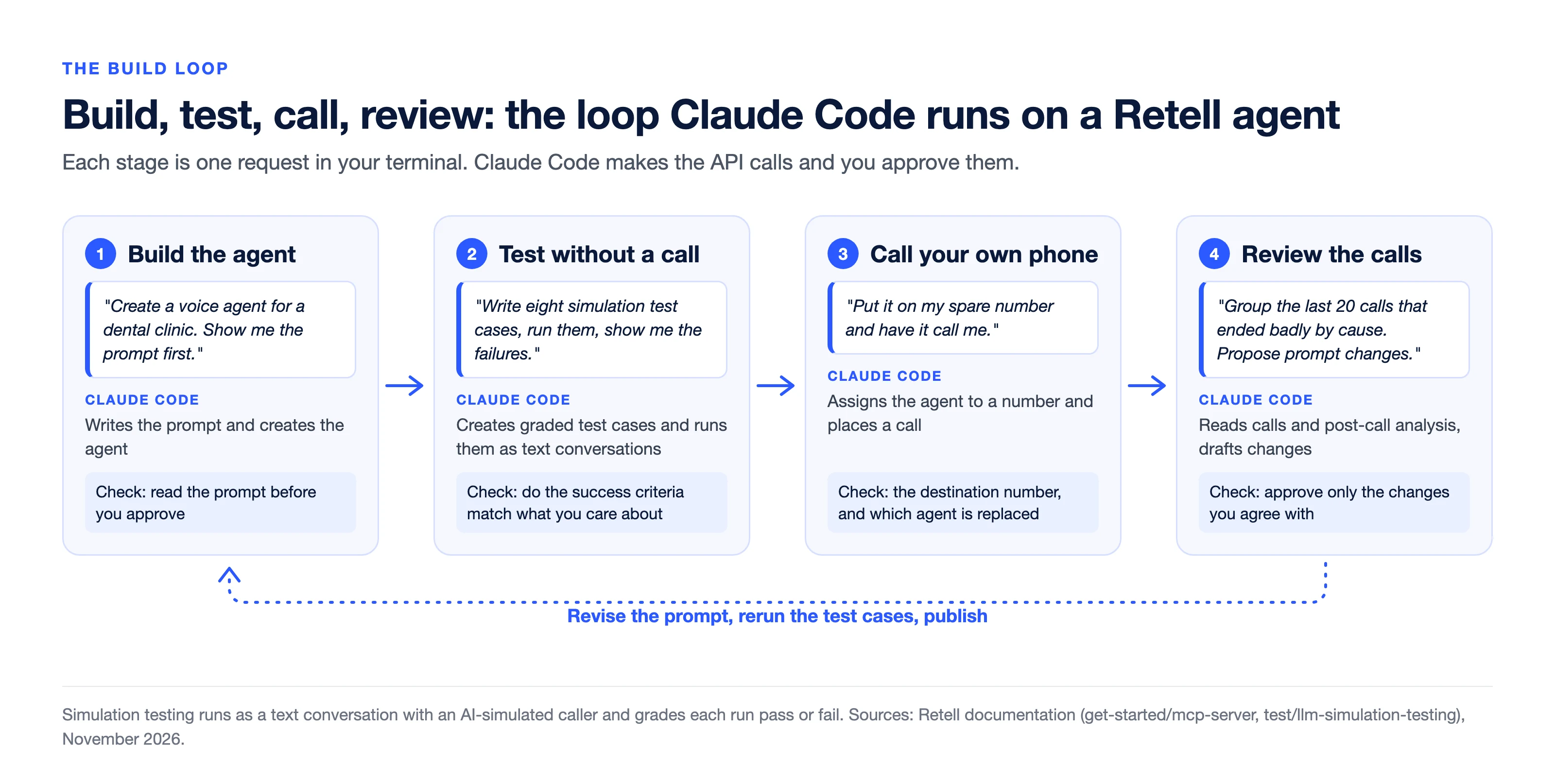
Approve the prompt changes you agree with, rerun the simulation suite, and publish. That loop of build, test, call, review and revise is the whole job, and it is the part Claude Code shortens most.
| What you ask for | What Claude Code does through the MCP server | Needs your approval |
|---|---|---|
| "List my agents" | Reads agents and their versions | Low risk, read only |
| "Create an agent that..." | Writes a prompt, creates the agent | Yes. Read the prompt first |
| "Write and run test cases" | Creates simulation test cases, runs them, reports failures | Yes |
| "Put it on my number" | Lists numbers, assigns the agent | Yes. Check which agent it replaces |
| "Call my phone" | Creates a phone call | Yes. Check the destination number |
| "Review recent calls" | Lists calls and reads each call's transcript, latency and post-call analysis | Low risk, but transcripts can hold personal data |
| "Delete the old agent" | Calls a delete endpoint | Yes. Treat deletion as permanent |
Which approvals to keep on
Every API call from Claude Code goes through one tool, invoke_api_endpoint. If you choose to always allow that tool, you allow every endpoint your key can reach, including delete and publish. Retell's documentation recommends approving each call separately and checking its endpoint and arguments, and we would not skip that.
- Use a key with the least permission that does the job. A read-only key is enough for call review.
- Read before you write. Have Claude Code fetch the current agent before it updates or deletes it.
- Treat transcripts as untrusted text. A caller can say anything, including instructions aimed at the model. Do not let a call review session also hold approval to change agents without you looking.
- Keep personal data out when you can. Ask for summaries of failures, not full transcripts, unless you need them.
Does it have to be Claude Fable 5.2?
No. The MCP server works with any model Claude Code can run, and Anthropic's own advice in the launch post is direct: "For most coding and knowledge tasks, we recommend that users start with Claude Opus 5.5, our strongest daily driver." It describes Fable and Mythos as built for the most ambitious, open-ended technical work.
For one agent with a short prompt, Opus 5.5 will do the job. Fable 5.2 is worth choosing when the job is large and open-ended: rewriting prompts across dozens of agents to a new standard, turning a month of failed calls into a regression suite, or migrating agents between workspaces while keeping behavior the same. Those are our judgment calls, not benchmark results. Anthropic prices Fable 5.2 at $8 per million input tokens and $40 per million output tokens on its platform.
Frequently asked questions
Can Claude Code connect to Retell AI?
Yes. Retell runs a hosted MCP server at mcp.retellai.com, and Claude Code connects to it with the claude mcp add command and a Retell API key in the Authorization header. Cursor, Claude Desktop, Codex and other MCP clients can connect to the same server.
Do I need Claude Fable 5.2 to use the Retell MCP server?
No. The server works with whichever model your MCP client runs. Anthropic recommends starting with Claude Opus 5.5 for most coding and knowledge tasks and positions Fable 5.2 for the most ambitious, open-ended technical work.
Can the voice agent itself run on Claude Fable 5.2?
Not from Retell's model list as of November 10, 2026. The agent answers calls with a model you pick from that list, which includes Claude 5.5 Opus, Claude 5.5 Sonnet and Claude 5.5 Haiku. Fable 5.2 does the building, testing and review from Claude Code.
What is the difference between the Retell MCP server and the Retell AI connector for Claude?
The MCP server signs in with a Retell API key and reaches the Retell API from clients such as Claude Code and Cursor. The connector is listed in Claude's connectors directory, signs in with your Retell login over OAuth, and shows build, deploy and test steps as widgets inside the chat. The connector builds single-prompt agents only.
Is it safe to let Claude Code manage my Retell account?
It is as safe as the key and the approvals you give it. Use a key with the minimum permissions, keep per-call approval on for invoke_api_endpoint, and review any call to a delete or publish endpoint before you approve it.
Does testing through Claude Code cost money?
Usage through the MCP server is usage of the Retell API, so calls it places are billed like any other call. Retell's testing pricing page covers what tests cost, and Claude Code usage is billed by Anthropic, under your Claude plan, usage credits or API rates depending on how you sign in.
Build one agent and run it on your own calls
According to Retell's platform data, 80% of production minutes run through agents that customers build and manage themselves. Claude Code makes that loop shorter. Follow the MCP server setup, build one agent in Retell, and judge it on your own calls before you decide anything else.
See how much your business could save by switching to AI-powered voice agents.
ROI Result
Total Human Agent Cost
AI Agent Cost
Estimated Savings
A Demo Phone Number From Retell Clinic Office
What results look like with Retell AI


Estimate your monthly voice AI cost
Read Other Blogs


Revolutionize your call operation with Retell