Introducing Retell Workflows: Native CRM and Helpdesk Automation, Built into Every Call
8
MIN READ
October 12, 2026
TL;DR: Retell Workflows natively pulls context into a call before your agent speaks, and writes the outcome back the moment it ends. Connect Salesforce, HubSpot, Zendesk, Cal.com, and Calendly directly, and cut the Zapier or n8n layer you were maintaining to do it yourself.
Retell Workflows is native agentic workflow orchestration for the work around a call: pulling context in before your agent speaks, and writing the outcome after it ends. Before the call connects, Workflows looks up the caller's Salesforce contact, Zendesk ticket, or next Cal.com or Calendly booking, and hands that context to the agent. After the call ends, it writes the outcome back automatically: updating a CRM record, closing a ticket, posting a summary to Slack, or booking a follow-up. For support teams, this is help desk automation that lives inside the call instead of running alongside it in a separate tool.
For years, the only way to get context into a call and an outcome back out was to build that layer yourself: a Zapier scenario, a Make.com automation, or a custom Lambda, wired around the call and maintained indefinitely. None of these tools were built for a live conversation's latency budget, so getting them to work for a call means building and maintaining that connection yourself.
This isn't a one-off pattern. At least five different accounts we've worked with independently built and maintained this same kind of middleware, Zapier, Lambda, or n8n, for exactly this job: pulling context in before a call and writing the outcome back after. An online mortgage broker ran exactly this setup using Retell: a sync that pulled CRM context into the call before the agent spoke. It missed often enough that live callers, sometimes mid-application, kept getting greeted like strangers. Another team was paying an outside consultancy to turn a single finished call into three separate CRM record writes: creating the call record, then updating both the lead and the contact with its ID. A third, a residential solar company, maintained two custom functions just to fetch and pass a lead through before the agent said a word. It's what building a serious voice AI deployment has required, until now.
Retell Workflows is a dependency graph, not a straight-line script: functions with no dependency on each other start at once, and a function that depends on another waits for that one's output. Retell runs the graph in batches, every function whose dependencies have finished runs concurrently, then the next batch, until the graph is done. Total time is the length of the longest chain, not the sum of every function in it.
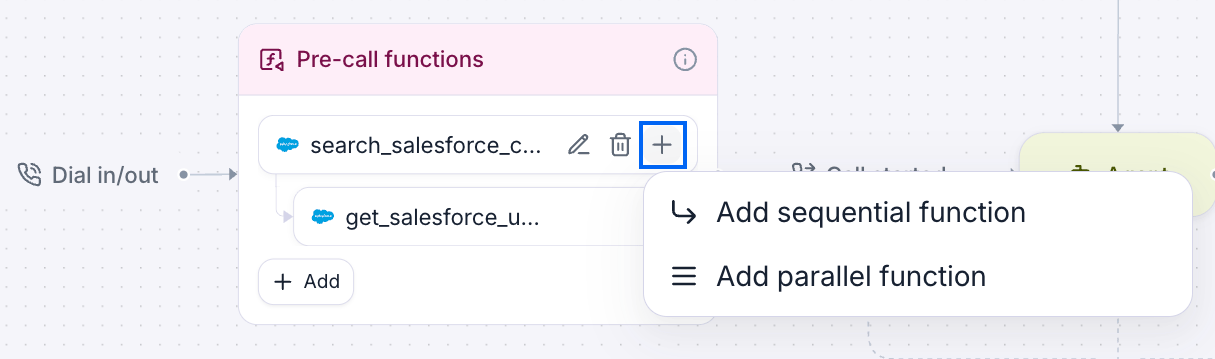
Before the call connects, pre-call functions look up the caller's record and pass the result into the call as dynamic variables. Inbound and web calls get a 1-minute budget for this; outbound calls get 5 minutes before dialing. If a function runs past its budget, the call starts anyway and the result lands in the transcript late, too late for the opening message.
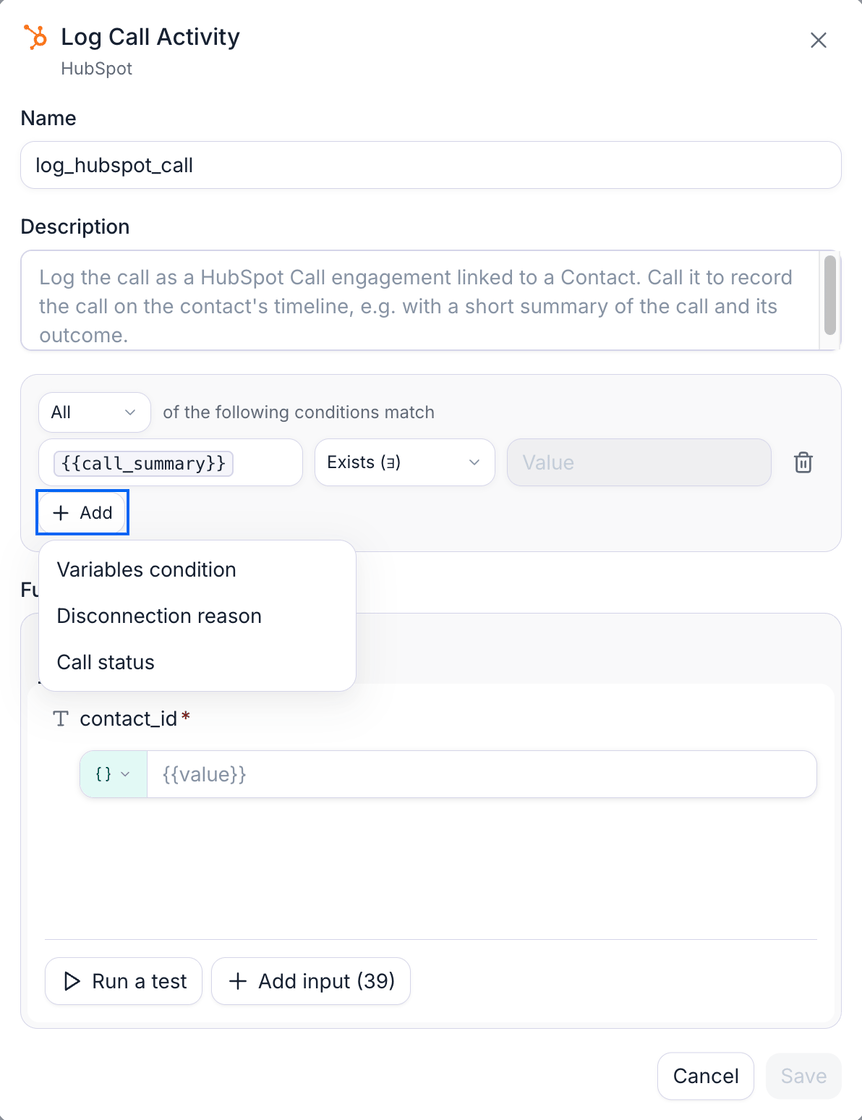
After the call ends, post-call functions write the outcome back automatically, each one gated by its own "only when" condition, so a function only runs when the call actually warrants it. Post-call functions get a hard 5-minute cap; anything still running past that is cancelled.
Salesforce, HubSpot, Zendesk, Cal.com, Calendly, Slack, Google Workspace (Sheets, Docs, Drive), Microsoft Dynamics 365, and GoHighLevel, plus credential-based number import from Twilio and Telnyx, no SIP trunk required. Full detail in the integrations overview and CRM integrations overview. Stripe, WhatsApp, and Google Calendar are on the roadmap, not live yet.
Retell also lists a wider set of community and custom connectors, some marked unofficial, in the full integrations directory. Those are a different mechanism than the native integrations above: check each listing's label before assuming it's the same thing. Need a system that isn't on either list? Use custom function calls to reach any external API.
A webhook to an external automation tool, the kind Zapier, Make.com, and n8n run on, is billed by usage: every lookup and every write-back is a task or an execution, metered and charged. Run that on every call, and the middleware bill scales with your call volume, on top of what you're already paying for the tool itself. Workflows is built into Retell: the lookups and write-backs are part of the platform you're already running, not a metered pass-through service charging you again for moving your own data.
That's the direct value. There's a technical reason it's built this way, too: a webhook to an external tool adds a network round trip and a new failure surface, on every call, right at the moment Retell's turn-taking model is deciding when to speak. Workflows avoid that by executing actions as part of the same conversation flow engine that already runs the call, against the same latency budget, instead of pausing the conversation to wait on an external service. The result is what you'd expect: fewer moving parts between your systems and the call, and nothing else billing you for the connection.
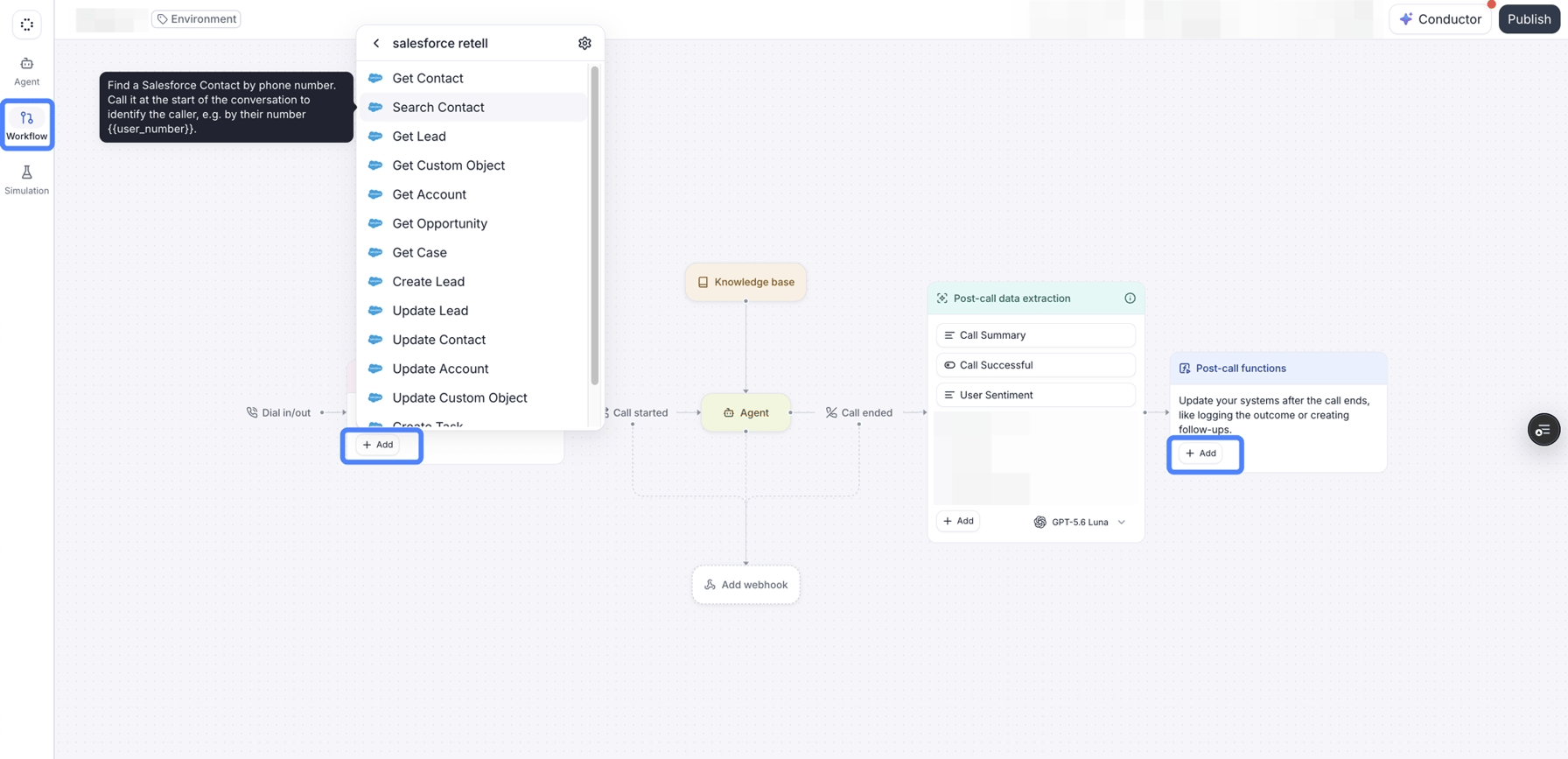
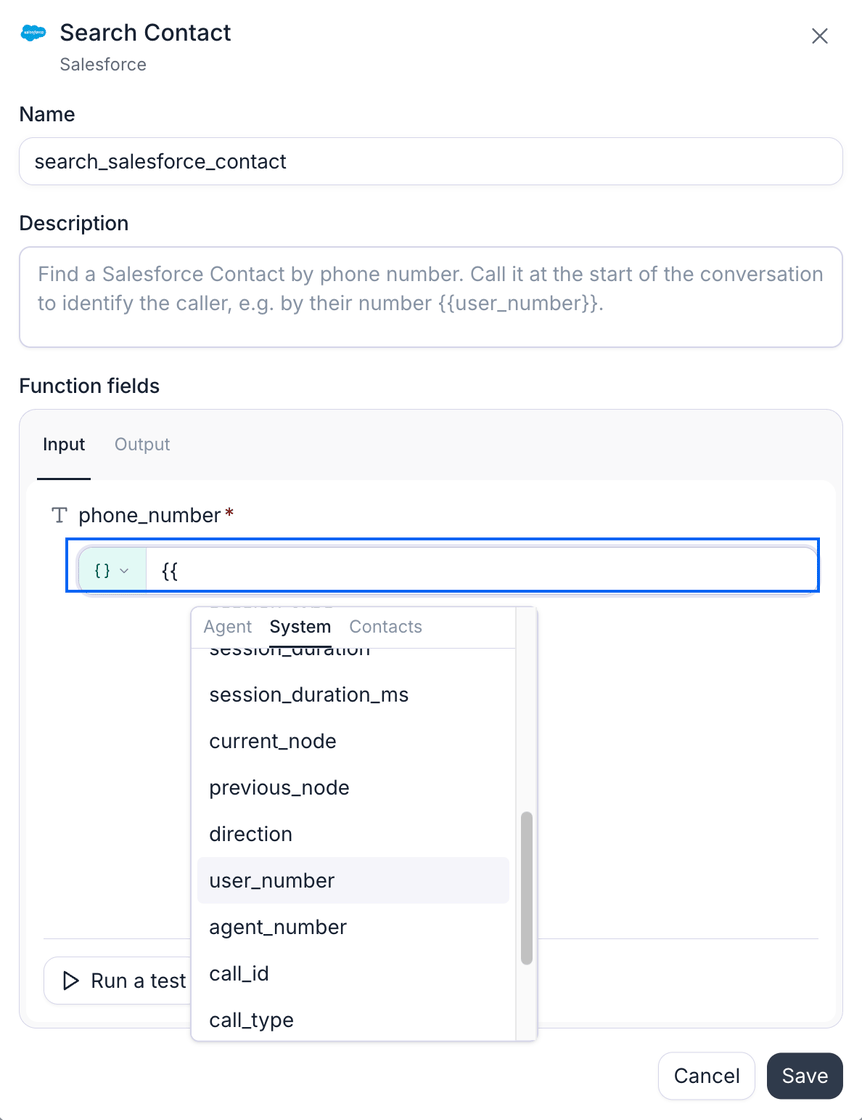
There's also less to build. Wiring up a custom function against Salesforce, Zendesk, or Calendly means mapping placeholders, endpoints, and auth by hand, for each one, separately. Workflows replaces that with built-in functions per integration; connect Salesforce once, and actions like searching a contact or creating a ticket are already there, with their fields already available to map to dynamic variables. What used to be custom integration work is now clicking add and wiring inputs to outputs.
Compliance matters just as much. Retell runs on SOC 2 certified infrastructure, the model trains on aggregate call data only, and Retell is HIPAA compliant with BAAs available directly through the platform. Most third-party tools in a voice AI stack can't say the same.
Before your agent says a word, Workflows already knows who's calling. It checks your CRM for the caller's record and pulls their open ticket from the helpdesk, and hands all of it to the agent, so the conversation starts already knowing the answer to "can I get your name and account number" instead of asking for it.
Think of it as a dispatcher, not a queue. Anything that doesn't depend on something else goes out immediately, at the same time as everything else that's ready; anything that does depend on another step waits its turn automatically. On a support call, the CRM lookup and the ticket search don't need each other, so both happen together the moment the call comes in, not one after the other, and the agent has both answers before there's any risk of dead air.
The moment the call ends, the same thing runs in reverse, on its own: close the ticket if the issue actually got resolved, leave it open and create a follow-up if it didn't, post the summary wherever your team already looks. None of it waits on someone to remember to do it after they hang up.
Two things make that safe to rely on, not just fast:
It respects the call. There's a hard limit on how long any of this is allowed to take before the agent has to speak, so a slow lookup can never leave a caller sitting in silence.
It only acts when it should. Every after-call action carries its own condition, so a follow-up only gets created when a call actually needed one, and a ticket only closes when the issue was actually resolved.
Retell Workflows plug directly into Salesforce, HubSpot, Zoho CRM, Microsoft Dynamics 365, and GoHighLevel for CRM work, Zendesk for helpdesk, and Cal.com or Calendly for scheduling. Need something that isn't on that list? A custom function call reaches any external API directly, so you're not stuck waiting on a native connector to ship.
Full setup walkthrough: Agent Workflow docs.
For the specific job of moving data in and out of a call, yes, and you don't have to give Zapier up entirely to use it. Keep Zapier for everything else, and let Retell's Workflows handle the layer between your CRM and the call itself: no per-task middleware cost for that specific connection, and it runs on infrastructure that's SOC 2 Type 1 and Type 2 certified, HIPAA compliant, and GDPR compliant.
Same idea as Zapier: yes, for that specific job, and you don't have to drop n8n everywhere else to use it. Independent lookups and sequential steps run natively inside Retell instead of in an n8n workflow outside it, so you're not paying per execution for that connection anymore. You're also not taking on a separate compliance surface for it: Retell is HIPAA and GDPR compliant and SOC 2 Type 1 and Type 2 certified, with a BAA and DPA available to self-sign whenever you need one.
Yes. Retell supports credential-based number import from Twilio, so you can bring an existing number in without setting up a SIP trunk.
Yes, both natively. Once connected, contact lookups and record updates for either system are available as prebuilt actions inside a workflow, so there's no middleware needed to move data in or out of the call.
Yes, live today, alongside the rest of the integrations list above.
Yes, natively, live today. GoHighLevel contact and record actions are available as prebuilt actions inside a workflow, the same as Salesforce or HubSpot.
Yes. Workflows reads from and writes to your existing CRM and helpdesk. It replaces the automation layer that used to sit between them and the call, not the systems themselves.
Cut the middleware. Connect your CRM and helpdesk once, and let every call start already informed.
See how much your business could save by switching to AI-powered voice agents.
Total Human Agent Cost
AI Agent Cost
Estimated Savings
A Demo Phone Number From Retell Clinic Office
For the specific job of moving data in and out of a call, yes, and you don't have to give Zapier up entirely to use it. Keep Zapier for everything else, and let Retell's Workflows handle the layer between your CRM and the call itself: no per-task middleware cost for that specific connection, and it runs on infrastructure that's SOC 2 Type 1 and Type 2 certified, HIPAA compliant, and GDPR compliant.
Same idea as Zapier: yes, for that specific job, and you don't have to drop n8n everywhere else to use it. Independent lookups and sequential steps run natively inside Retell instead of in an n8n workflow outside it, so you're not paying per execution for that connection anymore. You're also not taking on a separate compliance surface for it: Retell is HIPAA and GDPR compliant and SOC 2 Type 1 and Type 2 certified, with a BAA and DPA available to self-sign whenever you need one.
Yes. Retell supports credential-based number import from Twilio, so you can bring an existing number in without setting up a SIP trunk.
Yes, both natively. Once connected, contact lookups and record updates for either system are available as prebuilt actions inside a workflow, so there's no middleware needed to move data in or out of the call.
Yes, live today, alongside the rest of the integrations list above.
Yes, natively, live today. GoHighLevel contact and record actions are available as prebuilt actions inside a workflow, the same as Salesforce or HubSpot.
Yes. Workflows reads from and writes to your existing CRM and helpdesk. It replaces the automation layer that used to sit between them and the call, not the systems themselves.