Phone Tree Template: Free Examples to Copy
Free phone tree templates for small teams and contact centers, with menu examples you can copy, and when to swap the menu for a voice agent.
A phone tree template is a ready-made script for the automated menu that answers a business phone line: the greeting, the numbered options, where each option sends the call, and what callers hear when you are closed. The five templates below are plain text. Copy one, replace the words in square brackets, and record it or paste it into your phone system's auto attendant.
If you want the other kind of call tree, the list of who phones whom in an emergency, that template follows the five menus.
Which phone tree template fits your business?
Pick the template closest to how your calls split today, then cut any option that gets almost no calls.
| Template | Fits | Options | When you are closed |
|---|---|---|---|
| Small office | One location, a few staff | 3, plus 0 | Voicemail and a callback time |
| Medical or dental practice | Practices that book appointments | 4, plus 0 | On-call line for urgent problems |
| Home services | Plumbing, HVAC, electrical, repair | 3, plus 0 and an emergency key | Emergencies reach the on-call technician |
| Multi-department support line | Support teams with several queues | 4, plus 0 and one sub-menu | Self-service and a callback |
| After-hours and holiday | Any business outside open hours | 2 | This is the closed message |
Small office phone tree template
Three options cover most small offices, and a caller who presses nothing still reaches a person.
OPEN HOURS
"Thank you for calling [Company].
For sales or a new quote, press 1.
For help with an existing order or account, press 2.
For our hours and address, press 3.
To speak with someone, press 0 or stay on the line."

ROUTING
1: [sales]. 2: [support]. 3: plays your hours and address.
0 or no key: repeat the options once, then ring [front desk].

AFTER HOURS
"Thank you for calling [Company]. We are closed right now.
Our hours are [days], [open time] to [close time].
To leave a message, press 1. We will call you back [by when]."
Medical or dental practice phone tree template
Put the emergency line first. Appointments come next in this version. Reorder the rest to match your own call volume.
OPEN HOURS
"Thank you for calling [Practice name].
If this is a medical emergency, hang up and dial 911.
To book, change or cancel an appointment, press 1.
For prescription refills, press 2.
For billing or insurance questions, press 3.
If you are calling from a pharmacy or another provider's office, press 4.
For anything else, press 0 or stay on the line."

ROUTING
1: [scheduling]. 2: [refill line]. 3: [billing]. 4: [back office].
0 or no key: ring [front desk].

AFTER HOURS
"Thank you for calling [Practice name]. Our office is closed.
If this is a medical emergency, hang up and dial 911.
If you have an urgent problem that cannot wait, press 1 to reach the on-call provider.
To leave a message about an appointment, press 2. We will call you back on the next business day."
Use your local emergency number, and have whoever handles compliance at your practice review the wording before you record it.
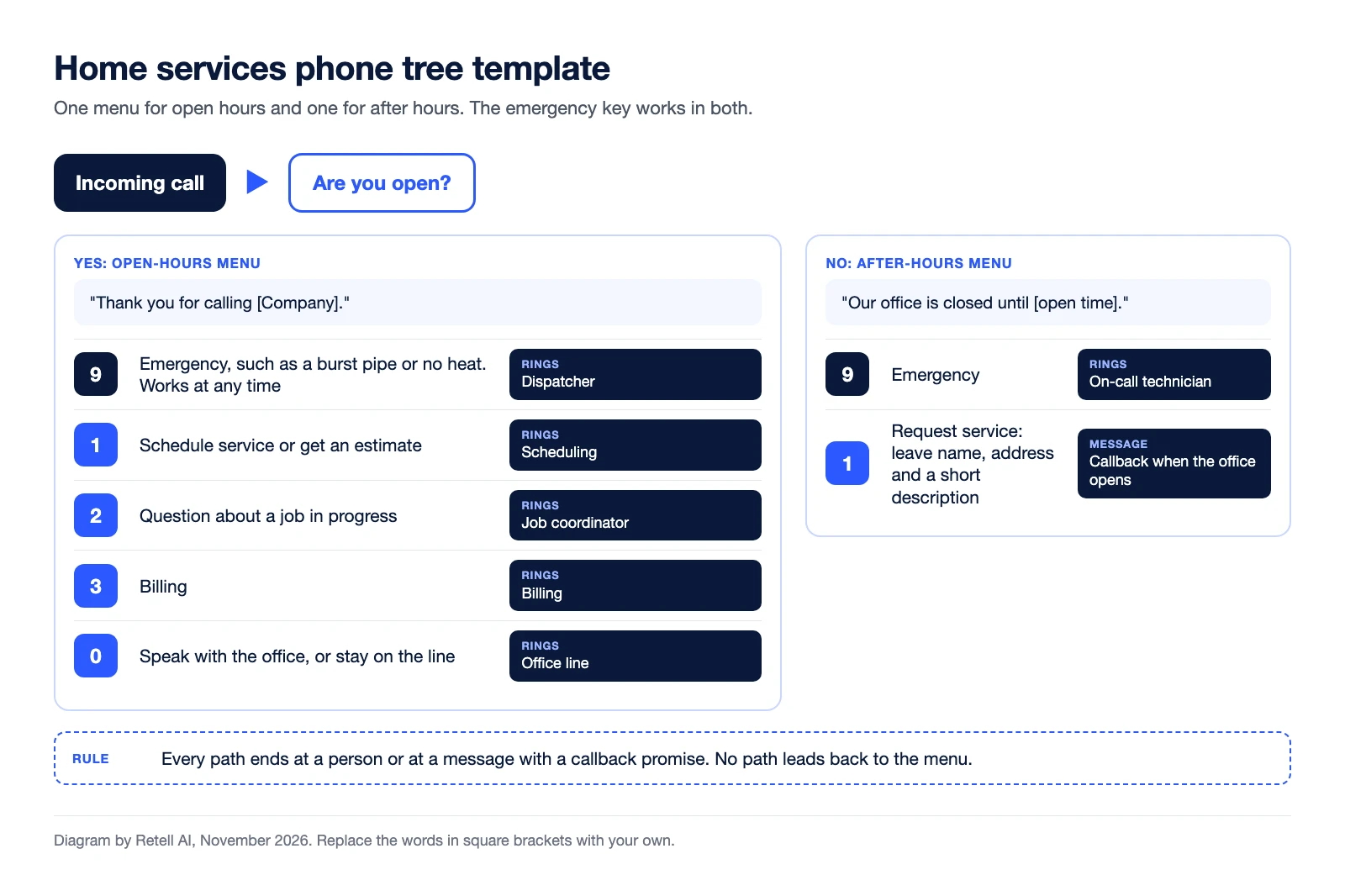
Home services phone tree template
An emergency key that works at any point in the greeting sends a burst pipe or a dead furnace to a live person, day or night.
OPEN HOURS
"Thank you for calling [Company].
If you have an emergency such as [a burst pipe or no heat], press 9 at any time.
To schedule service or get an estimate, press 1.
For a question about a job in progress, press 2.
For billing, press 3.
To speak with our office, press 0 or stay on the line."

ROUTING
9: [dispatcher]. 1: [scheduling]. 2: [job coordinator]. 3: [billing].
0 or no key: ring [office line].

AFTER HOURS
"Thank you for calling [Company]. Our office is closed until [open time].
If you have an emergency such as [a burst pipe or no heat], press 9 now to reach our on-call technician.
To request service, press 1 and leave your name, address and a short description. We will call you back when we open."
Multi-department support line phone tree template
Use a second level only where one team supports several products, and keep it to that one branch.
OPEN HOURS
"Thank you for calling [Company] support.
For help with an order or delivery, press 1.
For technical support, press 2.
For billing or refunds, press 3.
For sales, press 4.
To speak with an agent, press 0."

TECHNICAL SUPPORT SUB-MENU
"For [product A], press 1. For [product B], press 2.
For anything else, stay on the line."

ROUTING
Each key goes to its own queue.
0, no key, or a wrong key twice: [general queue]. Never back to the main menu.

AFTER HOURS
"Thank you for calling [Company] support. We are closed. Our hours are [days], [open time] to [close time].
You can [track an order] any time at [website].
To request a callback, press 1. We will call you by [time] on the next business day."
In a larger contact center the menu hands each call to a queue, and automatic call distribution (ACD) picks the agent.
After-hours and holiday phone tree template
Use this on its own if a person answers during the day and you only need a menu when you are closed.
AFTER HOURS
"Thank you for calling [Company]. We are closed right now.
Our hours are [days], [open time] to [close time].
If your call is urgent, press 1 to reach [on-call person or service].
To leave a message, press 2. We will call you back [by when]."

HOLIDAY
"Thank you for calling [Company]. We are closed for [holiday] and will reopen on [day] at [time].
If your call is urgent, press 1. To leave a message, press 2."
For single messages such as hold, voicemail and no-input prompts, see these IVR script examples.
Call tree template for staff alerts
A call tree, in the emergency planning sense, is an outbound chain: one person phones a few people, and each of them phones a few more until everyone has the message. It is a contact list, not a phone menu.
STARTER: [name, role, mobile] calls [A], [B] and [C].
[A] calls [name], [name], [name].
[B] calls [name], [name], [name].
[C] calls [name], [name], [name].

MESSAGE: "[What happened]. [What to do now]. [Where to check for updates]."
NO ANSWER: leave the message, call that person's contacts yourself, then tell [starter].
CONFIRM: the last person on each branch calls [starter].
LAST UPDATED: [date]
What makes a phone tree easy to use?
A phone tree is easy to use when a caller can finish it without thinking. These rules are common sense, and you can test each one by calling your own number.
- Keep the top menu short. Callers have to hold the list in their head. Four options plus a route to a person is a sensible ceiling.
- Order options by call volume. The most common reason for calling goes first.
- Say the reason before the key. "For billing, press 3" lets callers listen for their reason.
- Keep the greeting to one sentence. Promotions and website addresses do not belong in front of the menu.
- Always give an exit to a person. Offer 0 or "stay on the line", and send silence to a person. A menu should never loop.
- Stop at two levels. If a branch needs a third, a person should ask the questions.
The IVR best practices guide has the longer list, and what IVR is explains the system that plays the menu.
When does a phone tree stop working?
A phone tree stops working when callers cannot match their reason to an option. The signs are callers pressing 0 at the greeting, calls transferred between departments, and requests for a longer menu.
A menu can only route a call on a key press. An AI voice agent asks "How can I help?" and routes on the answer, so the caller never translates a problem into a number. Voice AI vs. IVR makes the full comparison.
Retell AI builds this kind of agent. Per its documentation, an agent can transfer a live call to a person, a department or another number. In a warm transfer the agent stays on the line and can brief the person who answers before connecting the caller. Keypad presses are still captured by default, so "press 1 to confirm" keeps working. See how call transfers work between AI voice agents and human teams. Pricing is from $0.07 per minute.
You still write most of what is in these templates: the greeting, the hours, who takes which call and what happens after hours. That list becomes the agent's call flow, without the numbers.
Frequently asked questions
What is a phone tree?
A phone tree is the automated menu that answers a business phone line and routes each caller by the key they press, such as "for sales, press 1." It is also called an auto attendant or an IVR menu.
How many options should a phone tree have?
Keep the main menu to about four options plus a route to a person. Callers hear the list once and have to remember it. If you need more, group related reasons under one option and add a short second menu.
What is the difference between a phone tree and a call tree?
A phone tree usually means an inbound menu that callers move through by pressing keys. A call tree usually means an outbound contact chain for notifying staff, where each person calls the next few people on a list. Some guides use either name for both.
What should a phone tree say after hours?
Say that you are closed, give your hours, offer a real route for urgent calls, and tell callers how to leave a message and when you will call back. Give a specific time, such as "by noon on the next business day."
Try the menu without the numbers
If your team keeps asking for more options, test the alternative on one phone line. AI IVR from Retell AI answers with a question instead of a list. Small teams can compare other routes in the guide to call center solutions for small business. Buying for a larger team? Start with the AI voice agent RFP template.