Agent Assist Software: What It Is, How It Works, and How to Choose
12
MIN READ
October 20, 2026
Agent assist software gives contact center agents real-time AI help while they're on a live call.
As the customer talks, it listens, pulls up the right answer, and suggests the next move, so the agent isn't digging through tabs or guessing under pressure.
The problem is the name. "Agent assist" gets used for two very different things, and buyers end up comparing tools that don't do the same job.
One coaches a human through the call. The other handles the call without a human at all. Picking the wrong one wastes months and budget.
This guide clears that up. What agent assist software actually is, how it works, the features that matter, and how it differs from autonomous AI agents, so you know exactly which one your team needs.
TL;DR
Agent assist software is real-time AI that supports a human agent during a live conversation. The human stays in control.
It listens to the call, surfaces knowledge and next-best actions, and automates after-call work like summaries and notes.
It's different from autonomous AI agents, which handle the call end to end and only bring in a human when needed.
Most mature contact centers run both: AI takes the routine, high-volume calls, and humans backed by assist tools take the complex ones.
The main things to check when choosing: real-time latency, knowledge and CRM integrations, whether QA and coaching share one record, and pricing.
Agent assist software is real-time AI that listens to a live customer conversation and gives the human agent prompts, knowledge, and next-best actions while the call is still happening. The human stays in control the whole time and decides what to actually use.
The simplest way to picture it is a co-pilot sitting next to the agent. As the customer talks, the software follows along, understands what they need, and quietly surfaces the right answer or the next step on the agent's screen.
Nothing gets sent to the customer on its own. It's there to make the person on the call faster and more accurate, not to replace them.
On a typical call it will:
Transcribe the conversation live and work out what the customer actually wants
Pull the right answer or document from your knowledge base in the moment
Suggest the next-best action, along with any compliance or script reminders
Auto-write the summary and notes once the call wraps up
It works on both voice and chat, but voice is where it matters most, since an agent can't put a caller on hold to go read a manual.
Most vendors in this space define it this same way, Balto, Cresta, NiCE, and Observe.AI among them. The confusion isn't about what agent assist does. It's about where it stops and where autonomous AI agents begin, which is the part most buyers get wrong.
This is the distinction that trips up almost every buyer, and getting it right saves you from buying the wrong tool.
The short version: agent assist augments a human on the call. An autonomous AI agent handles the call itself and only brings in a human when it needs to. Same underlying technology, completely different job.
| Comparison | Agent Assist | Autonomous AI Agent |
|---|---|---|
| Who talks to the customer | The human agent | The AI |
| The AI’s role | Coaches the human in real time | Handles the conversation end to end |
| Human involvement | On every call | Only on escalation |
| Best for | Complex, emotional, high-stakes calls | Routine, high-volume, repetitive calls |
| Main outcome | Makes existing agents better | Reduces how many calls reach an agent |
Most mature contact centers run both. The AI takes the routine, high-volume calls like order status, hours, and password resets. Human agents, backed by assist tools, take the complex ones.
The two aren't rivals, they hand off to each other. Anautonomous AI voice agent resolves the routine call on its own, and when something needs a person, itwarm-transfers to a human with a whisper or three-way intro so they aren't starting cold.
The moment that human takes over is exactly where the agent assists and steps in to coach them.

Agent assist runs the same loop on every call. Here's what's happening under the hood.
The software converts speech to text live, for both the customer and the agent. This running transcript is what everything else depends on, so if the transcription lags or misfires, the rest falls apart with it. Voice is the hard part here, since accents and cross-talk have to be handled on the fly.
A transcript alone isn't useful. Natural language processing works out what the customer actually means, not just the words they used, so the help that follows fits the real situation.
It searches yourknowledge base, policies, and past interactions for the answer that matches, so the agent isn't digging through tabs mid-call. How good this is depends on how well the tool is wired into your own content.
As the customer talks, it pushes suggestions to the agent's screen: a response, a next step, a compliance reminder. The agent decides what to use. Nothing goes to the customer automatically.
When the call ends, it writes the summary, sets the disposition, and updates the record on its own. That saved time adds up across every call, and the same data feedscall analytics so supervisors can see what's working.
All of this only counts if it's fast. A prompt that arrives after the moment has passed is just a distraction. That's why "real time" defines this category, and why latency is the first thing buyers should test.
Plenty of tools call themselves agent assist. Fewer do the hard parts well.
These are the features that decide whether it actually helps your agents or just clutters their screen, and the ones worth pressure-testing in a demo.
Real-time transcription. Everything downstream is built on this. If the speech-to-text is slow or sloppy, the prompts, the answers, and the summaries all inherit the mistake. Test it on a noisy call, not a scripted one.
Live prompts and next-best actions. The heart of the category. Real help arrives mid-conversation, when the agent can still use it, not as a suggestion that surfaces once the customer has already hung up.
Knowledge surfacing. It should answer from your knowledge base and documentation, not a generic model guessing at your policies. The tool is only as sharp as its connection to your own content.
Compliance and script adherence. Live reminders that keep agents on-script and within regulation. In finance, healthcare, and collections, this feature alone can be the reason to buy.
Automated call summaries. After-call work quietly eats minutes on every call. Good tools write the summary, set the disposition, and update the record themselves, sopost-call analysis stops being a manual chore.
QA and scoring. Built-inAI quality assurance scores calls automatically, so you're reviewing every conversation instead of the 1 to 2% a human team can realistically sample.
The best tools connect all of this into a single record.
When transcription, guidance, summaries, and scoring live in one place, supervisors see the whole picture instead of piecing it together across half a dozen dashboards.
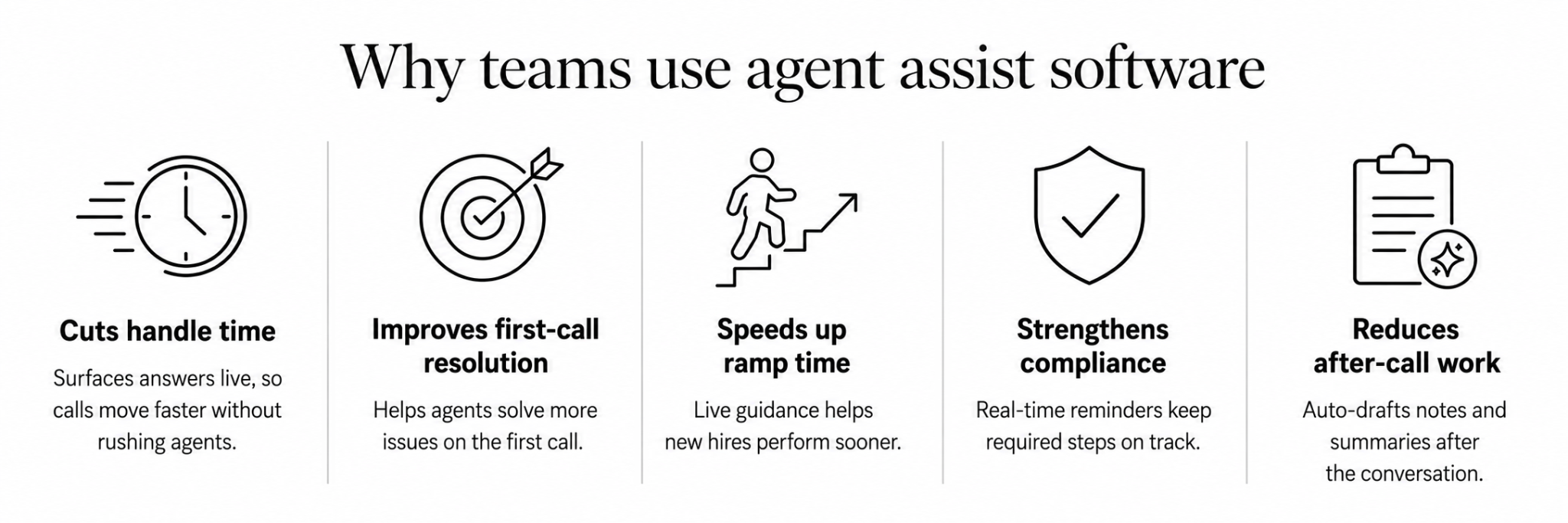
Features are easy to list. What matters is whether they move the numbers a contact center leader gets measured on. Here's where agent assist earns its cost.
Most of a long call isn't talking, it's the agent searching for an answer, putting the customer on hold, or checking with a teammate. Agent assist removes that dead air by surfacing the answer as the question comes up. Calls get shorter because the friction disappears, not because agents are pushed to hang up faster.
Repeat calls usually trace back to an agent giving an incomplete or wrong answer the first time. When the right guidance is on screen in the moment, more issues get solved on the first call, which is the single metric customers feel most and the one that quietly drives down total volume.
Onboarding is expensive, and in an industry with 30 to 45% annual attrition, you're always onboarding someone. A new agent with live prompts and answers performs closer to a tenured one in their first weeks, so ramp time shrinks and the cost of turnover stings less.
Manual QA reviews a tiny sample, so compliance slips go unnoticed until they're a problem. Real-time reminders put the required disclosure or script step in front of every agent on every call, which is why regulated industries lean on this feature hardest.
After-call work is invisible on a dashboard but brutal in aggregate, a few minutes of note-taking on every call, all day, across every agent. Automating the summary and the record update gives that time back to the next customer instead of the keyboard.
The common thread is consistency. Agent assist takes what your best agent knows on their best day and puts it in front of everyone, on every call.
The technology stays the same. What changes is the problem you point it at. Here's how it actually plays out across the teams that lean on it.
Most support queues are a mix of questions agents could answer in their sleep and the occasional one they've never hit before.
The trouble is you can't tell which is which until the customer starts explaining. Agent assist picks up on where the call is going early and puts the right policy or account action on the agent's screen.
The everyday stuff moves quicker, and the odd curveball is less likely to throw a newer agent who'd otherwise be working from memory.
On technical calls, the fix a customer needs often already exists in a release note or a support doc somewhere. The agent just hasn't read it, or can't find it fast enough with someone waiting on the line.
So the call gets bumped to a senior engineer, and now two people are handling something the documentation already covered.
Agent assist pulls that specific step up as the customer describes the symptoms, so a tier-one agent can work through issues that used to get escalated, and your senior people get interrupted less.
Revenue conversations hinge on small signals that are easy to talk right past. A customer mentions they're expanding. Another lets slip they've been shopping around. A rep who's focused on the actual conversation won't always register these in the moment.
This is where live prompts help, flagging the upsell opening or the retention risk the second it comes up, with a suggested offer attached. The rep still runs the call, they just stop leaving openings on the table.
Manual QA listens to maybe one or two calls out of a hundred. Everything else goes unchecked, and whatever does get caught surfaces days later.
For teams in finance, healthcare, or collections, one missed disclosure is a genuine liability, so sampling after the fact isn't really good enough.
Agent assist prompts the required language during the call itself, which moves the whole exercise from catching mistakes to preventing them.
Usually a supervisor only finds out a call went badly once the customer has already hung up. The gap between the mistake and the feedback is the actual problem with coaching.
Since agents assist streams calls as they happen, a supervisor can watch a tricky one and either step in or quietly message the agent while there's still a call to save.
Once you know you want agent assist, the tools start to look similar on a feature list and behave very differently in production. A few things separate the ones that hold up.
Some tools improve by training on your own call data, others run on a generic model that never adapts to how your customers actually talk. The first gets sharper over time. The second plateaus.
Latency is the whole game. Ask for the real number on live calls, not a scripted demo, and watch whether prompts land during the moment or just after it.
Agent assist is only as good as its reach into your knowledge base, your CRM, and your telephony. If it can't see your content and your customer records, its suggestions stay generic.
When guidance, scoring, and after-call data live in one system, supervisors get the full picture. When they're bolted together from separate tools, someone spends their week reconciling dashboards.
Per-seat, per-minute, and usage-based models add up very differently depending on your volume. Map it to your actual call load before you sign.
Underneath all of this is a bigger question the feature comparison hides: do you want to coach your humans, or take work off them entirely?
Agent assist makes your agents better on the calls they take.
An autonomous AI voice agent handles calls so they never reach an agent at all.
Most teams eventually want both, but where you start depends on where your pain is. If your agents are drowning in complex, high-value calls and need to be sharper, assist is the answer. If they're buried under routine, repetitive calls that don't need a person, automating those first frees them for the work that does.
That second path is whereRetell comes in. It's an autonomous AI voice agent that answers and resolves the routine calls on its own, order status, hours, appointment booking,qualifying inbound leads, and hands off to a human the moment a call needs one.
Instead of coaching an agent through a password reset for the thousandth time, you take that call off the board completely.
It's built to run in production, not as a pilot. Retell handles over 100 million calls a month at 99.99% uptime, holds a 4.8 out of 5 across nearly 2,000 G2 reviews, and is HIPAA-ready with a self-serve BAA on every plan, which matters if you're in healthcare, finance, or any regulated line of work.
Pricing is usage-based from $0.07 a minute with no platform fees and no feature gating, so you can see exactly what a call costs before you commit.
Try Retell free, ortalk to sales if you want to map it to your call volume first.
Agent assist software is real-time AI that listens to a live customer call and gives the human agent prompts, answers, and next-best actions while they're still talking.
It pulls information from your knowledge base in the moment and automates the after-call work like summaries and notes. The agent stays fully in control and decides what to actually use.
Agent assist coaches a human who is on the call, feeding them guidance in real time while they do the talking. An autonomous AI agent handles the call itself and only brings in a person when the situation needs one.
One makes your existing agents better, the other reduces how many calls reach an agent at all. Many mature contact centers run both, using AI for routine calls and assisted humans for complex ones.
Yes, and it has to be to work at all. The entire value is guidance that arrives during the conversation, at the moment the agent needs it, not in a report they read afterward.
A suggestion that lands even a few seconds too late is a distraction rather than a help. This is why latency is the first thing serious buyers test before signing anything.
Most agent assist tools support both voice and digital channels like chat and email. Voice is where it earns its keep, because an agent on a live call can't put a customer on hold to go read a manual or search the knowledge base.
On chat the same real-time guidance applies, though agents there have a little more breathing room to look things up themselves.
Pricing depends heavily on the model. Some tools charge per agent seat, others per minute or by usage, and the total scales with your call volume and which features you switch on.
A per-seat price and a usage-based price can look similar on paper and then diverge sharply once real volume hits. Map any quote to your actual call load before you commit, and watch for add-on fees on things like QA and knowledge.
See how much your business could save by switching to AI-powered voice agents.
Total Human Agent Cost
AI Agent Cost
Estimated Savings
A Demo Phone Number From Retell Clinic Office