Why Your AI Voice Agent Goes Quiet Mid-Call (and 4 Ways to Fix Dead Air)





A caller asks to move an appointment to Tuesday. The agent says nothing for a few seconds while it checks the calendar. The caller says "hello?", wonders if the line dropped, and starts the question again. The agent then answers the first question and talks over the second.
That silence is dead air, and in AI voice agents it often has nothing to do with the language model. One prospect told us a live agent "felt slower" than the demo. The pauses came from API and tool lookups, not from the model or the voice.
This guide explains where that silence comes from, why it can hide from your latency numbers, and the four ways to fix it, in the order we recommend using them.
What causes dead air during a tool call?
When an agent needs data it does not have, such as open appointment slots, an order status or a patient record, it makes a tool call: the model asks for a function to run, your endpoint does the work, and the result comes back to the model. Only then can the agent write its answer.
In Retell, a custom function runs in Wait for completion mode by default. The agent waits for the result before it responds to it. Everything that happens on the way adds to the silence:
- Your endpoint's response time. A slow database query, a scheduling system with a slow API, or a chain of calls to other services.
- The size of the response. Everything a custom function returns is converted to a string and handed to the agent's LLM, so a large payload gives the model more to read before it speaks.
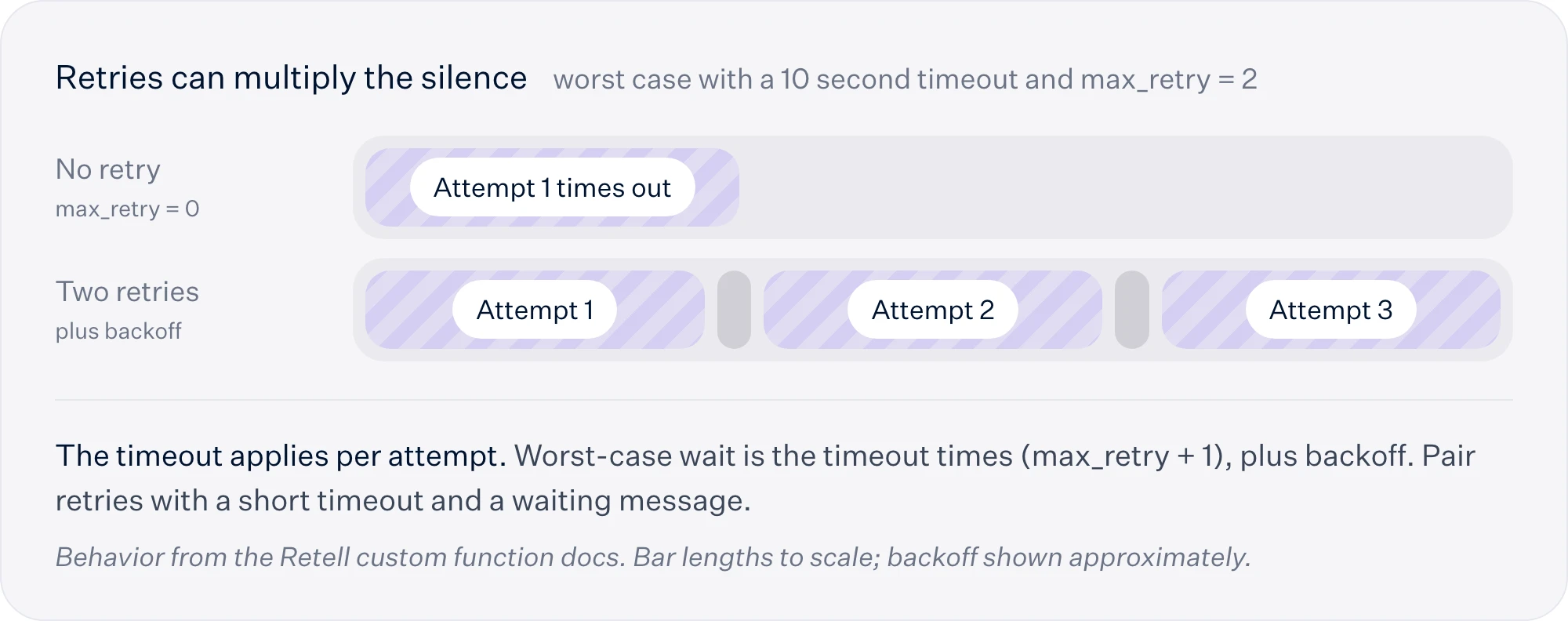
- Failures and retries. If the request times out and retries are on, the caller waits through every attempt.
None of this is model latency. Switching to a faster LLM does not shorten the time your calendar API takes to answer.
Why your latency dashboard may not show it
Retell's per-call e2e latency measures the time from when the user stops talking to when the agent starts talking. According to the latency docs, turns where the agent only runs tool calls without saying anything are excluded, "so tool execution time doesn't inflate this metric."
That makes the metric a clean read on the speech pipeline. It also means a call can show healthy end-to-end latency while the caller sat through a long lookup. To see tool time, measure it where it happens: log how long each request takes on your own endpoint, and listen to calls that use your slowest tools.
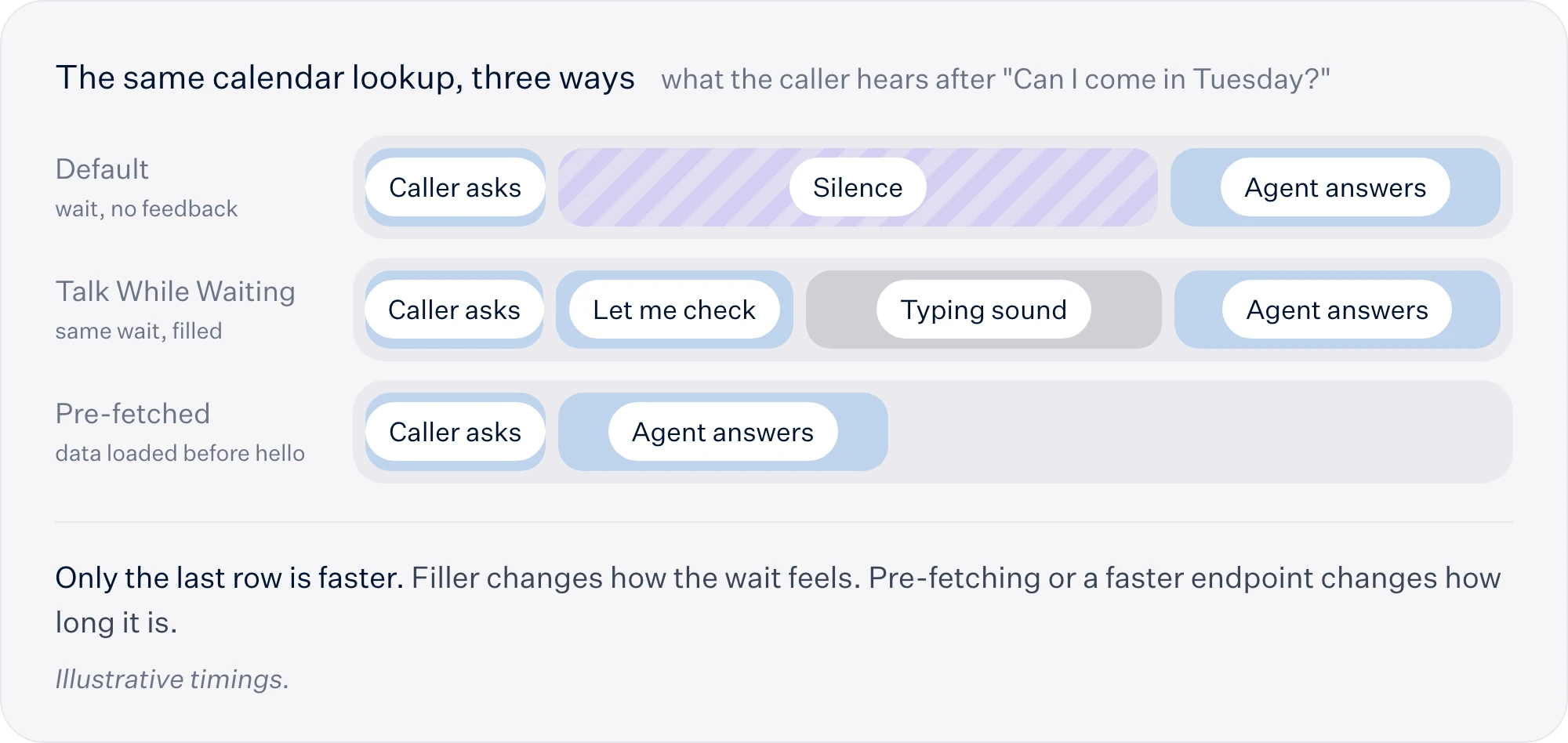
Four ways to fix dead air during tool calls
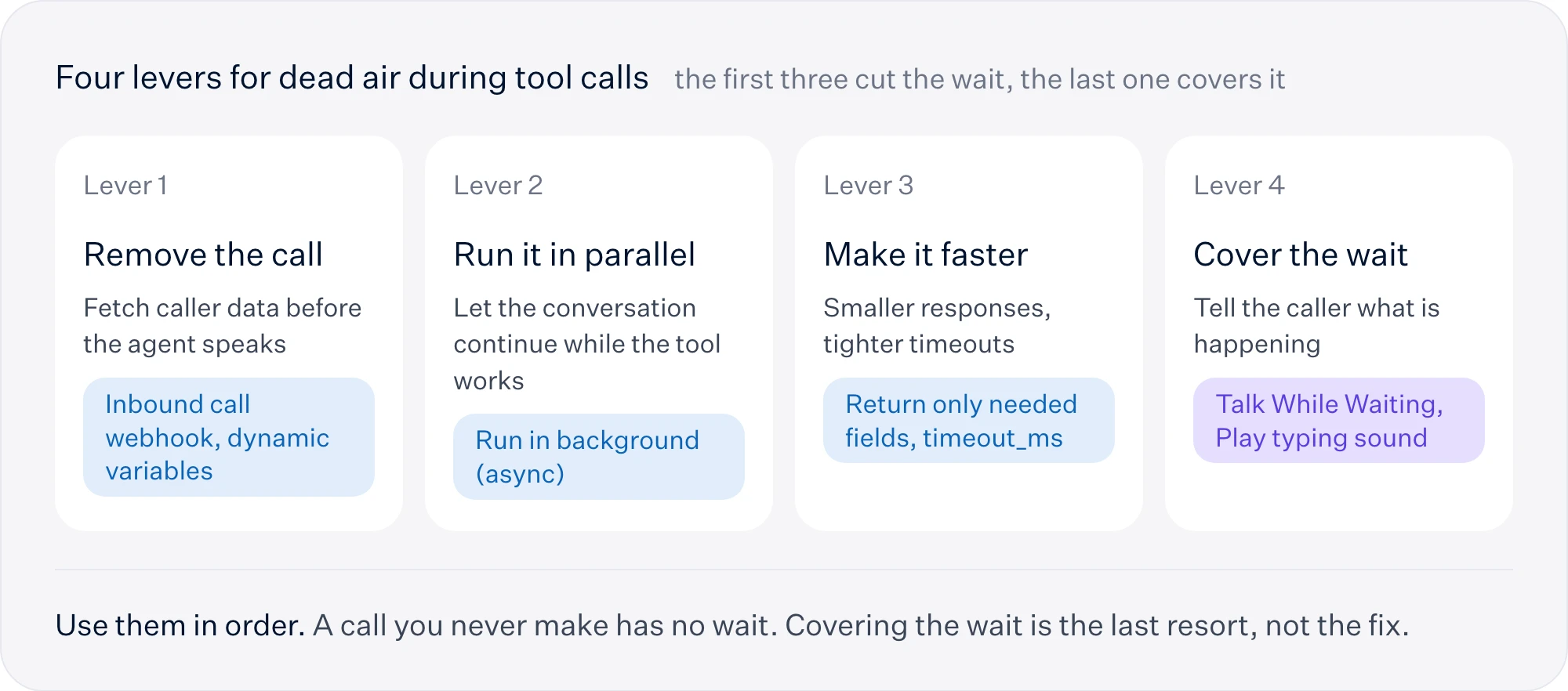
There are two kinds of fix. The first three shorten the wait. The last one changes how the wait feels. Use them in this order, because a lookup you never make has no wait at all.
Pre-fetch caller data before the agent speaks
Many lookups ask for data you could have had before the call started: who is calling, their next appointment, their account status. Load that data up front and the agent never has to pause for it.
- Inbound calls: the inbound call webhook fires when a call arrives on your number. Your server can look up the caller and return
dynamic_variables, which the agent can use from its first sentence. - Outbound calls: you start the call, so pass the same data as dynamic variables in the API request.
A healthcare front desk is a good example. If the patient's name and upcoming appointment are already loaded, the agent can greet them by name and confirm the visit with no lookup at all. Keep tool calls for data that changes during the call, such as live availability right before you book.
Run non-blocking tools in the background
Some tools do not change what the agent says next: logging the call to a CRM, sending a confirmation SMS, creating a support ticket. There is no reason for the caller to wait for those.
Set them to Run in background (async). The conversation continues while the function runs. In a conversation flow, the next node may run before the result or response variables are available, so only use background mode when the next part of the conversation does not depend on the result. The waiting feedback options below are hidden in background mode, because there is no wait to cover.
If you turn on retries for these tools, make side effects such as creating a ticket or charging a card idempotent, because each retry repeats the request.
Make the tool itself faster
When the agent has to wait, shorten the wait:
- Return only what the agent needs. If the agent needs the next three open slots, do not return the whole week. A smaller response is faster to send and gives the model less to read.
- Set a timeout you would accept on a real call. A custom function's timeout can be set from 1 to 600 seconds and defaults to 120 seconds. Few callers will wait two minutes, so set it to match what the call can tolerate, and tell the agent in the prompt what to say if the lookup fails.
- Be careful with retries.
max_retry(0 to 5, default 0) repeats a failed request with backoff. The timeout applies to each attempt, so the worst-case wait is the timeout times (max_retry+ 1), plus the backoff between attempts. See the custom function docs.
Cover the wait the caller still has
Some waits cannot be removed. Live availability has to be checked live. For those, tell the caller what is happening instead of leaving the line silent. Human contact centers use the same rule: Call Centre Helper suggests telling the caller "I'm just going to go quiet for a minute" rather than going silent without warning (source).
In Wait for completion mode, Retell gives you two options:
- Talk While Waiting: the agent says something while the function runs, either generated from a prompt you write or a static sentence you set word for word.
- Play typing sound: a typing sound plays during the wait, so the caller knows the agent is still working.
A few practical rules:
- Write the line for the tool. "Let me pull up your appointment" tells the caller more than a generic "One moment." A static sentence gives the exact wording every time; a generated line can change from call to call.
- Say it once. One clear line followed by the typing sound is easier to sit through than several variations of "just checking."
- Keep it short. In a conversation flow, if the waiting message is still being spoken when the result arrives, the transition waits for the speech to finish. A long message can add delay of its own.
- Expect interruptions. If the caller talks during the wait, the agent turns to answer them, and the waiting message can be skipped. The request is not cancelled; it runs to completion and its result stays in the transcript for later turns.
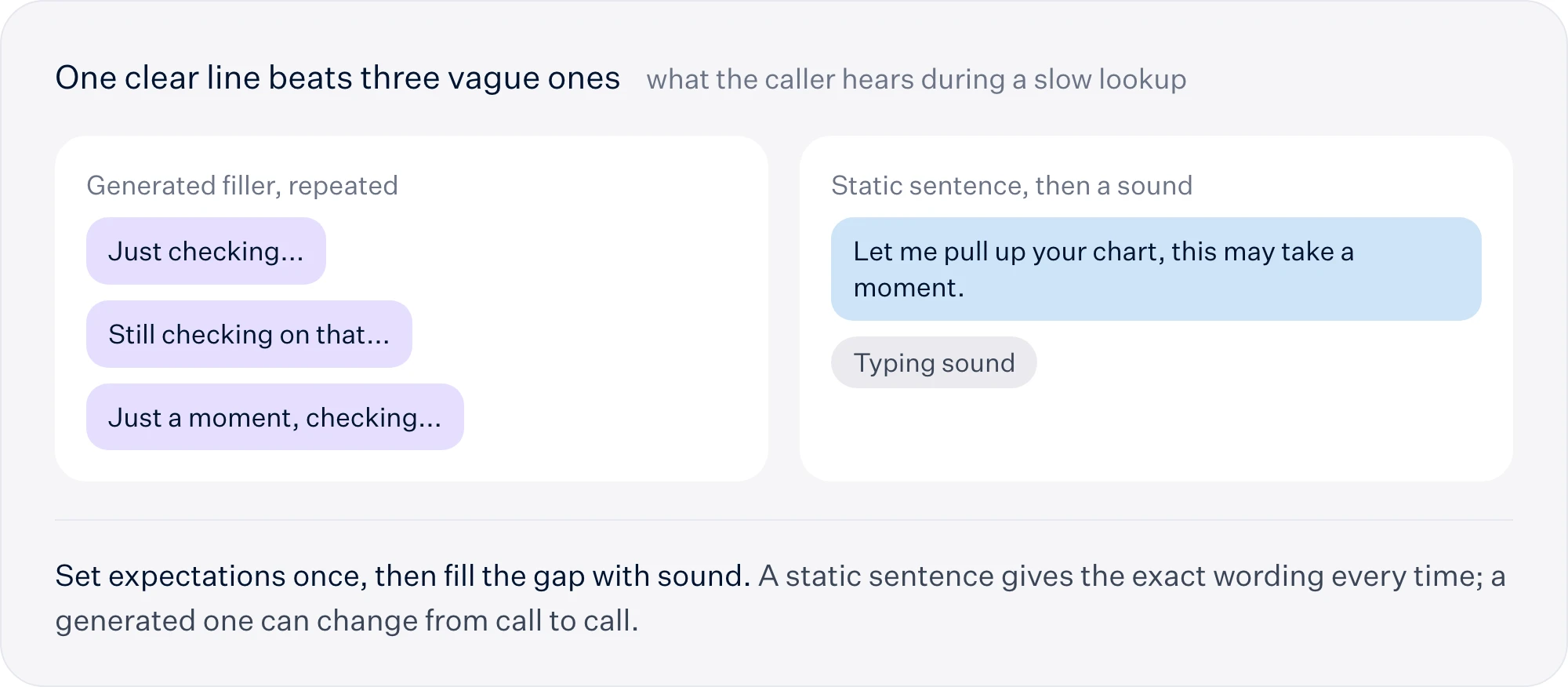
Covering the wait is the last lever, not the fix. It makes a three-second lookup feel acceptable. It does not make a fifteen-second lookup acceptable.
Which fix should you use first?
| Situation | Best fix |
|---|---|
| The data is known before the call (caller identity, account, existing appointments) | Pre-fetch it with the inbound webhook or outbound dynamic variables |
| The agent's next sentence does not depend on the result (CRM logging, SMS, tickets) | Run in background (async) |
| The agent needs the result to answer, and the endpoint is slow | Trim the response, set a realistic timeout, review retries |
| The agent needs the result, and the wait cannot be shortened further | Talk While Waiting with a tool-specific line, plus the typing sound |
Most agents need more than one. A typical booking agent pre-fetches the caller's details, checks live availability with a short waiting line, and logs the booking in the background.
For the rest of the speech pipeline (transcription, the model and the voice), see Retell's latency troubleshooting guide and how real-time voice AI works. For the short sounds an agent makes while the caller is talking, see backchanneling.
Frequently asked questions
Is dead air the same as latency?
No. Latency usually means the time between the caller finishing and the agent starting to speak, which depends on transcription, the model and the voice. Dead air is any stretch where neither side is talking. Tool calls are a common cause of dead air that latency metrics can miss, because Retell's end-to-end latency excludes turns where the agent only runs tools.
Does Talk While Waiting make the agent faster?
No. It fills the wait so the caller knows the agent is working, but the lookup takes the same time. To shorten the wait, pre-fetch data, run non-blocking tools in the background, or make the endpoint faster.
Should a voice agent make fewer API calls?
It should skip the calls it does not need during the conversation. Data that is known before the call can be loaded through the inbound webhook or outbound dynamic variables, and calls whose results the agent does not need right away can run in the background. Calls the answer depends on should stay, made as fast as possible.
What happens if the caller talks while a tool is running?
The agent turns to answer the caller, and the waiting message or the immediate response to the result can be skipped. The request is not cancelled. It runs to completion up to the timeout, its actions still happen, and the result stays in the transcript for later turns.
How long can a tool call run before it fails?
A Retell custom function times out after 120 seconds by default. You can set the timeout from 1 to 600 seconds. If retries are on, the timeout applies to each attempt, so the total wait can be several times longer.
See how much your business could save by switching to AI-powered voice agents.
ROI Result
Total Human Agent Cost
AI Agent Cost
Estimated Savings
Estimate your monthly voice AI cost
Read Other Blogs

Revolutionize your call operation with Retell