AI Voice Agent Tools and Actions: How Agents Check Calendars, Update CRMs, and Hand Off Calls




AI voice agent tools are functions that an AI voice agent can call during a phone call to reach external APIs: check calendars, look up or update a CRM record in Salesforce or HubSpot, send a text, and transfer the caller to a person. Actions are what the caller experiences as a result, such as a booked appointment, a corrected record, a confirmation text, or a human on the line.
Retell AI publishes this guide. Retell AI is an AI voice agent platform for contact centers, and every product fact below describes Retell AI as documented at docs.retellai.com on November 17, 2026.
What are AI voice agent tools and actions?
AI voice agent tools are the defined functions an agent's language model can ask its platform to run during a call, such as checking a calendar, updating a CRM record, sending an SMS, or transferring the caller. Actions are the results the caller notices. Retell's documentation calls the mechanism function calling.
A tool differs from the two other things that shape what an agent says:
- A prompt tells the agent how to behave and when to use each tool. It cannot fetch or change anything.
- A knowledge base lookup retrieves passages from your documents. In Retell, an agent with a linked knowledge base retrieves from it before every response, and auto-refreshed sources update every 24 hours. That suits "what is your cancellation policy?"
- A tool reads from or writes to a live system during the call. That suits "is Thursday at 2 open?" and "please update my email address."
How does a tool call work in the middle of a phone call?
A tool call during a phone call has four parts in Retell's documentation: the language model decides a function is needed, extracts the parameters from the conversation, Retell runs the function with those parameters, and the result goes back into the conversation so the AI voice agent can act on it or say it.
Take a caller who asks to move Tuesday's appointment to Thursday afternoon. The model picks the availability tool and fills in the date range, Retell sends the request to the calendar system, and the agent reads back the open slots.
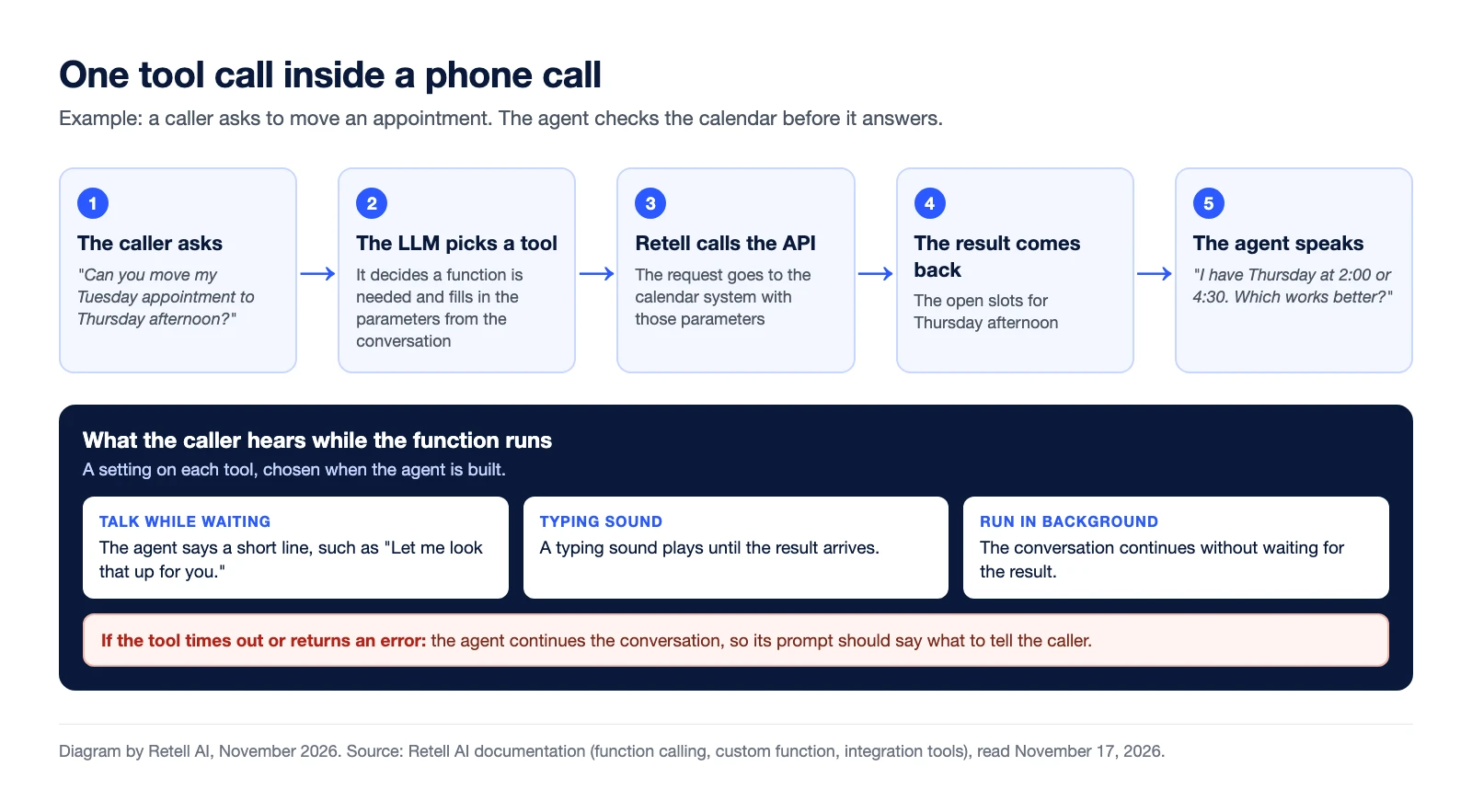
What the caller hears while the function runs is a setting. For a tool that waits for its result, Retell's docs describe Talk While Waiting, where the agent says a generated or fixed line such as "let me look that up for you," and Play typing sound. A tool can also run in the background while the conversation continues.
What types of tools can an AI voice agent use?
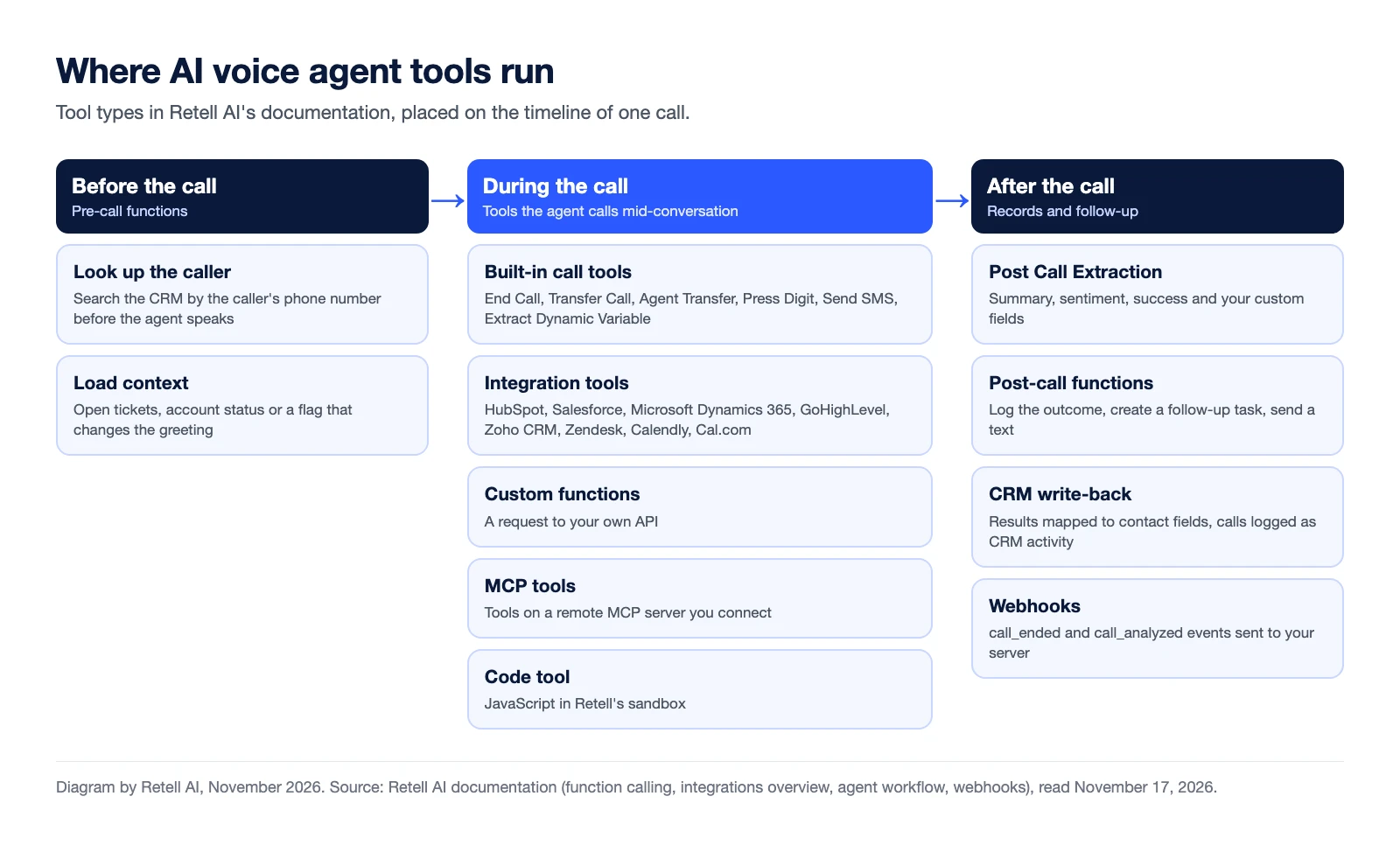
The tools an AI voice agent can use on Retell fall into six types: built-in call tools, integration tools for connected providers, custom functions that call any API, MCP tools, a code tool, and pre-call and post-call functions that run outside the conversation.
| Tool type | What it does | Example on a call | Where to read more |
|---|---|---|---|
| Built-in call tools | End Call, Transfer Call, Agent Transfer, Press Digit, Send SMS and Extract Dynamic Variable | The caller asks for billing, so the agent transfers the call | Call transfer |
| Integration tools | Act on a connected provider: HubSpot, Salesforce, Microsoft Dynamics 365, GoHighLevel, Zoho CRM, Zendesk, Calendly or Cal.com | The agent finds the caller in HubSpot and greets them by name | Salesforce, HubSpot and Zendesk guide |
| Custom functions | Send a request to your own API and use the response | The caller gives an order number and hears the delivery date | API integration guide |
| MCP tools | Call tools on a remote MCP server you connect | The agent uses a lookup tool your internal assistants already use | MCP node guide |
| Code tool | Runs JavaScript in Retell's sandbox | The agent calculates a repayment amount | Tool calling |
| Pre-call and post-call functions | Run before the agent speaks or after the call ends | Look up the caller before pickup. Log the outcome after hang-up | How a call works |
Integration tools need no endpoint of your own: a provider is connected once for the whole workspace. An agent does not hang up on its own unless End Call is added as a tool.
How does an AI voice agent check calendars and book appointments?
An AI voice agent checks a calendar by calling the scheduling system's availability tool during the call, offers the open slots, and books the one the caller confirms. Retell documents calendar tools for Cal.com and Calendly, and for GoHighLevel calendars through the GoHighLevel connection.
The Cal.com and GoHighLevel tools can also reschedule and cancel, and the Calendly tools can cancel. Retell's docs list Google Calendar as coming soon as of November 2026. A scheduling system the docs do not list needs a custom function or an MCP server.
The full flow, from "do you have anything Thursday?" to the confirmation, is in how AI voice agents check calendars and book appointments. The product page is book appointments.
How does an AI voice agent look up and update CRMs like Salesforce and HubSpot?
An AI voice agent looks up and updates CRMs like Salesforce and HubSpot by calling CRM tools during the call: it searches for the caller's record by phone number, reads related deals or cases, and writes the changes the caller confirms.
- Salesforce tools: search, create and update Contacts. Create and update Leads. Update Accounts and custom objects. Read Opportunities and Cases, run a SOQL query you write, and create Tasks and Notes.
- HubSpot tools: search, create and update contacts. List a contact's deals, companies and tasks. Update deals and companies, create tasks and notes, and log the call on the contact's timeline.
Two limits matter. As of November 17, 2026, the Salesforce list has no tool that creates or edits an Opportunity or a Case. Permissions also sit in the CRM: Salesforce tools run as a Run As user, and each HubSpot tool needs its scope.
Retell's CRM integrations page also covers Microsoft Dynamics 365, GoHighLevel and Zoho CRM, and Zendesk tools handle support tickets. Setup guides: connecting Retell AI to Salesforce and connecting Retell AI to HubSpot.
How does an AI voice agent hand off a call to a human?
An AI voice agent hands off a call to a human with a transfer tool that dials a phone number or SIP address and connects the caller. Retell's Transfer Call tool has three types: cold transfer, warm transfer and agentic warm transfer. It works on phone calls, not web calls.
- Cold transfer: the call goes straight to the destination and the agent drops off.
- Warm transfer: the agent stays on the line after dialing. It can wait for a real person to speak, play a private message only the destination hears, or do a three-way introduction.
- Agentic warm transfer: a second AI agent, the transfer agent, talks with the destination while the caller is on hold, then connects the caller or cancels. If it cancels, the caller goes back to the main agent.
What the human receives depends on the type. In a warm transfer, the human can hear a whisper message before the caller joins. In an agentic warm transfer, the transfer agent is given the original conversation, so it can explain who is calling and why.
The trade-offs are in how call transfers work between AI voice agents and human teams.
How do you connect an AI voice agent to any other system?
An AI voice agent connects to a system that has no prebuilt connector in three documented ways on Retell: a custom function that calls the system's API, an MCP server that exposes the system's tools, or a webhook that sends call events to your server. Order management, point-of-sale and ERP systems go through these routes.
- Custom functions. You set a name, a description, an HTTP method and a URL. Retell sends the request and waits for the response. A failed request is not retried unless you set a retry count.
- MCP tools. You connect a remote MCP server and choose which tools the agent may call. Only the tools you add are exposed.
- Webhooks. A webhook is a notification, not a tool. Retell sends events such as call_started, call_ended and call_analyzed to your endpoint.
- Automation platforms. Retell's integration pages for Zapier, Make and n8n describe starting a call from an event in another app and sending the transcript, summary and outcome onward.
What happens after the call ends?
After the call ends, an AI voice agent's platform turns the conversation into records other systems can use. In Retell, Post Call Extraction reads the transcript with a language model and writes a summary, the caller's sentiment, whether the call was successful, and any custom fields you define.
- CRM write-back. With contact sync on, extraction results map onto contact fields and sync to the CRM. Calls can be logged as a Task in Salesforce or a Call engagement on the HubSpot timeline.
- Post-call functions. Workflow functions run after extraction and can use its results, such as creating a follow-up task.
- The call_analyzed webhook. It delivers the analysis to your own endpoint.
More detail is on the post-call analysis page.
Which tools does an AI voice agent need before launch?
An AI voice agent needs one tool for each caller request that reads or changes a live system, plus a transfer tool for the requests it should not handle. List the top caller requests, then put four questions to any vendor for each tool.
- Does the tool read or write? Start with lookups. Add write tools for changes a caller can confirm out loud.
- Whose permissions does it use? Know which CRM user or app the tool acts as.
- What happens when the tool fails? In Retell, an integration tool call times out after 3 to 14 seconds (as of August 2026). The agent then continues the conversation, so the prompt should say what to tell the caller.
- How are tool calls checked before launch? Retell's integration tool test sends a real request, so trying an update tool writes a real record. The LLM Playground shows each tool invocation and result.
Frequently asked questions
What tools can an AI voice agent use?
An AI voice agent can use built-in call tools (end call, transfer call, agent transfer, press digit, send SMS, extract variables), integration tools for CRMs, helpdesks and calendars, custom functions that call any API, MCP tools, a code tool, and pre-call and post-call functions. Retell AI documents all six types.
Can an AI voice agent update Salesforce or HubSpot?
Yes. On Retell AI, Salesforce tools can create and update Contacts and Leads, update Accounts, and create Tasks and Notes during a call. HubSpot tools can create and update contacts, update deals and companies, create tasks and notes, and log the call.
Can an AI voice agent check a calendar and book an appointment?
Yes. An AI voice agent checks open slots with an availability tool and books the slot the caller confirms. Retell AI documents calendar tools for Cal.com, Calendly and GoHighLevel calendars.
How does an AI voice agent hand a call to a human?
An AI voice agent hands a call to a human with a transfer tool. Retell AI documents a cold transfer, where the agent drops off, a warm transfer, where the agent can brief the person privately first, and an agentic warm transfer, where a second AI agent talks with the destination first.
What happens if a tool call fails during a call?
On Retell AI, the agent continues the conversation after a timeout or error, so the prompt should tell it what to say when a lookup or booking does not go through.
See how much your business could save by switching to AI-powered voice agents.
ROI Result
Total Human Agent Cost
AI Agent Cost
Estimated Savings
Estimate your monthly voice AI cost

Revolutionize your call operation with Retell