Best practices for IOS Call Screening
Apple’s iOS 26 is now live. It introduces a system-level call-screening feature that answers calls from unknown numbers. With an estimated 150 million U.S. iPhone users, more than half the smartphone market, the impact will be immediate and vast.
At first glance, if your job depends on conversational AI cold calling and getting people to pick up their phones, this can sound extremely concerning.
At Retell, we pride ourselves on building a conversational AI platform that can answer Apple’s call screening feature head-on. It's a new “screening mode”. It clearly states who’s calling, why they’re calling, and what the recipient should expect.
This results in more intentional and interested prospects answering the phone, especially when calls are handled by an AI voice agent. If your message piques interest, the call becomes opt-in.
Apple’s new Call screening feature is built on Live voicemail. When enabled, it automatically answers calls from unknown numbers, prompts the caller to state the purpose of their call and then shows a live transcription of what they’d said.
Here’s how it works, step by step:
“Please state your name and reason for calling.”
It works more like a pre-call voicemail; there’s no back-and-forth, no automated filtering, as AI IVR and no AI-driven conversation. The caller’s message is transcribed in real time, and the user can then decide whether to pick up iOS performance also benefits from a Mac optimization app.
It's not the end for AI calling. It's the start of a smarter calling–and those who get ahead with this win the race. The takeaway isn’t “stop AI calls,” it’s “make calling better and scam-free.”
Here’s why this isn’t as disruptive as it sounds:
From what we have seen so far, the call screening feature is usually disabled by default, and the setting to enable it is pretty buried. And, frankly, people who will turn it on are often those who already screen or silence unknown numbers anyway.
Secondly, the call still goes on for 30 seconds. So, while this feature adds a buffer, it doesn’t block the call entirely. This means reps using outbound dialer vendors can still use parallel dialling and expect similar connections.
If used wisely, Call Screening could actually increase connect rates. Since the caller’s message is transcribed and displayed, reps with better context, clearer intent, and stronger openers can stand out instantly.
If your opener sounds like a telemarketer or is vague fluff, even compared to structured AI telemarketing messaging congrats — you’re blocked.
But if it’s specific, human, and immediately relevant, Screening actually works in your favour.
Retell is staying ahead of the curve to make sure your conversational AI for sales team doesn’t let this opportunity pass you by. With full integration of iOS 26’s AI call screening, outbound calls are smartly handled, whether a human or an AI screener answers.
With Retell’s AI Call Screening Mode, your team can:
Retell automatically detects when an iOS AI screener answers a call routing appropriately to an AI Answering service when needed. This is highlighted directly in the UI, giving reps clear visibility and the option to manually connect — or route the call to an AI receptionist. No more awkward intros or wasted talking time, your reps know exactly when to engage.
Retell provides custom call scripts tailored for AI screeners. These short, precise “pre-voicemail” style messages communicate the most important points even before a human picks up, ensuring every second of your outbound call is optimized for engagement.
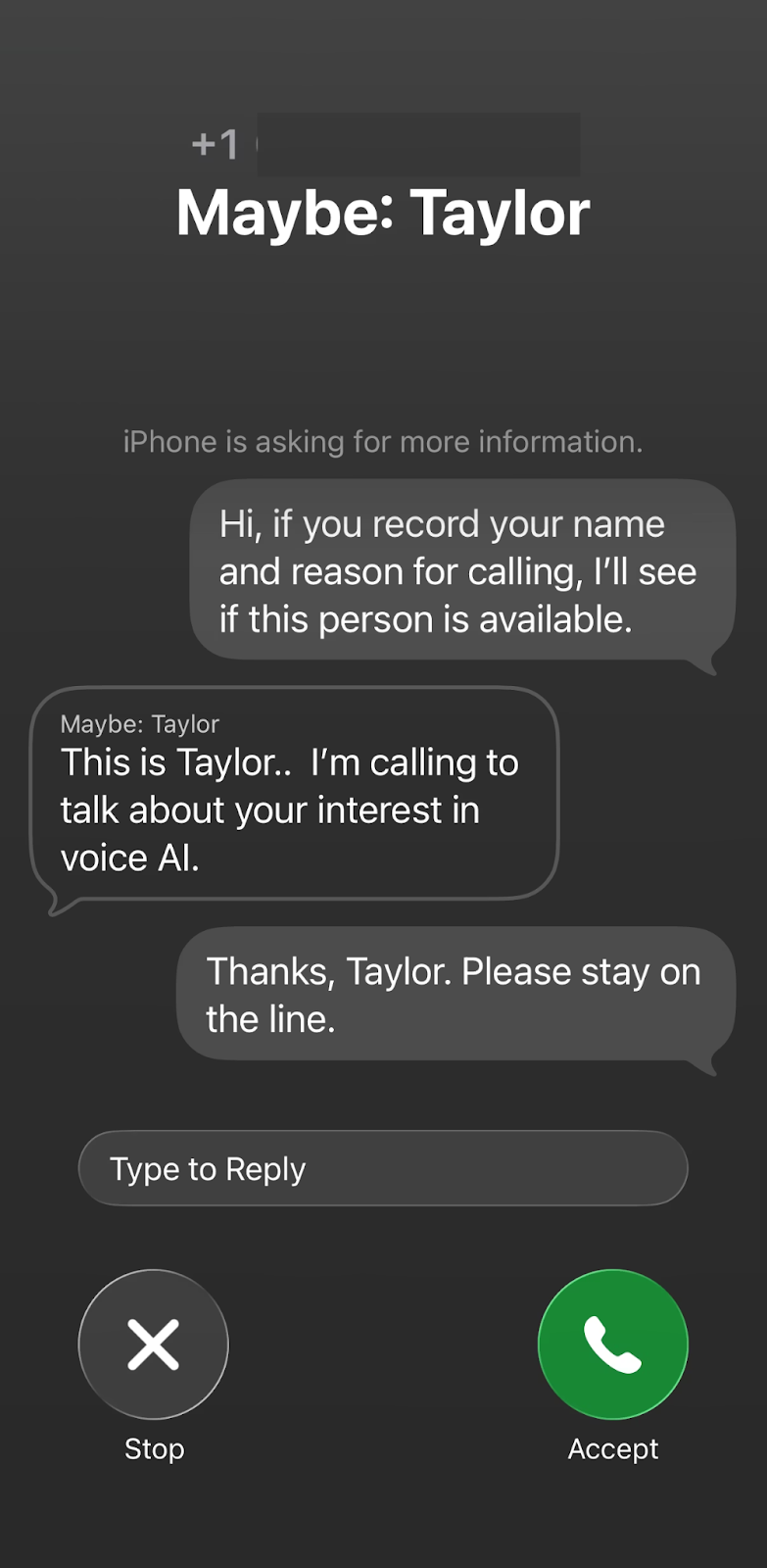
Once a human answers, Retell seamlessly transitions to the full conversation script. The conversation flows naturally, allowing reps to engage prospects effectively without missing a beat.
This means fewer awkward intros, higher connect rates, and a future-proof approach to outbound calling. Retell’s iOS Call Screening support ensures your outbound strategy remains effective, even as AI screeners become the standard.
Call screening favours professionalism. Teams that lead with respectful outbound calling practices and clear, transparent messaging are far more likely to build trust and get through where others do not.
Here’s what you can do to improve your outbound pick-up rates:
Apple iOS call screener has made your first few seconds on the phone more important than ever. When voice intelligence like Siri intercepts your call and asks for your name, company, and reason for calling, that short intro becomes your new elevator pitch.
Say too little, and you look like spam. Say too much, and the message gets cut off. The winning formula is simple: clear, concise, and instantly relevant. Aim for under five seconds, roughly 12–18 words, anchored in details the recipient immediately recognizes.
With Retell’s built-in CRM integrations and dynamic scripting, you can automatically pull in contact data like name, quote number, or appointment time, so your reps always sound personal, professional, and compliant.
Avoid vague openers like “touching base,” “checking in,” or “special offer.” Instead, use clear, contextual details that show authenticity and purpose.
Here’s a simple prompt you can use to improve your iOS screening for Retell voice agents:
Q: Hi, if you record your name and reason for calling, I'll see if this person is available
A: In one sentence, introduce yourself and explain why you are calling. <wait for response>
The Apple call screener may be falsely affecting your answered call analytics. So, whenever the screener picks up a call, your voice agent takes it as answered, even if it hasn’t reached a human.
Retell offers a post-call analysis feature that automatically analyses customer conversations after they have ended, helping you derive accurate insights into your outbound calls.
We provide several built-in analysis categories, and you can create custom categories to match your specific business needs.
Use a simple Boolean analysis category to extract a simple yes/no, if the call was picked up by a human or screener.
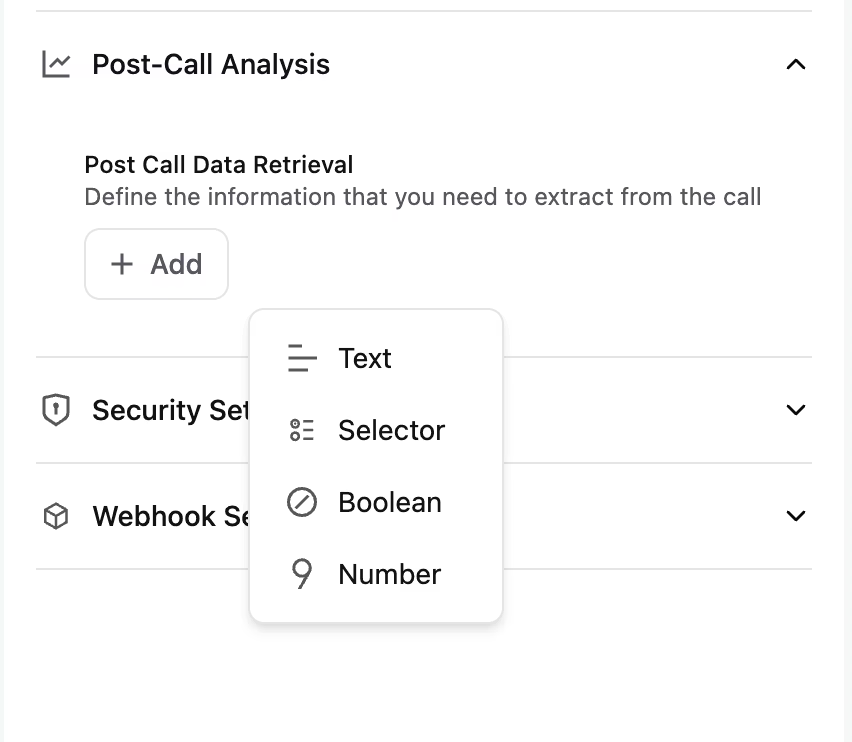
Example configuration:
This way, you’ll get an accurate idea of whether your outbound calls are getting picked by the screener or a human. If it’s getting rejected by the screener, you will have to work on your screening prompt script.
Apart from your script, passing iOS 26 call screening requires the right pacing, systems and behaviours behind every call. Follow these best practices to maintain trust, stay compliant, and connect with more real prospects.
With iOS 26 tightening call screening and spam detection, your caller ID reputation now directly impacts whether your calls get through.
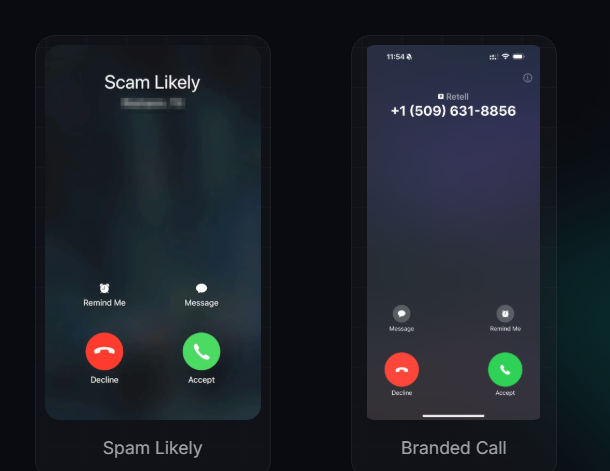
Phone carriers may mark certain phone numbers as “Spam Likely".Check your outbound call log to see if the call was not connected due to SIP error code 608. If that’s the case, that means it’s rejected due to being marked as spam likely.
Retell monitors your caller ID reputation in real time, alerting you if your numbers are at risk of being flagged. This allows you to take proactive steps to maintain call deliverability and avoid unnecessary blocks.
You can also reference external APIs and services to gauge spam risk, though results may vary by carrier:
Under iOS 26, unverified numbers face more friction than ever. Unknown or unregistered numbers are more likely to be screened, ignored, or flagged before a human ever sees the call.
Retell helps you get ahead and improve your call pickup rate with:
This reduces the likelihood of your calls being flagged or filtered as spam, helps them bypass aggressive call screening, and significantly improves your chances of reaching a real person, especially under stricter systems like iOS 26.
Branded Call: Instead of seeing an unfamiliar or generic number, the callee sees your verified business name when the phone rings. This immediate brand recognition builds trust before the call is answered, making recipients more confident that the call is legitimate and relevant, and far more likely to pick up.
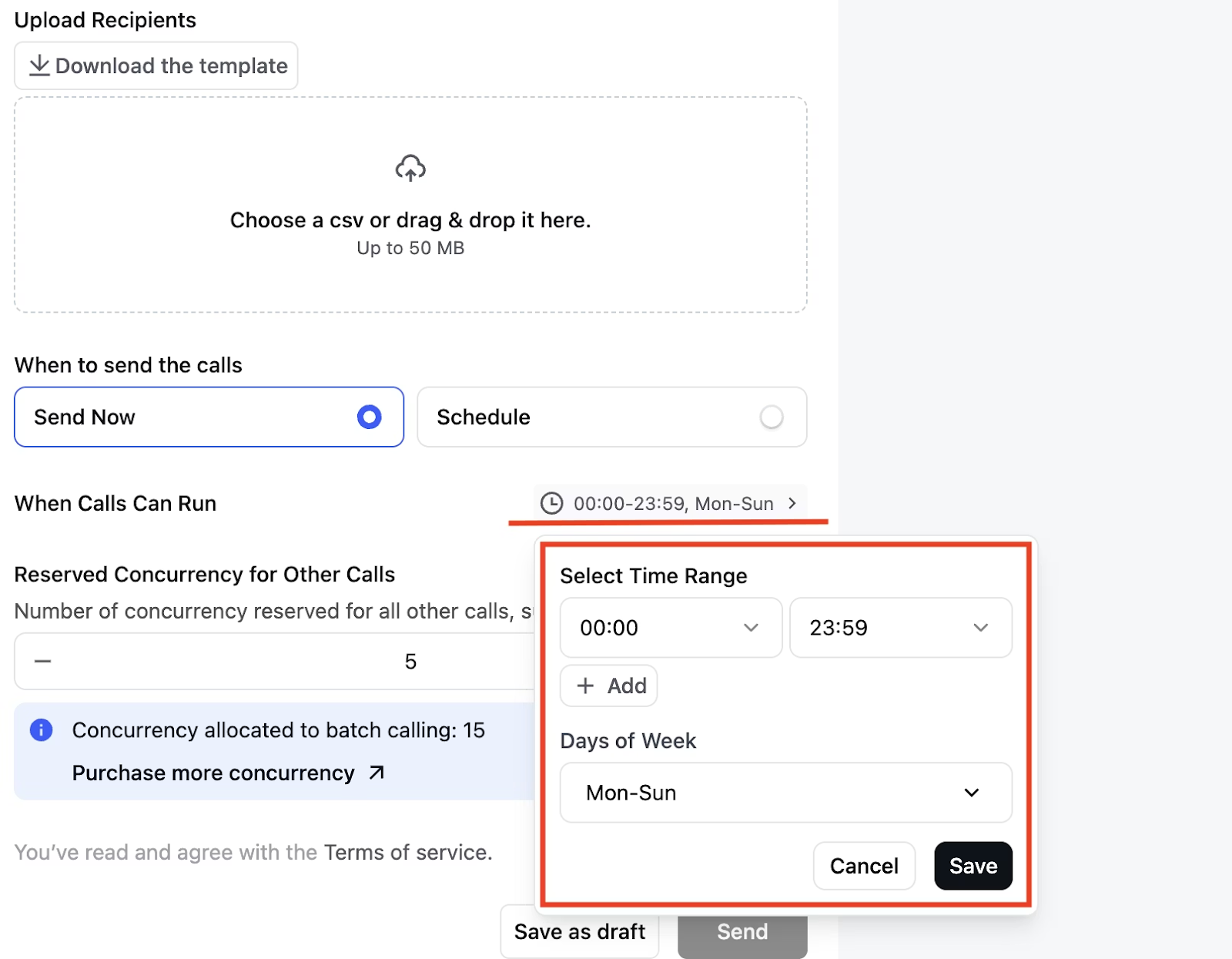
With iOS 26’s updated screening rules, aggressive or repetitive dialling now triggers warnings much faster. Calling the same number repeatedly in a short span can prompt the iPhone’s Manage Unwanted Calls system to automatically silence or filter future calls.
To maintain visibility without getting flagged, spread out your follow-ups, rotate call times, and balance calls with other touchpoints like SMS or email.
Retell AI helps by enabling you to pace your outreach, prevent over-dialling, and keep campaigns compliant across channels.
Its Batch Calls feature lets you organize, schedule, and monitor multiple calls efficiently, making it easy to manage campaigns or updates without risking call quality or getting flagged as spam.
With iOS 26 now screening both calls and texts from unknown numbers, outreach can’t feel fragmented anymore; it has to feel cohesive.
When your voicemail, follow-up SMS, and email all share the same tone and clearly state who you are, where you’re calling from, and why you’re reaching out, it builds credibility with prospects and with carrier filtering systems. Regular accessibility testing also improves usability for all users.
Retell AI makes this seamless through its CRM and omnichannel integrations, keeping call notes, SMS, and email activity perfectly in sync. The result? Each touchpoint reinforces the last, creating a consistent, trustworthy experience that drives higher pickup rates, better CSAT scores, and better responses.
Call Screening on iOS 26 is not a death for cold calling. It reinforces what the team already knows: the key to outbound isn’t brutal force. It’s strategy, relevance, timing, and execution.
At Retell, that’s precisely what we are building here: a smarter, more intentional approach to outbound calling.
By combining AI-driven insights, dynamic scripts, and intelligent call pacing through outbound call center automation, your team can navigate iOS 26’s call screening seamlessly.
The future of cold calling isn’t about dialling more; it’s about calling better: more relevant, more personal, and more effective.
We’ve got you covered. Reach out to learn how we’re supporting reps in the age of Call Screening.
See how much your business could save by switching to AI-powered voice agents.
Total Human Agent Cost
AI Agent Cost
Estimated Savings
A Demo Phone Number From Retell Clinic Office