Conversational AI Architecture for Voice Agents
How a voice agent is built: the components, cascaded vs speech-to-speech designs, where state lives, SIP and WebRTC, tool calls, latency and fallbacks.
Conversational AI architecture is the set of components that turn a person's speech into a reply and an action, together with the interfaces that carry audio, text, state and events between them. For a voice agent on a phone line, that means a telephony edge, speech recognition, a language model, text to speech, an orchestration layer that manages turns, and connections to your business systems.
This guide is for the person evaluating that design: which parts exist, what passes between them, where the trade-offs sit and what to ask a vendor. To follow one call from ring to hang-up instead, read how AI voice agents work on a phone call.
What are the components of a conversational AI architecture?
A voice agent has six components, and each one has a defined input and output.
- Telephony edge. Takes a call from the phone network or a browser and turns it into a two-way audio stream.
- Speech recognition. Takes the audio stream and returns text as the caller speaks. See automatic speech recognition.
- Orchestration. Decides when the caller has finished, when the agent may speak and what to do when the caller interrupts. It also holds the call's state. This is where turn-taking lives.
- Language model. Takes the transcript, the instructions and any retrieved context, and returns either words to say or a request to call a tool. See large language model.
- Text to speech. Takes the reply as text and returns audio.
- Tools and data. Functions, a knowledge base and integrations that let the agent read and change records in your systems.
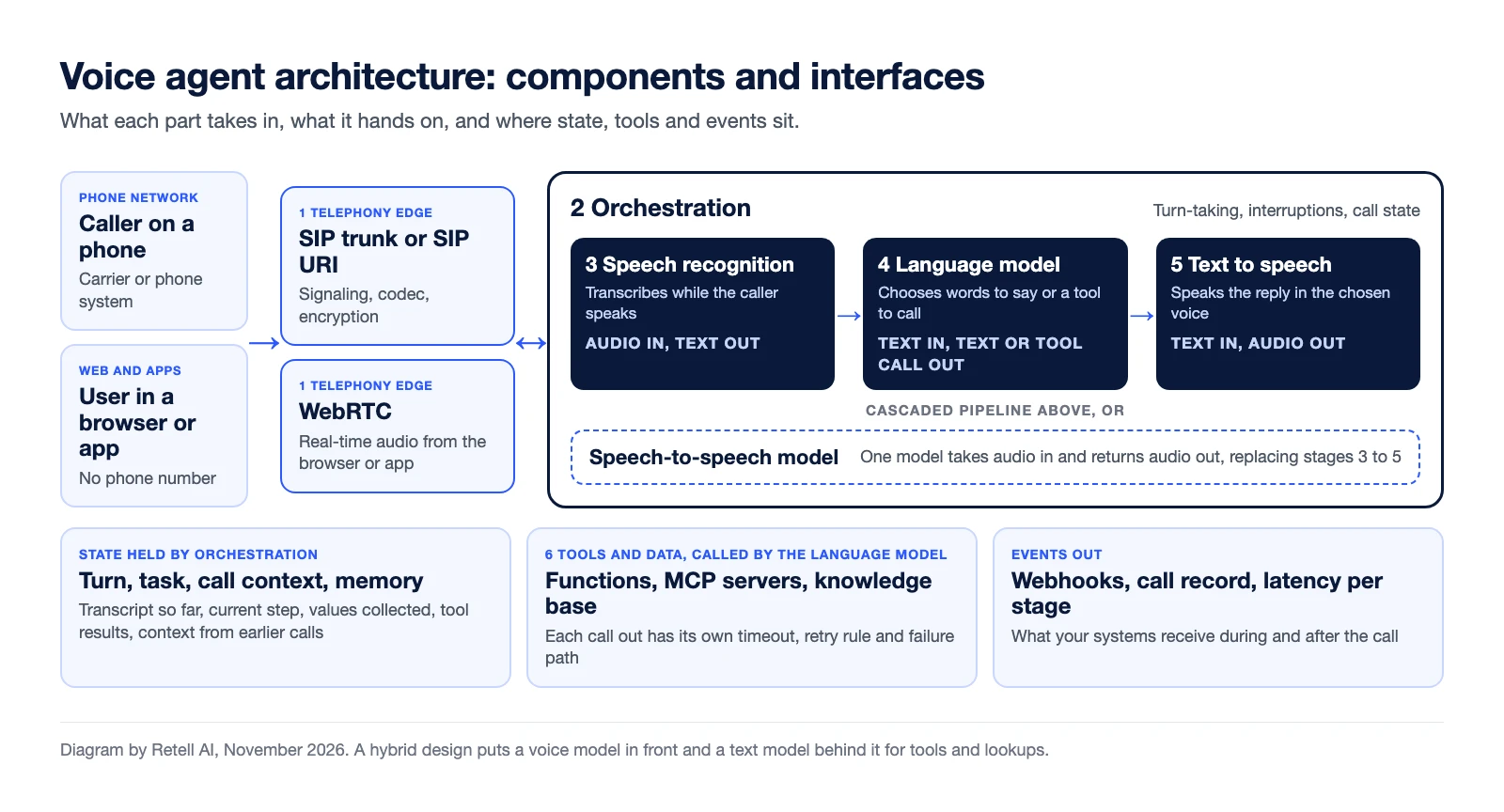
Chat systems share the middle of this picture. Voice differs at the two ends: audio arrives and leaves in real time, and the system has to judge when a person has stopped talking. The conversational AI glossary entry covers the wider category.
Should you use a cascaded or a speech-to-speech design?
Use a cascaded design when you need to see and control each stage, and a speech-to-speech design when one model handling audio directly matters more than that visibility.
A cascaded design chains three models: speech recognition, a language model and text to speech. A speech-to-speech design sends audio to a single model that returns audio. OpenAI's voice agents guide describes the same split: the speech-to-speech path when you want one model to "interpret audio, decide what to do, and respond in speech", and the chained path when you want to "inspect or transform intermediate text and replace each component independently".
A third, hybrid design pairs a voice model with a text model behind it. Retell's docs describe one in GPT Live: the voice model handles turn-taking and speech, and hands actions and lookups to a backend text model that runs the prompt, tools and knowledge base.
| Cascaded (speech recognition, language model, text to speech) | Speech-to-speech | Hybrid (voice model plus backend text model) | |
|---|---|---|---|
| What passes between stages | Text at every hop | Audio in, audio out | Audio at the front, text behind it |
| What you can inspect | A transcript and a model response for every turn | The model's audio and whatever events the provider exposes | The voice model's speech and the backend's text work |
| What you can swap | Each stage on its own | The whole model | The backend text model |
| Where latency shows up | Per stage: transcription, model, speech | One combined figure | Voice model keeps the conversation going while the backend works |
| Main cost | More hops to tune | Less control over each step | Two prompts to maintain |
| Fits | Scripts that must be followed, exact capture of numbers and dates, regulated calls | Conversations where tone and quick turns matter most | Single-prompt agents that take actions mid-call |
The trade-offs show up as product limits. In Retell's docs, transcription modes apply to cascading voice agents and not to speech-to-speech models, and fast fallback to a backup model is not supported for speech-to-speech models. For a comparison of model APIs, see speech-to-speech APIs for phone calls. For how stages stream into each other, see how real-time voice AI works.
Where does conversation state live?
Conversation state lives in the orchestration layer, not in the language model. The model does not keep the call between requests, so the layer around it holds the transcript, the current step, the values collected and earlier tool results, and sends the relevant part on every turn.
Ask where each of four kinds of state is kept:
- Turn state. Who is speaking, and whether a reply in progress should be dropped. With a custom LLM on Retell, Retell decides when the agent speaks and discards a requested response if the caller keeps talking.
- Task state. Where the call is in the job. A single prompt leaves this to the model. A conversation flow divides the task into nodes with conditions for moving between them. Older systems call this layer dialogue management.
- Call context. Values loaded for this call, such as a name or an order ID. Retell passes these as dynamic variables.
- Memory across calls. Retell's contact memory keeps a running brief per contact, matched by phone number.
Then ask who owns the state when something restarts. If a model request is retried or a backup model takes over, the orchestrator must replay the same context.
How do calls reach the agent over SIP and WebRTC?
Calls reach the agent through one of two edges: SIP for the phone network, and WebRTC for browsers and apps.
SIP is the signaling protocol carriers and phone systems use. RFC 3261 defines it as a protocol for "creating, modifying, and terminating sessions with one or more participants". To keep your carrier and numbers, you connect a SIP trunk to the voice platform. Retell documents two ways: elastic SIP trunking, which it recommends, and dialing to a SIP URI. The same page lists the supported transports (TCP, UDP, TLS, mTLS), SRTP media encryption and codecs (PCMU, PCMA, G.722). Setup is covered in keeping your existing number with a SIP connection.
WebRTC carries real-time audio between browsers and devices, and its browser API is a W3C Recommendation. It is the edge for voice inside a website or app, with no phone number involved. Retell's web call SDK connects a browser user to an agent, and native apps connect over WebRTC.
The edge also sets the audio codec the recognizer hears, the network path that adds delay, and how a transfer to a person is carried out.
How do tool calls and integrations fit in?
Tool calls are a side path off the language model: the model returns a request instead of words, the platform runs it against your system, and the result goes back to the model for the next reply. Every tool is a dependency with its own speed and failure rate.
There are three ways to connect one:
- Prebuilt integrations. Retell lists HubSpot, Salesforce, Microsoft Dynamics 365, GoHighLevel and Zoho CRM for CRM, Zendesk for tickets, and Calendly and Cal.com for scheduling.
- MCP servers. An agent can connect to a remote Model Context Protocol server and use the tools you select.
- Custom functions. An HTTP request to your own API. On Retell a custom function has a timeout of 1 to 600 seconds (120 by default) and optional retries, which the docs say to use only when your endpoint is idempotent.
Retrieval works the same way. When a knowledge base is attached, Retell retrieves matching passages before every response.
Events travel the other way. Webhooks such as call_ended and call_analyzed push call data to your server. Retell waits 10 seconds for a 2xx response and retries up to 3 times, so the receiver must handle duplicates.
Where does the latency budget go at each stage?
The latency budget is the time between the caller's last word and the agent's first sound, and every component on the path spends part of it. Measure it per stage, because the fix depends on which stage is slow.
Retell's Get Call API returns this breakdown after each call, with P50, P90, P95 and P99 values for each field:
- Transcription (
asr). How far the transcript trails the audio. Endpointing, the short silence the system waits through to confirm the caller has finished, adds to the pause as well. - Language model (
llm). Time to the first speakable chunk. With a custom LLM this includes the WebSocket round trip to your server. - Knowledge base (
knowledge_base). Retrieval time, when one is attached. - Text to speech (
tts). Time to the first audio byte. - Speech-to-speech (
s2s). One figure in place of the three stages above. - End to end (
e2e). Caller stops to agent starts. It counts only turns where the agent speaks and excludes the network trip to the caller.
Two costs sit outside that list: the network and carrier leg at the edge, and tool execution on turns where the agent waits for a result.
Hold vendors to sourced numbers. Retell's docs say the platform achieves latency as low as 600 ms, from when the user stops speaking to when the agent begins responding. The example response in the same docs shows a median of 800 ms and a P99 of 2,500 ms, which is why limits belong on percentiles and not on the average. The troubleshooting guide names model choice and prompt length as the two most common causes of a slow agent. (Retell docs read November 12, 2026.)
Voice AI latency explains what callers notice, and how to read latency benchmarks covers comparing platforms.
What fails in production, and what should the fallback be?
Each component fails in its own way, so each needs its own fallback. Before a pilot, write down a planned response for each.
- Speech provider outage. The voice should switch providers mid-call. Retell's TTS fallback is automatic for platform voices and configurable for third-party voices.
- Slow or failing model. Retell's reliability overview says LLM fallback and retries are built in. Fast fallback runs a backup model alongside the primary and prefers the primary for a set period, 1.5 seconds by default.
- Tool timeout or error. The agent receives the error and continues based on your prompt. Decide what it says and when it transfers.
- Your webhook is down. If the inbound webhook fails all 3 attempts, Retell connects the call to the number's default inbound agent if one is set, and otherwise disconnects.
- Capacity or a broken agent. Inbound calls above your concurrency limit wait briefly, then go to the number's fallback number if one is set. Backup mode sends all new inbound calls there while you investigate.
Failures inside the conversation, such as a wrong transcript or a skipped step, are a different list. See voice agent failure modes.
What should you ask a vendor about the architecture?
Ask questions that make the vendor draw the diagram and show the numbers:
- Which design does the agent use: cascaded, speech-to-speech or hybrid? Can it differ per agent?
- Can we choose or bring each model, and what do we lose if we bring our own?
- Where is call state held, and what happens to it when a model request is retried?
- How do calls reach you: SIP trunk, SIP URI or WebRTC? Which transports, encryption and codecs?
- Do you report latency per stage and per call, with percentiles? Where does the measurement start and stop?
- What is the fallback for each component, and is it automatic?
- What are the timeout and retry rules for tools and webhooks, and what record does each call leave?
The evaluation process around these questions is in how to evaluate an AI voice agent platform. If you are weighing whether to assemble the stack yourself, read build vs buy for voice AI agents.
Frequently asked questions
What is conversational AI architecture?
Conversational AI architecture is the set of components that turn a person's speech or text into a reply and an action, plus the interfaces between them. For a voice agent it covers the telephony edge, speech recognition, orchestration, a language model, text to speech, and tools and data.
What is the difference between a cascaded and a speech-to-speech architecture?
A cascaded architecture chains speech recognition, a language model and text to speech, with text passing between stages. A speech-to-speech architecture sends audio to one model that returns audio. Cascaded designs are easier to inspect and tune stage by stage.
Where is state stored in a voice agent?
State is stored in the orchestration layer, outside the language model. That layer holds the transcript, the current step, the values collected and tool results.
Does a voice agent use SIP or WebRTC?
It can use both. SIP connects the agent to the phone network and existing phone systems. WebRTC connects it to browsers and mobile apps without a phone number.
Which part of a voice agent adds the most latency?
It varies by agent, so check a per-call breakdown first. Retell's troubleshooting guide names model choice and prompt length as the two most common causes.
See the architecture on your own calls
Retell AI is an AI voice agent platform for contact centers. It runs the telephony, speech and language model layers and reports latency per stage for every call. The way to test an architecture is a pilot on real calls, with your own call types and systems. Talk to the Retell team about a pilot. Pricing starts from $0.07 per minute.