How to Test and Release Voice Agent Changes
A release process for voice agent changes: test calls, simulation runs, prompt versioning and rollback, so a fix ships without breaking live calls.
Releasing a voice agent change safely means moving every edit, whether a prompt line, a voice, a tool or a transfer rule, through one fixed path: build it in a draft version, test it against saved scenarios and real calls, review what changed, expose it to a few callers first, and keep a one-move rollback ready while you watch.
This page covers the release process once an agent is live. For why testing pays for itself, see the business case for voice agent testing; for pre-launch checks, see voice agent evaluation before go-live. It is written for whoever owns the agent day to day, often an in-house CX automation engineer, and uses the drafts, versions and tags defined in prompt versioning.
What counts as a voice agent change, and how much testing does each need?
Anything that changes what a caller hears or what the agent does is a release. Match the tests to the change: text simulation covers logic, a web call lets you hear the voice, and only a phone call proves transfers to a phone number, keypad input and SMS.
| Change | Example | Tests before you publish | Extra care |
|---|---|---|---|
| Prompt or flow logic | Reword the refund policy, add a branch | Full simulation suite as a batch | Rerun any case that fails before trusting the result |
| Knowledge base content | New price list or opening hours | Simulation cases that ask about the changed facts | Treat it as a release even if no prompt changed |
| Voice, speed or greeting | Switch to a new voice | Web call to hear pacing, interruptions and pronunciation | Simulation runs in text and cannot hear the voice |
| Function or integration tool | New booking endpoint | Simulation with every mockable function mocked | An unmocked function calls its real endpoint, and MCP tools ignore mocks |
| Transfers, keypad input or SMS | New transfer destination | Phone call on a test number | A web call cannot transfer to a phone number or send SMS |
| Model | Move the agent to a different LLM | Full suite, run more than once, plus a web call | Compare latency and success rate by version after release |
| Numbers or call routing | New SIP trunk or queue route | Phone calls through the real route | Rerun load and call closure tests |
A routing change can pass every functional test and still fail at peak. That is why load tests must follow the real call path, why the call closure test belongs in the gate after any change to transfers, numbers or routing, and how to run voice agent load testing at volume.
What should a change pass before you publish it?
Set the gate before you make the change, so nobody argues about the threshold after a test fails. A workable gate has three parts:
- The regression suite passes on the draft. In Retell AI, saved simulation test cases run as a batch that reports a pass rate, and the docs suggest comparing it with the previous run before each release. Also require every critical case, such as identity checks or payments, to pass.
- Failures are rerun, not dismissed. The simulated caller and the grader are both language models, so Retell's simulation testing docs advise rerunning a batch before trusting a single failure.
- Audio and telephony are checked where the change touches them. Web and phone calls both work on a draft without publishing.
Mock every function that writes to a live system first. Retell's docs warn that an unmocked custom function, code tool, calendar tool or MCP tool calls its real endpoint during a test, so a test can create a real booking. MCP tools ignore mocks entirely, so point them at a test server or keep them out of the scenario.
Teams that release often can run the gate from CI: the batch test API returns pass, fail and error counts, so a script can block a publish that misses the gate. Testing bills at production rates, so size the suite with voice agent testing pricing in mind. The simulation and batch testing launch post shows how to build the suite.
How do you review a change before it goes live?
Read the diff, then write down what you are releasing. In Retell AI, the publish dialog can compare the draft with the last published version, field by field and down to the words changed in a long prompt, including linked knowledge bases and functions. Check that the diff holds only the change you meant to make.
Then record a short release note:
- What changed and why, in one line. Retell's publish API accepts a version title and description for this.
- The version you will roll back to.
- The tests that ran and their pass rate.
- Who approved it. Changes to disclosures, payments or identity checks get a second reviewer.
How do you roll out a change to live calls?
Expose the change in widening rings and stop at any ring that looks wrong. Retell AI documents three controls for this.
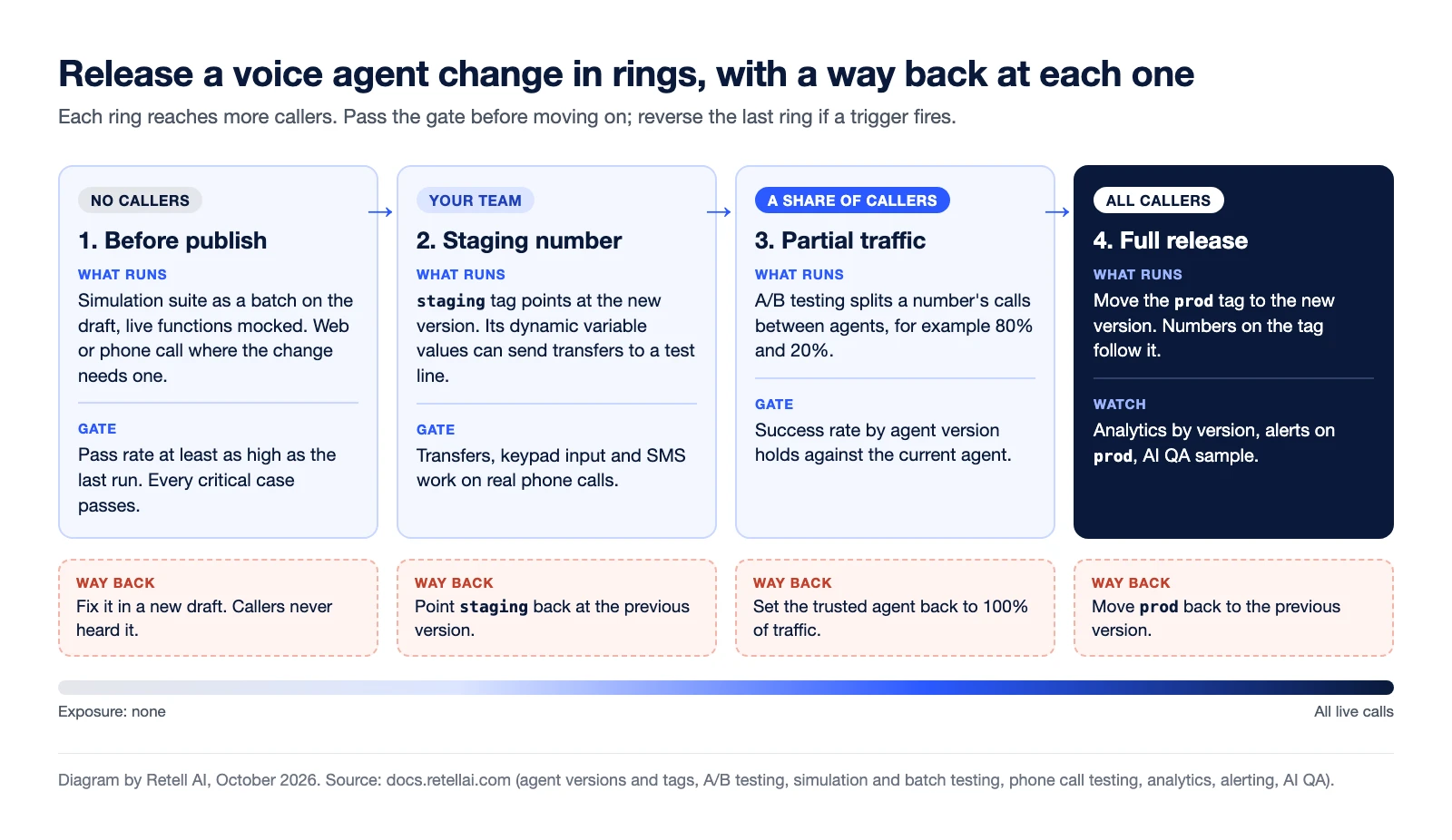
A staging number your team calls. Each agent starts with prod and staging environment tags. Point staging at the new version and assign a test number to it. Each tag carries its own dynamic variable values, so the transfer destination can be your own number under staging and your team's under prod.
A share of live calls. A/B testing splits a number's inbound or outbound traffic between agents by percentage, for example 80% and 20%, so a change runs on part of the traffic without changing your main agent.
Full release. Move the prod tag to the new version, and phone numbers on the tag follow it. One catch: numbers assigned directly to a version stay on that version, so confirm every production number uses the tag.
What should you watch after release, and when do you roll back?
Decide the rollback triggers before the release: success rate below the previous version's, more transfer or function failures than the previous period, a rise in negative sentiment, or any call that skips a required disclosure. The last one means an immediate rollback.
Retell AI documents the tools for this window:
- The analytics dashboard breaks charts down by agent version, so the new version sits next to the old one.
- Alert rules send an email or webhook when a metric crosses a threshold, can be limited to agent versions or tags such as
prod, and can compare against the previous window to catch a sudden change. - Call History filters by agent and version, and Live Monitoring lets a supervisor listen silently to a live call or take it over.
- AI QA scores a sample of production calls for problems such as hallucinations. A cohort for the agent with a start date of the release day samples calls from that day onward.
To roll back, reverse the last ring you entered: move prod back, or edit the A/B split so the trusted agent takes 100% of traffic. The failed version stays saved and read-only, so the fix starts as a new draft from it.
How do failed calls make the next release safer?
Every production failure should become a test case before the fix ships. In Retell AI, Conductor can turn a call from Call History or AI QA into a simulation test case, drafting the persona, success criteria and mocks from the transcript. Confirm the case fails on the current version and passes on the draft. The voice agent QA scorecard covers the weekly review that finds those calls.
Frequently asked questions
What is the difference between testing a voice agent and releasing a change?
Testing checks a change before callers hear it. Releasing controls who hears it and when: a staging number, then a share of live calls, then all calls, with a rollback ready at each step.
How often should you run regression tests on a voice agent?
After every prompt or flow change and before every release, comparing the pass rate with the previous run.
Can you test a new version on real calls without moving all traffic?
Yes. Point the staging tag at the new version and call a staging number, or use A/B testing to send a set percentage of a number's calls to a second agent.
How do you roll back a voice agent change?
Move the prod environment tag back to the previous version, and phone numbers assigned to that tag follow it. Numbers assigned directly to a version do not move, so check those separately.
Does testing a voice agent cost money?
In Retell AI, yes. Testing bills at production rates: text tests per message, web and phone tests per minute. Run most checks in text simulation and save voice calls for changes that need them.
Release voice agent changes with Retell AI
Retell AI is an AI voice agent platform for contact centers, with drafts, version comparison, environment tags, simulation and batch testing, and A/B traffic splits on phone numbers, so the person who owns the agent can test, release and roll back a change without waiting on a vendor. AI QA then scores a sample of production calls so you can check call quality after each release.