What Is Prompt Versioning?
What prompt versioning is, why voice agent teams version every prompt change, and how to test, release and roll back a version without breaking live calls.
Prompt versioning is the practice of saving each change to an AI agent's prompt as a numbered, fixed version, so a team can test the change before it goes live, see exactly what changed, and switch back to an earlier version if the new one fails. It is also called prompt version control. Prompt management is the wider job of writing, storing and organizing prompts; versioning is the part that controls releases.
Prompt engineering decides what the prompt says. Prompt versioning decides when callers hear it.
Why is a prompt change riskier on a voice agent?
A voice agent speaks to live callers in real time, so a bad prompt reaches people before anyone reviews the transcript. Nothing can take back a sentence the caller already heard.
| Chat assistant | Phone voice agent | |
|---|---|---|
| Where a mistake shows up | On screen, where the user can reread or retry | Spoken once, mid-conversation |
| What the prompt controls | Text replies, sometimes tool calls | Replies plus transfers, bookings and texts that reach real systems |
| What a text test misses | Little, since the product is text | Voice, interruptions, transfers and keypad input |
On a voice agent, the prompt is not the only thing that changes. In Retell AI, a version is the whole agent: its prompt, voice, tools, conversation flow and linked knowledge bases. A new voice or a renamed tool can break calls as easily as a reworded instruction, so teams version the agent, not just the prompt text.
How does prompt versioning work in Retell AI?
Retell documents a release path built on drafts, published versions and environment tags. Each step below comes from Retell's docs on agent versions, testing, analytics and alerts.
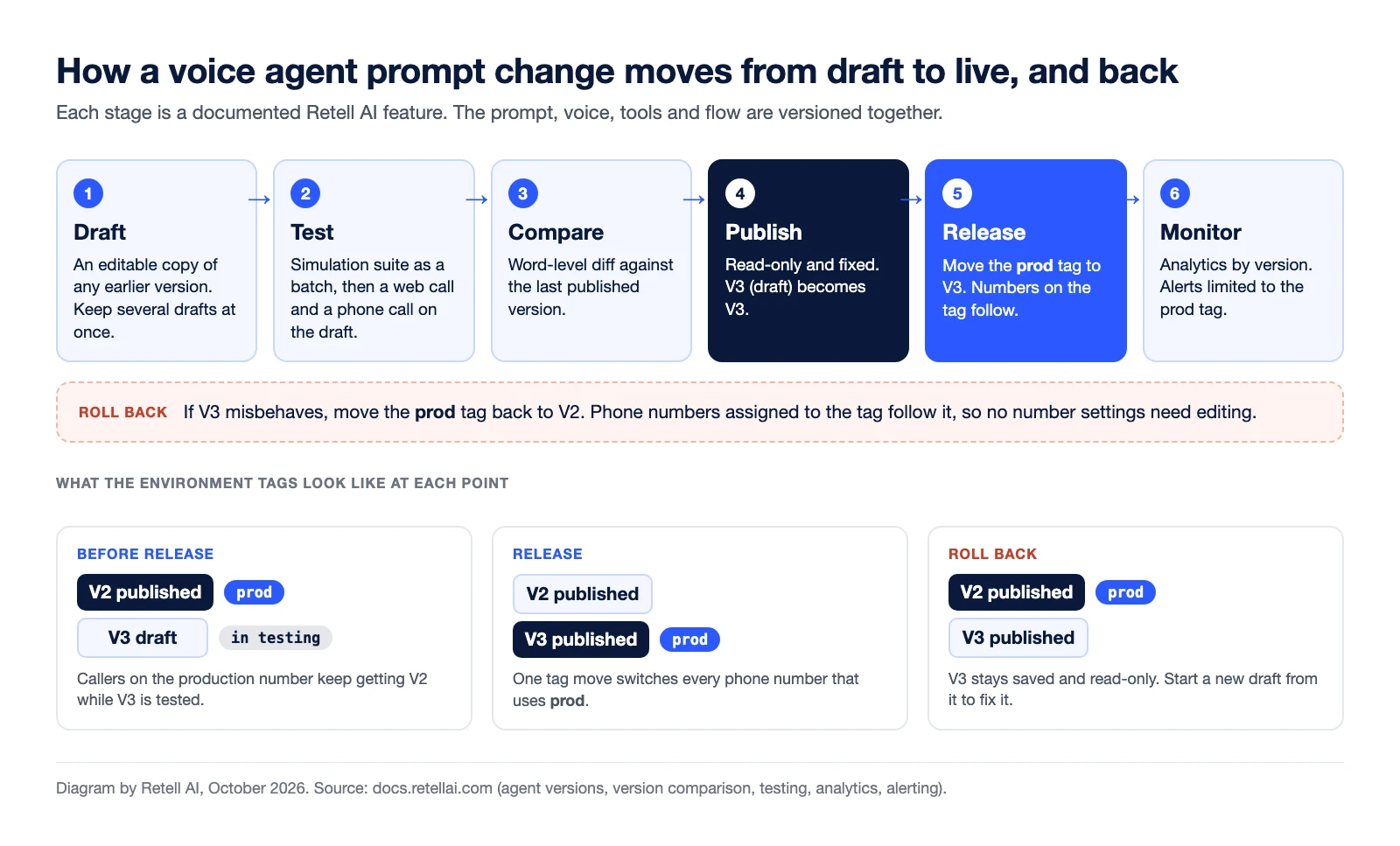
- Draft. A new version starts as an editable draft. You can create one from any past version and keep several drafts at once.
- Test. Run your saved simulation test cases as a batch and compare the pass rate with the previous run. Then hear the change in a web call and confirm transfers and keypad input on a phone call. Both work on a draft without publishing it.
- Compare. The publish dialog can compare the draft with the last published version, down to the words added or removed in the prompt.
- Publish. Publishing makes the version read-only, so V3 (draft) becomes V3, a fixed configuration you can return to later.
- Release. Each agent starts with
prodandstagingtags. Phone numbers assigned toprodfollow the version it points to, so movingprodfrom V2 to V3 switches them without editing each number. To try a change on a share of calls first, A/B testing splits a number's traffic between agents by percentage. - Monitor. The analytics dashboard breaks metrics down by agent version, and alert rules can be limited to the
prodtag. - Roll back. Move
prodback to V2.
Who should own prompt versions?
One named person should own every release, because a prompt change on a phone line is a production change. Some Retell customers give that job to a CX automation engineer, the in-house owner who finds poorly handled calls, writes the fix, tests it and reverts to the last published version if it does not work.
A short release habit keeps versions useful:
- Title each version with the reason for the change, such as "Fix refund transfer".
- Mock every function that reaches a live system before running tests. Retell's docs warn that an unmocked custom function calls its real endpoint.
- Note which version you would roll back to before moving
prod. - Watch the new version's calls by version for the first day.
Frequently asked questions about prompt versioning
What is the difference between prompt versioning and prompt management?
Prompt management covers writing, storing, organizing and editing prompts. Prompt versioning is the part of prompt management that saves each change as a fixed version, so a team can test it, compare it and roll it back.
What are prompt versioning tools?
They are tools that store each prompt version with an identifier, show what changed, and control which version runs in production. On a voice agent platform, versioning can sit inside the agent builder. In Retell AI, drafts, published versions and environment tags are part of every agent.
How do you roll back a prompt change on a voice agent?
Point production back at the last version that worked. In Retell AI, you move the prod environment tag back to the previous version, and phone numbers assigned to that tag follow it.
Can you test a new prompt version without affecting live calls?
Yes. Keep the change in a draft and test it with simulation tests, a web call or a phone call on a test number. Retell lets you attach a draft version to a phone number without publishing it. Leave the prod tag's dynamic variables alone while testing, since they apply to live calls.
Version and test your voice agents with Retell AI
Retell AI is an AI voice agent platform for contact centers, with drafts, version comparison, environment tags and simulation and batch testing built into the agent builder. After a release, AI QA scores a sample of production calls, so you can check call quality after each release.


