Escalation Matrix
What an escalation matrix is, a template you can copy for support teams, and how AI voice agents decide when a call moves to a human.
An escalation matrix is a table that sets out who handles an issue at each level of escalation, what triggers the move to the next level, how quickly each level must respond, and which channel the handoff uses. Support, IT and contact center teams use it so that an issue the first person cannot resolve goes to the right owner on a known clock, instead of waiting while people work out who to call.
The term comes from IT incident management. Atlassian defines an escalation matrix as "a document or system that defines when escalation should happen and who should handle incidents at each escalation level," and describes the wider escalation policy as covering who is notified first, who takes over, how quickly the handoff occurs, and through which channel. Escalation management is the ongoing process of running those handoffs. The matrix is the reference document the process runs on.
What goes in an escalation matrix?
Every escalation matrix answers five questions for each level. If a column is missing, that is usually where escalations stall.
- Level. The ordered steps an issue can move through, from first contact to the most senior owner.
- Trigger. The condition that moves an issue up a level, written so two people would agree it has happened. "Customer is unhappy" is vague. "Customer asks for a manager, or the refund is above the agent's approval limit" is testable.
- Owner. A named role or queue, not a person, so the matrix still works on someone's day off. Add a backup for each level.
- Response time. How fast the owner must pick the issue up once it arrives. Without it, the matrix is only a contact list.
- Channel. How the issue reaches the owner: a live call transfer, a reassigned ticket, a page to an on-call phone, or a message in an incident channel.
Most teams also add a sixth column for what gets passed along: the case summary, what has been tried, and the customer's account details. That column is what stops the customer from explaining the problem again at every level.
What are the types of escalation?
Atlassian names three types of escalation, and notes that many teams use a mix of them.
| Type | How the issue moves | Contact center example |
|---|---|---|
| Hierarchical | To someone more senior or experienced | Tier 1 agent to team lead to support manager |
| Functional | To the person or team with the right skills or system access, regardless of seniority | Tier 1 agent to the billing team for a disputed charge |
| Automatic | By a rule, when an issue is not acknowledged or closed in time | A ticket reassigns itself when its response time runs out |
A single matrix often uses all three: functional routing picks the right team, hierarchical steps handle disputes inside that team, and automatic rules catch anything that sits too long.
Escalation matrix template
Copy this table and replace the owners, triggers and times with your own. The response times are example targets, not benchmarks. Set them from your service level agreements and staffing.
| Level | Trigger to move here | Owner | Respond within (example) | Channel |
|---|---|---|---|---|
| Level 1: Frontline | Any new contact | Tier 1 agent queue | Your first-response target | Phone, chat, email or ticket |
| Level 2: Specialist | Tier 1 cannot resolve, or the issue needs system access or skills Tier 1 does not have | Tier 2 specialist team for that issue type | 1 business hour | Warm transfer on a live call, or ticket reassignment with notes |
| Level 3: Supervisor | Customer asks for a manager, makes a formal complaint, or needs an exception above Level 2's authority; or Level 2 misses its response time | Supervisor on duty | 30 minutes | Supervisor joins the call, or calls the customer back |
| Level 4: Management or incident | Many customers affected at once, a legal, safety or regulatory issue, or a key account at risk | Support manager plus incident lead | 15 minutes | On-call page and incident channel |
Two rules keep a matrix usable. First, keep the levels few: Atlassian notes that many IT teams are effective with just two or three support tiers. Second, give every level a time-based trigger as well as a content trigger, so an issue that nobody picks up still moves.
What does an escalation matrix look like with AI voice agents?
A contact center that answers calls with an AI voice agent adds a level below Tier 1. Atlassian's IT support model calls this Level 0, the self-service level that resolves issues without a person. On the phone, the AI agent answers every call, handles the requests it is built for, and escalates the rest using the same matrix.
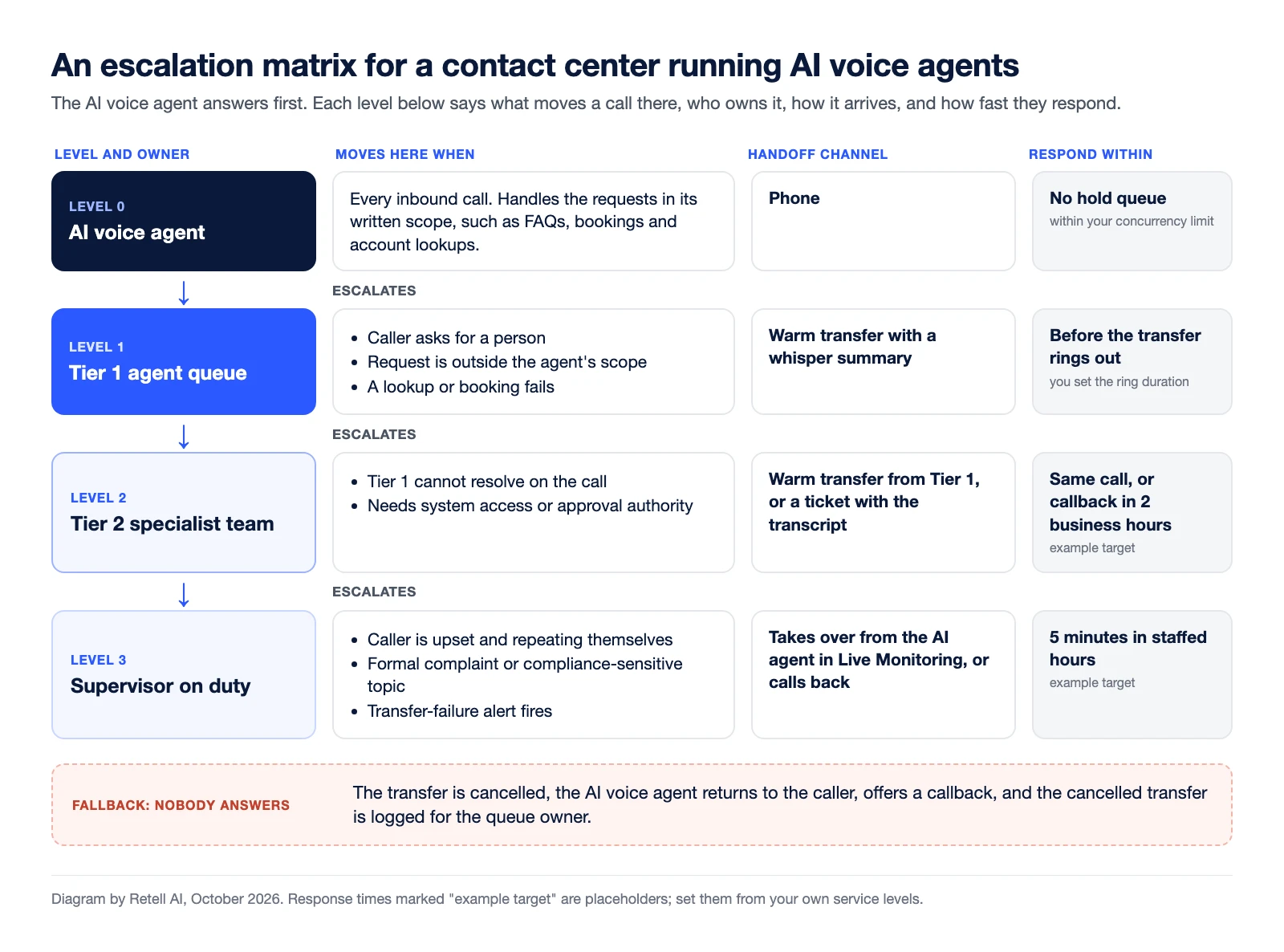
| Level | Trigger to move here | Owner | Respond within (example) | Channel |
|---|---|---|---|---|
| Level 0: AI voice agent | Every inbound call | AI voice agent | No hold queue, within your workspace's concurrency limit | Phone |
| Level 1: Tier 1 | Caller asks for a person; request is outside the agent's written scope; a lookup or booking fails | Tier 1 agent queue | Before the transfer rings out (you set the ring duration) | Warm transfer with a whisper summary |
| Level 2: Tier 2 | Tier 1 cannot resolve on the call; the issue needs system access or approval authority | Specialist team, chosen by issue type | Same call, or a callback within 2 business hours | Warm transfer from Tier 1, or a ticket with the call transcript |
| Level 3: Supervisor | Caller is upset and repeating themselves; formal complaint; compliance-sensitive topic; the transfer-failure alert fires | Supervisor on duty | 5 minutes during staffed hours | Takes over from the AI agent in Live Monitoring, or calls back |
| Fallback | No one at the destination answers | AI voice agent, then the queue owner | Before the call ends | Agent returns to the caller, offers a callback, and logs it |
The fallback row is easy to leave out. A transfer that rings out is an escalation that failed, and the matrix should say who owns it. For the situation-by-situation version (documents, payments, billing disputes), see who owns the next step at each handoff boundary.
How do you set up each level in Retell AI?
Each column of the matrix maps to a setting you configure. For a fuller walkthrough of how voicebots detect triggers and hand off, see can voicebots escalate calls to human agents, and for the transfer types in depth, how AI-to-human call transfers work.
- Triggers go in the prompt. You tell the agent when to transfer in plain language. Retell's Transfer Call docs give the example "If the user is angry or frustrated, use the transfer_call tool to transfer the conversation to a human agent." Copy your Level 1 trigger column into the prompt almost word for word.
- Owners are transfer destinations. The destination is a phone number, a SIP URI or a dynamic variable filled in at runtime, so one agent can route billing calls to billing and technical calls to support.
- The channel is the transfer type. A cold transfer connects the caller and drops off. A warm transfer can wait for a real person to answer and play a whisper message only the destination hears. An agentic warm transfer has a second AI agent talk to the destination first, then connect the caller or cancel.
- Response time is the ring duration. You set how long the destination rings before the attempt counts as unanswered. In a conversation flow, the transfer node has a failure path, so you decide what the agent says when nobody picks up.
- Supervisors can skip the queue. Live Monitoring lets a supervisor listen to a live call silently, take over from the agent, or end the call.
- AI-to-AI steps stay on the call. If your Level 0 has specialist AI agents, Agent Transfer hands the call to another AI agent with the full conversation history, without placing a new phone call.
How do you know if your escalation matrix is working?
Measure each level against its own row. Four numbers cover most of it:
- Escalation rate by level. The share of contacts that leave each level. In Retell, the analytics dashboard charts Call Transfer Rate, the share of calls transferred.
- Time to respond by level. How long each owner takes to pick up, compared with the target in the matrix.
- Failed handoffs. Transfers that were not answered. Retell sends
transfer_started,transfer_bridgedandtransfer_cancelledwebhook events, and you can set an alert rule on transfer call failures that emails or posts to a webhook when a threshold is crossed. - Resolution after escalation. Whether the issue was closed at the level it reached, which you track as first contact resolution.
Watch the customer's side too. Research from CEB, cited by Qualtrics, found that being transferred to a different agent and repeating information are both signs of a high-effort experience. Track customer effort score separately for escalated contacts. If it drops at one level, check that level's handoff column first.
Frequently asked questions about escalation matrices
What is an escalation matrix in customer service?
An escalation matrix in customer service is a table that tells support staff who takes over an issue they cannot resolve, what triggers each move, how fast each level must respond, and how the handoff happens, such as a warm transfer or a reassigned ticket.
What is the difference between an escalation matrix and escalation management?
Escalation management is the overall process of moving issues to the right people and resolving them. The escalation matrix is the document that process follows: the levels, triggers, owners, response times and channels written down in one table.
How many levels should an escalation matrix have?
Use as few as your team needs. Atlassian notes that many IT teams are effective with just two or three support tiers. A contact center with AI voice agents usually adds a level below Tier 1 for the AI agent.
What are the three types of escalation?
Hierarchical escalation moves an issue to someone more senior. Functional escalation moves it to the team with the right skills or system access. Automatic escalation moves it by rule when it is not acknowledged or closed in time.
When should an AI voice agent escalate a call to a human?
Write the triggers into the matrix and the agent's prompt. Common ones are a caller asking for a person, a request outside the agent's written scope, a lookup or booking that fails, and a caller who is upset or repeating themselves.
Build escalation into your AI voice agents with Retell AI
Retell AI is an AI voice agent platform for contact centers. Its call transfer options cover cold, warm and agentic warm transfers, so each row of your escalation matrix becomes a transfer rule the agent follows on every call. Pricing starts from $0.07 per minute; see Retell AI pricing for current details.


