What Is Voice of the Customer (VoC)?
What voice of the customer means, how VoC programs collect feedback, and how call transcripts turn every phone call into VoC data.
Voice of the customer (VoC) is what customers say about their needs, expectations, and experiences with a company, in their own words and through ratings. A VoC program is the ongoing process of collecting that feedback from every channel, finding the patterns in it, acting on them, and telling customers what changed.
The term comes from product development. In Quality Function Deployment (QFD), a product-planning method, the voice of the customer is the stage where a team identifies, structures, and prioritizes customer needs, the subject of Abbie Griffin and John Hauser's 1993 Marketing Science paper "The Voice of the Customer." Today it covers any customer feedback a company can capture, from survey scores to support calls.
Where does voice of the customer data come from?
VoC data comes from feedback you ask for (solicited) and feedback customers give unprompted (unsolicited). Solicited sources are mostly scores; unsolicited ones are mostly free text and speech.
| Source | Type | What it tells you | Watch for |
|---|---|---|---|
| NPS, CSAT, and CES surveys | Solicited, scored | Loyalty, satisfaction, and effort | Covers only people who reply |
| Interviews and focus groups | Solicited, open | The reasons behind a score | Small samples |
| Online reviews and social posts | Unsolicited, free text | Public perception | Written by people motivated to post |
| Support tickets and emails | Unsolicited, fields plus free text | What breaks, and how often | Categories chosen by whoever logs the ticket |
| Chat transcripts | Unsolicited, free text | Friction, in the customer's words | Needs text analysis at volume |
| Phone calls | Unsolicited, audio then transcript | The whole problem, in the customer's words | Needs transcription and analysis at volume |
The three survey scores work like this:
- Net Promoter Score (NPS) asks how likely a customer is to recommend you, from 0 to 10. NPS is the percentage of promoters (9 or 10) minus the percentage of detractors (0 to 6), per Bain & Company's Net Promoter System. More in our guide to Net Promoter Score.
- Customer satisfaction score (CSAT) rates satisfaction from 1 (very unsatisfied) to 5 (very satisfied). The score is the share of 4 and 5 ratings (Qualtrics). Our CSAT survey software roundup compares tools.
- Customer effort score (CES) measures how much effort a customer spent to get an issue resolved, from very easy to very difficult (Qualtrics).
Scores show how many customers are unhappy. Tickets, chats, and calls show why. Most programs need both.
How does a VoC program work?
A VoC program runs as a loop with four stages: collect, analyze, act, and close the loop.
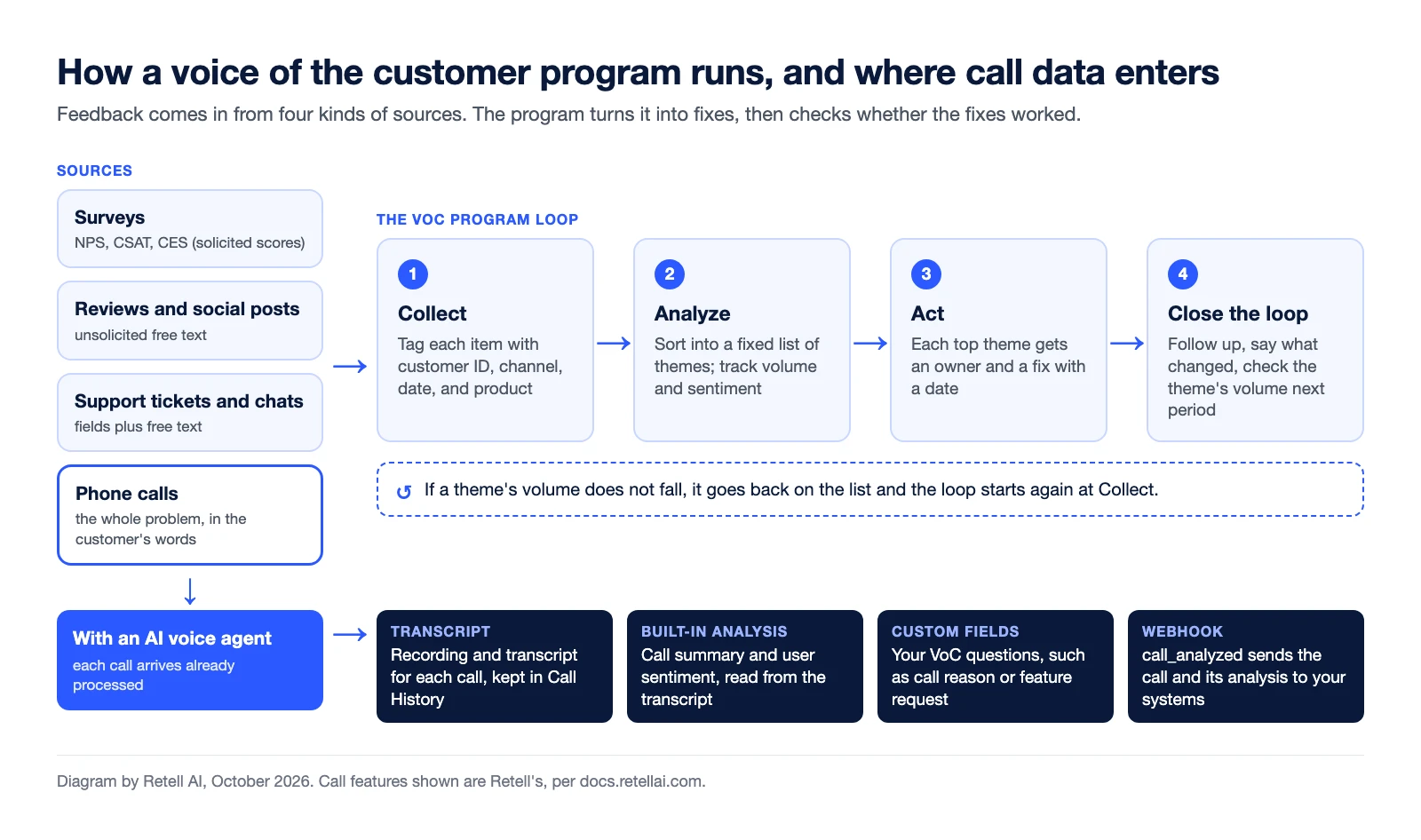
- Collect. Choose sources for each stage of the customer journey. Tag every item with customer ID, channel, date, and product, so a survey score can be joined to the call or ticket before it.
- Analyze. Sort feedback into a fixed list of themes, such as billing errors or missed deliveries, and track each theme's volume and sentiment. At volume, text analytics or an LLM does this, not people; see our guide to AI customer feedback analysis.
- Act. Give each top theme an owner in product, operations, or support, and a fix with a date.
- Close the loop. Follow up with the customers who raised the issue, tell customers what changed, and check whether the theme's volume falls next period. If it does not, the theme goes back on the list.
Why is every phone call voice of the customer data?
A call is unsolicited feedback at full length: the customer explains the problem in their own words, unprompted. The hard part is processing. A recording is not data until someone transcribes it and pulls out the reason for the call, the outcome, and how the caller felt.
When an AI voice agent handles the call, that processing can run on every call. In Retell:
- Transcripts. Each call in Call History can include its recording, transcript, summary, and analysis results (depending on your data storage setting), filterable by sentiment or any analysis field and exportable to CSV.
- Post-call analysis. After a call ends, an LLM reads the transcript and fills built-in fields: call summary, user sentiment (Positive, Negative, Neutral, or Unknown), call success, and whether it reached voicemail. Sentiment comes from the transcript, not tone of voice (docs).
- Custom extraction fields. You add your own boolean, text, number, or selector fields. Your VoC questions go here (examples below).
- Webhooks and CRM sync. The
call_analyzedwebhook sends the full call, transcript and analysis included, to your endpoint for your warehouse or feedback tool. Retell's CRM integrations for Salesforce, HubSpot, Microsoft Dynamics 365, GoHighLevel, and Zoho write analysis results to the contact record. - Dashboards and alerts. The analytics dashboard charts any custom field over time, and an alert rule can email you or call a webhook when the negative sentiment rate crosses your threshold.
| Field | Type | VoC question it answers |
|---|---|---|
call_reason | Selector (Billing, Delivery, Product issue, Cancellation, Other) | Why are customers calling? |
complaint_raised | Boolean | Did the caller complain about anything? |
feature_request | Text | What do callers ask for that you do not offer? |
competitor_mentioned | Text | Which alternatives come up, and why? |
satisfaction_score | Number | What score did the caller give when the agent asked a CSAT question at the end of the call? |
Three notes. Custom fields stay empty for calls that never connected, so leave those out of your rates. If your theme list changes, you can rerun extraction on past calls, which is billed again. And recording consent rules differ by state and country, so check yours first.
For a setup walkthrough that adds NPS and CSAT questions to calls, see how to track NPS and CSAT from call conversations. To see what you can extract from every call your agent handles, see Retell's post-call analysis.


