Contact Center Workflows: Examples to Automate
The contact center workflows that eat the most agent time, how to map each one, and which ones an AI voice agent can run end to end.
A contact center workflow is the repeatable sequence of steps, decisions and system actions that takes one type of customer request from first contact to a recorded outcome. Rescheduling an appointment is a workflow. So is verifying a caller, taking a payment arrangement or escalating a complaint.
Call center workflows are the same idea limited to phone calls. This guide covers the workflows most contact centers run, how to map one on a single page, and how to decide which ones an AI voice agent can run from start to finish.
What is a contact center workflow?
A contact center workflow is the documented way your operation handles one type of request, including the work before and after the conversation. It says what starts the work, who or what handles each step, which systems are read or updated, when a person steps in, and what counts as finished.
Three terms get mixed up with it:
- Call routing decides where a call goes. It is one step inside a workflow, usually handled by an automatic call distributor.
- A call flow is the path one phone call follows from greeting to hang-up. It covers the conversation only.
- A workflow covers the whole job. It includes the lookup before the call, the conversation, and the record update, ticket or follow-up after it.
The difference matters when you automate. Map only the call flow and you get an agent that talks well, then leaves a person to type the notes and book the follow-up.
What are the parts of a contact center workflow?
Every workflow has the same six parts, whoever runs it.
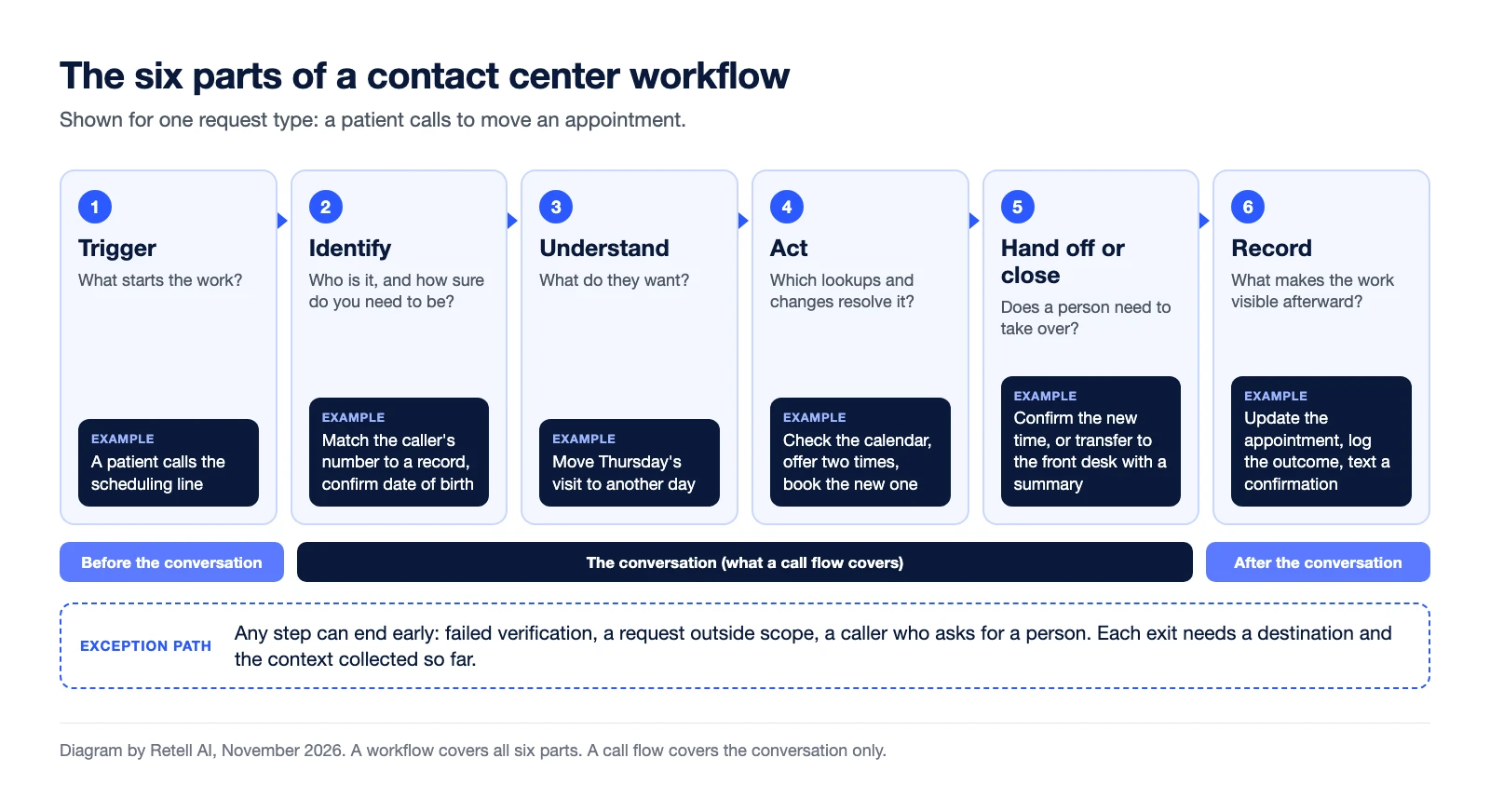
- Trigger. What starts the work: an inbound call, a missed payment, a form submission, a date on a calendar.
- Identify. Who the customer is and how sure you need to be. A store-hours question needs no check. A change to an account needs caller identity verification.
- Understand. What the customer wants, in their words, and which workflow that maps to.
- Act. The lookups and changes that resolve the request: check a status, book a time, open a ticket.
- Hand off or close. The rules for when a person takes over and what context goes with the call. An escalation matrix is the usual place to write those rules.
- Record. The summary, the outcome code and the system updates that make the work visible to the next person.
Parts 5 and 6 are where workflows most often break: the call ends, the notes are thin, and the next contact starts from zero.
Which contact center workflows are most common?
These eight workflows show up in most inbound and outbound operations. The last column is our editorial rating of how well each one suits an AI voice agent working alone, not a benchmark.
| Workflow | Trigger | Core steps and systems | Done when | Fit for an AI voice agent |
|---|---|---|---|---|
| Call intake and routing | Inbound call | Greet, find the reason for the call, then handle it or send it to the right queue (phone system, IVR, ACD) | The caller reaches the right place on the first try | High |
| Caller verification | Any request that touches an account | Match the phone number, ask the agreed questions, pass or fail (CRM or system of record) | Identity is confirmed, or the caller is sent to a manual check | High, with a fail path to a person |
| Appointment scheduling and changes | Caller asks to book, move or cancel | Find the record, check availability, book, confirm (calendar or scheduling system) | The booking is saved and the caller has a confirmation | High |
| Status lookups | "Where is my order, claim or ticket?" | Verify, look up the record, read the status, offer next steps (order, claims or ticketing system) | The caller has the answer and any follow-up is logged | High when the status is reachable through an API |
| Billing questions and payment reminders | Caller asks about a charge, or a due date passes | Verify, explain the balance, agree a next step (billing system, CRM) | The balance is explained and the next step is recorded | Medium: disputes and exceptions go to a person |
| Escalation and handoff | Caller asks for a person, or a rule is met | Decide who takes it, transfer, pass the context (phone system, CRM) | A person picks up already knowing the issue | The agent runs the handoff, a person resolves |
| After-call work | Call ends | Summarize, set the outcome code, update records, create tasks (CRM, helpdesk) | The record is complete with no manual typing | High |
| Outbound follow-up | A date, an event or a missed call | Dial, confirm identity, deliver the message, capture the answer (dialer, CRM, calendar) | The answer is recorded and the next action is set | High for reminders and confirmations |
Outbound workflows carry consent and calling-time rules that inbound ones do not. Retell's TCPA compliance guide describes them. Check your own program with counsel.
How do you map a contact center workflow?
Map one workflow on one page, starting from real calls instead of the policy document, because calls show the steps the policy leaves out.
- Pick one request type and count it. Call reason codes or a sample of recordings show whether it is worth mapping first.
- Listen to a sample of real calls. Write down every step the human agent takes, including undocumented ones like checking a second screen.
- Write the trigger and the definition of done. If two people disagree on what "resolved" means, settle that first.
- List each step with its owner and its system. Note what is read, what is written and where.
- Write each decision as a rule. For example: "If the balance is over the limit, transfer to billing."
- Write the exits. Give every early stop a destination: failed verification, an angry caller, a request outside scope.
- Note the after-call work. Which fields get updated, which tasks get created, who is notified.
The finished page works as training material, as a QA reference, and as the specification if you automate.
Which workflows should you automate first?
Start with the workflow that is high in volume, follows written rules, and reads and writes data you can reach through an API. Score each mapped workflow on five questions:
- Volume. Does it happen often enough to matter?
- Rules. Can every decision point be written as a rule, or does it need judgment?
- Data access. Can the systems it touches be read and updated by software today?
- Risk. What happens if a step goes wrong, and can a person catch it?
- A clear finish. Can you tell from the record whether the call was resolved?
Scheduling, status lookups and reminders usually pass all five. For workflows that fail on rules or risk, such as disputes and retention calls, automate the parts around the conversation instead: verification before it and the notes after it.
Choosing voice AI use cases covers the scoring in detail, and Retell's list of seven high-volume customer service workflows looks at examples that combine a call with a text message. If you are comparing software categories, see the guide to call center automation.
How does an AI voice agent run a workflow end to end?
An AI voice agent runs a workflow end to end when it handles all six parts itself, from loading the caller's context to writing the record. On Retell, each part maps to a documented feature:
- Before the call. Pre-call functions look the caller up in your CRM before the agent speaks, so it can open with the account already loaded.
- During the call. A conversation flow agent divides the task into nodes with conditions for moving between them. The agent can check availability, book an appointment or create a support ticket through connected providers: HubSpot, Salesforce, Microsoft Dynamics 365, GoHighLevel and Zoho CRM for CRM, Zendesk for tickets, and Calendly and Cal.com for scheduling. Systems without a listed integration are reached with a custom function that calls your own API.
- Handing off. The agent can transfer the call to a person with a cold, warm or agentic warm transfer. The guide to how call transfers work explains the difference.
- After the call. Post Call Extraction turns the transcript into structured fields, and post-call functions log the outcome, create a follow-up task or ticket, or text the caller a confirmation.
Before go-live, turn each path on your map, including the exits, into a simulation test case. A test case describes the caller, what they want and what success looks like.
How do you know a workflow is working?
Measure each workflow against its own definition of done. Four numbers per workflow are enough to start:
- Completion rate. The share of contacts that reach the "done when" state without a person stepping in. For an AI voice agent this is close to call containment.
- Exit reasons. Which early exits fire most often. One dominant exit usually points to a missing rule or data source.
- Repeat contact. Whether the customer comes back about the same thing, which is what first call resolution tracks.
- Time. Average handle time, including the after-call work.
When a number slips, go back to the map and find the step that changed.
Frequently asked questions
What is the difference between a call flow and a contact center workflow?
A call flow is the path a single phone call follows from greeting to hang-up. A contact center workflow is the whole job for one type of request, including the lookup before the conversation and the record updates, tickets and follow-ups after it.
What are examples of contact center workflows?
Common examples are call intake and routing, caller verification, appointment scheduling, order or claim status lookups, billing questions, escalation to a person, after-call work and outbound follow-up such as reminders.
Which contact center workflows are easiest to automate?
The easiest are high in volume, follow written rules and use data that software can already reach. Appointment scheduling, status lookups, reminders and after-call work usually fit. Disputes and retention calls need more human judgment.
How do you document a call center workflow?
Put one workflow on one page. Write the trigger, each step with its owner and system, every decision rule, each reason the workflow can stop early and where the call goes next, the after-call updates, and the definition of done.
Can an AI voice agent run a whole workflow without a human?
Yes, when it can reach the systems the workflow reads and updates, and when every decision can be written as a rule. It still needs an exit to a person for failed verification, exceptions and callers who ask for one.
Map one workflow, then prove it on your own calls
Retell AI is an AI voice agent platform for contact centers. Build the workflow you mapped first and run it as a pilot on real calls before you commit to more. Talk to the Retell team about a pilot. Pricing starts from $0.07 per minute.