Voice Agent Maintenance Checklist
A weekly, monthly and quarterly maintenance checklist for production voice agents: transcript review, knowledge base updates, regression tests and audits.
A voice agent maintenance checklist is the fixed set of recurring tasks that keeps a live AI voice agent accurate, connected and compliant after launch: weekly checks of alerts, call quality and releases, monthly audits of its knowledge, tests, integrations and capacity, and quarterly reviews of access, data retention, models and failover.
Agents drift even when nobody edits them: a price changes in a document the agent never re-reads, a credential expires, a model is replaced. The checklist gives that upkeep a calendar and one owner, usually the in-house CX automation engineer who runs the agents day to day. The weekly call review is set out in the voice agent QA scorecard, and shipping a fix follows how to test and release voice agent changes.
What does the full maintenance checklist look like?
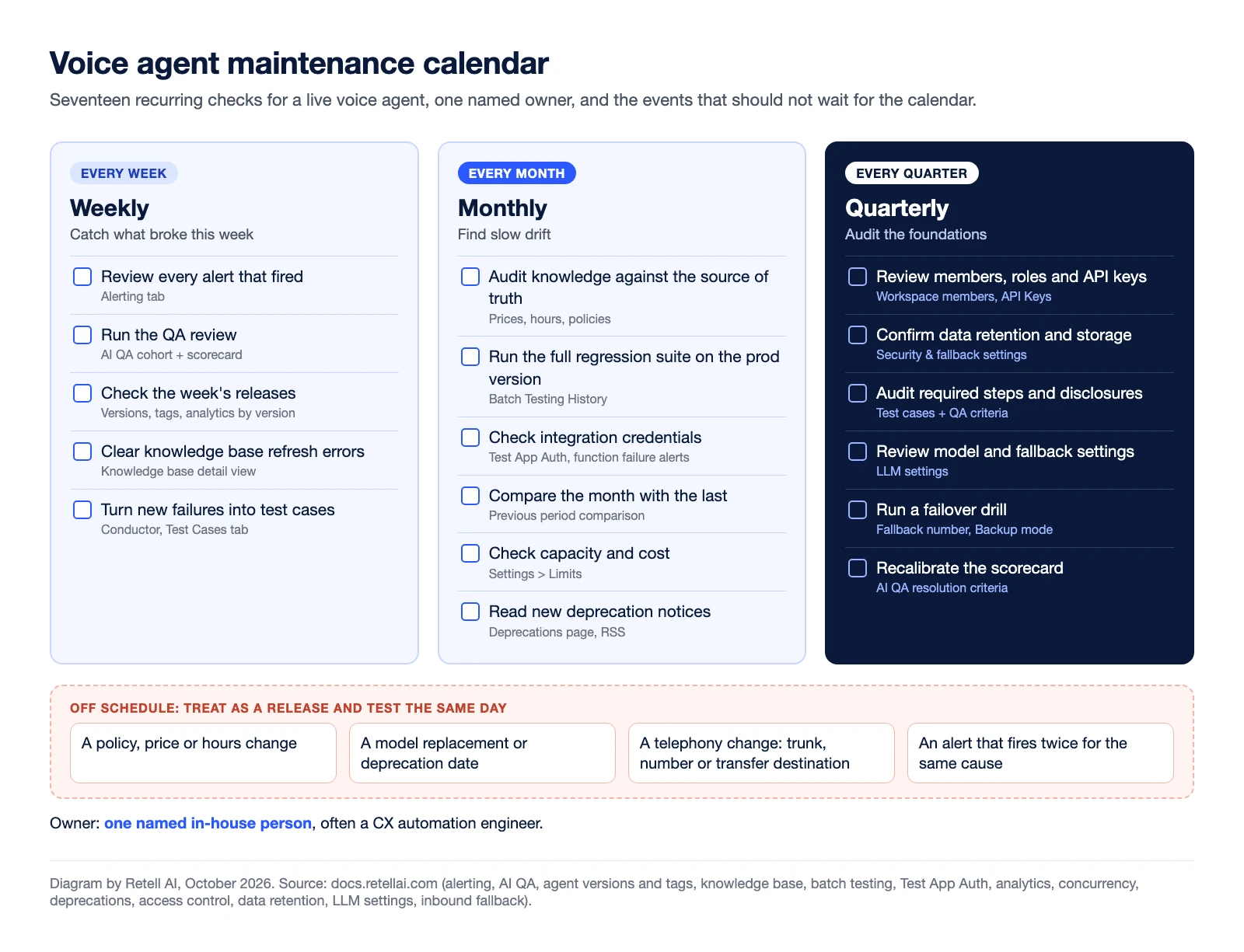
Seventeen tasks across three cadences, each with the Retell AI feature that answers it.
| Cadence | Task | Where in Retell AI | Done when |
|---|---|---|---|
| Weekly | Review every alert that fired | Alerting | Each alert has a written cause |
| Weekly | Run the QA review | AI QA cohort | Fix list has one owner per fix |
| Weekly | Check the week's releases | Versions and tags | Each prod move has a reason and a rollback version |
| Weekly | Clear knowledge base refresh errors | Knowledge base detail view | No source left on stale content |
| Weekly | Turn new failures into test cases | Conductor | Each new failure pattern has a case |
| Monthly | Audit knowledge against the source of truth | Knowledge base sources | Prices, hours and policies match |
| Monthly | Run the full regression suite on the prod version | Batch Testing History | Pass rate at or above last month |
| Monthly | Check integration credentials | Test App Auth API | Every connection returns success |
| Monthly | Compare the month with the last | Analytics dashboard | Each moved metric explained |
| Monthly | Check capacity and cost | Settings > Limits | Peak concurrency below the limit |
| Monthly | Read new deprecation notices | Deprecations page | Each notice has an owner and a date |
| Quarterly | Review members, roles and API keys | Workspace and API key settings | Leavers removed, shared keys scoped |
| Quarterly | Confirm data retention and storage | Security & fallback settings | Matches your retention policy |
| Quarterly | Audit required steps and disclosures | Test cases, QA criteria | Each disclosure has a passing case |
| Quarterly | Review model and fallback settings | LLM settings | Both models pass the suite |
| Quarterly | Run a failover drill | Fallback number, Backup mode | The fallback line answers |
| Quarterly | Recalibrate the scorecard | AI QA resolution criteria | Criteria match current call reasons |
What should you check every week?
Start with what fired. Retell AI alert rules email or call a webhook when a metric such as call success rate, transfer call failures, custom function failures or calls failing QA crosses your threshold. Write down each cause. If a rule keeps firing on brief spikes, give it a longer window or a slower check frequency rather than ignoring it.
Then run the QA review as the scorecard routine describes, and check the week's releases. Phone numbers assigned directly to a version stay on it when the prod tag moves, so confirm every production number uses the tag. The prompt versioning entry explains drafts, versions and tags.
Last, open the knowledge base detail view. When a source cannot be re-fetched, auto-refresh keeps its existing content and reports "Refresh completed with N errors". Nothing breaks on the call, which is the risk: the agent keeps answering from the old copy.
What should you check every month?
Knowledge. Compare the agent's sources with the current prices, hours and policies. With auto-refresh on, Retell re-fetches URLs every 24 hours and re-syncs changed Google Drive, OneDrive and Notion sources, but uploaded documents and pasted text cannot be refreshed, so replace those by hand. Missing facts invite invented answers; the guide to AI hallucinations in voice agents covers grounding.
Regression suite. Run every saved test case as a batch against the version your prod tag points to, even if nothing changed, and compare the pass rate with last month. Retire cases for removed flows and add cases for new call reasons. Testing bills at production rates, so keep the suite lean.
Integrations. The Test App Auth API probes an app connection's stored credentials and records the result. Pair it with an alert on custom function failures.
Trends, capacity and cost. Tick Previous period comparison on each analytics chart and explain each metric that moved; the voice agent KPI dashboard template gives a layout. Calls above your standard limit with concurrency burst on carry a $0.10 per minute surcharge, so raise the base limit if you burst regularly.
Deprecations. Subscribe to the deprecations page by RSS and pick who gets deprecation emails under Settings, Workspace, Notifications. Model replacements migrate existing configurations automatically on the stated date (the 10/29/2026 notice, for example, replaces claude-4.5-sonnet with claude-5.5-sonnet), so rerun the suite after any replacement that touches your agent.
What should you check every quarter?
Access. Remove leavers and check roles: Admins control billing and members, Developers build agents and manage API keys and webhooks. Delete unused keys and use restricted permissions for any key shared with a third party.
Data retention. Retention is set per agent, defaults to keeping data forever, and deletion is permanent. Match each agent to your policy and export what QA or compliance needs first.
Required steps. Every disclosure, recording notice and identity check should have a test case that passes and an AI QA condition that fails the call when it is skipped (with weighted scoring off, or weighted heavily enough to fail it alone).
Model and failover. If you use fast fallback, test that both models follow your instructions and call tools correctly. Then test failover: with concurrency burst off, when inbound calls hit the limit, Retell waits about 40 seconds for a slot, then transfers to the number's fallback number if one is set, and Backup mode diverts new inbound calls there at once. Call that line and make sure someone answers. Review geographic restrictions too.
Finally, recalibrate the scorecard against current call reasons. Daily checks and decisions about what the agent handles next sit with the AI agent manager.
What should trigger maintenance outside the schedule?
Some changes cannot wait for the calendar. Treat each of these as a release and test it the same day:
- A policy, price or hours change in the business
- A model replacement or deprecation date that affects your agent
- A telephony change, such as a new trunk, number or transfer destination
- An alert that fires twice for the same cause
Frequently asked questions
What is voice agent maintenance?
The recurring upkeep that keeps a live AI voice agent accurate and working: reviewing alerts and calls, updating its knowledge, rerunning regression tests, checking integrations, and auditing access, retention and failover on a fixed schedule.
How often should you update a voice agent's knowledge base?
Whenever the source changes, plus a monthly audit. In Retell AI, auto-refresh (when enabled) re-fetches URLs and re-syncs changed Google Drive, OneDrive and Notion sources every 24 hours, but uploaded documents and pasted text must be replaced by hand.
Do you need to retest a voice agent you have not changed?
Yes. Run the full regression suite monthly and after any model replacement date. Models get replaced and integrations change without anyone editing the agent.
Who should own voice agent maintenance?
One named in-house owner, often a CX automation engineer, runs the checklist and ships the fixes. A workspace Admin should sign off the quarterly access and retention review.
What is the difference between voice agent monitoring and maintenance?
Monitoring watches live metrics to catch problems as they happen. Maintenance is the scheduled upkeep that stops the agent drifting between them.
Keep voice agents current with Retell AI
Retell AI is an AI voice agent platform for contact centers. Alerts, AI QA, batch testing, versions and tags, and an auto-refreshing knowledge base sit in one workspace, so the team that owns the agent runs this checklist without waiting on a vendor. For the roles behind it, see how to build an internal voice AI team.