Novedades en Conductor: observabilidad de agentes de voz en todas las páginas
8
MIN READ
September 15, 2026
Un directivo importante de la organización pregunta por qué cayó la tasa de «call successful» de la semana pasada. Los análisis disponibles muestran la caída, pero les falta contexto valioso.
Para encontrar las llamadas que están detrás, tienes que:
La mayoría de los equipos tiene a una persona capaz de recorrer todo esto, pero eso significa que cualquier pregunta sobre el rendimiento del agente depende de ella.
Pero ya existe una forma mejor: nuestro Conductor is Everywhere ahora funciona en todas las páginas de Retell, no solo en la del agente. Lee la página que tienes abierta, así que el agente, la lista de llamadas o el gráfico que tienes delante ya forman parte de la conversación. Está pensado para quienes crean agentes, equipos de operaciones, responsables de QA y cualquiera que revise llamadas en volumen.
La pregunta con la que empieza un usuario puede ser una pregunta de negocio sin más. La respuesta no exige saber qué pestaña o qué filtro usar.
La mayoría de los fallos de un agente acaban en una llamada completada. Quien llama cuelga y la transcripción se guarda. A partir de ahí, la plataforma registra la llamada como normal.
El benchmark vCX-Hard de Retell AI evaluó 27 modelos con los turnos más difíciles de llamadas reales de centros de contacto. De los 1.514 casos de uso de herramientas del conjunto:
Casi todos los fallos fueron una cuestión de criterio sobre cuándo usar una herramienta. Una consulta omitida no interrumpe la llamada. El agente sigue hablando y quien llama oye una conversación normal hasta que llega la respuesta.
El prompt, el modelo, la lista de funciones y la base de conocimiento son idénticos en la llamada que funcionó y en la que falló. Nada dio error, lo que significa que nada se registró como error. El único rastro de esa decisión es la transcripción de la llamada en la que el agente la tomó.
Cuando toque hablar de presupuesto, es probable que alguien pregunte:
Esas respuestas suelen salir de la misma revisión manual. Conductor is Everywhere lleva a las organizaciones más allá de estos procesos manuales y permite a los usuarios explorar los problemas del agente sin fricciones y desplegar las soluciones sugeridas.
Abre Conductor en Analytics y pregunta por qué ha cambiado una cifra concreta, como la «call successful rate». Analytics te evita tener que nombrar el dashboard que quieres consultar. La misma pregunta se puede hacer desde cualquier otra página de Retell.
Es decir, puedes escribir «¿Por qué ha bajado mi call successful rate este mes?» y quedarte ahí.
También puedes resaltar una etiqueta del dashboard y Conductor la recoge como parte de la pregunta. Conductor extrae los datos que hay detrás de la página y crea un gráfico que responde a la pregunta, además de explicar qué muestra ese gráfico. Aprueba el gráfico y pasa al dashboard.
También puedes crear así un dashboard desde cero. Describe la vista que necesita tu equipo, aprueba el gráfico que propone Conductor y repite hasta que el dashboard contenga lo que la gente consulta cada semana. Nadie necesita saber qué campos usar como desglose.La descripción funciona como especificación.
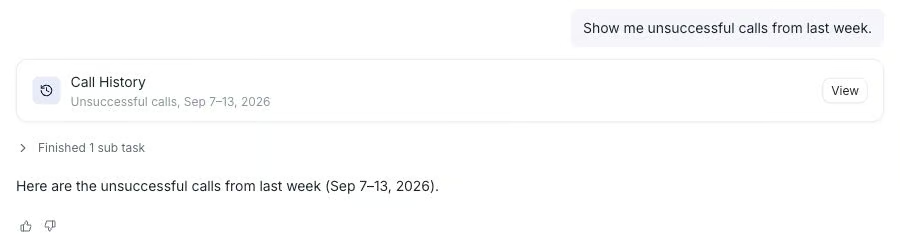
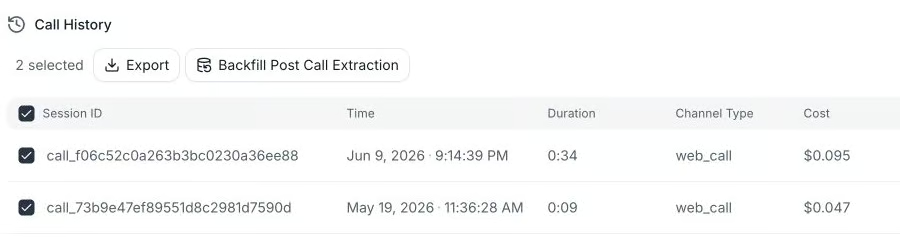
Puedes empezar en Call History o preguntar desde donde ya estés.
Conductor lee esas llamadas y después te dice qué tienen en común y señala las causas probables. También recomienda un siguiente paso.
Una tarjeta de navegación abre el agente que gestionó esas llamadas, y las llamadas siguen adjuntas a la conversación. Puedes leer el prompt y la configuración del agente mientras tienes delante la evidencia del problema.
Cada una de las secciones anteriores termina dándole al usuario algo que hacer a continuación. La propuesta de gráfico, el análisis de causa raíz y el resumen de la cohorte cierran con un paso recomendado, y una tarjeta de navegación te lleva a la pantalla adecuada para ejecutarlo. Entre las cosas que puedes preguntar están estas:
AI QA puntúa llamadas reales según los criterios que establece tu equipo. Una cohorte es un conjunto de esas llamadas junto con la configuración usada para puntuarlas. Conductor leerá ambas cosas.
Abre una cohorte y pregunta qué ha encontrado. Conductor te da un resumen en lenguaje natural con los hallazgos ordenados por relevancia y después enumera qué revisar a continuación.
Un responsable de QA que haga esto a mano tiene que abrir cada llamada puntuada, leerla y recordarla lo suficiente para compararla con la siguiente. En cambio, Conductor recorre la cohorte completa e informa de qué tienen en común las llamadas con puntuación baja, sin modificar la cohorte ni volver a puntuar nada. Los criterios los escribes y editas tú.
Conductor sabe en qué página estás. Pregúntale cómo hacer algo, como configurar una cohorte de AI QA, y ejecutará un recorrido guiado resaltado que señala cada paso en orden.
Los recorridos guiados funcionan desde cualquier página. Pregunta desde Analytics y empezará por los pasos que te llevan a AI QA, y después seguirá con la función en sí.
Las tarjetas de navegación pueden llevarte a un agente, a una lista de llamadas filtrada, a un dashboard o a una cohorte de QA sin cerrar la conversación.
El recorrido guiado se ejecuta como una capa sobre la propia página en vivo. Un responsable de QA que abre AI QA por primera vez estará viendo sus propias cohortes mientras Conductor le señala los controles adecuados. Así, puede aprender a usar una función nueva en el mismo lugar donde hace su trabajo.
Una conversación que empezó en Call History sigue teniendo contexto sobre esas llamadas después de pasar a Analytics. Puedes seleccionar llamadas fallidas en una pantalla y preguntar sobre ellas en otra sin tener que volver a seleccionarlas.
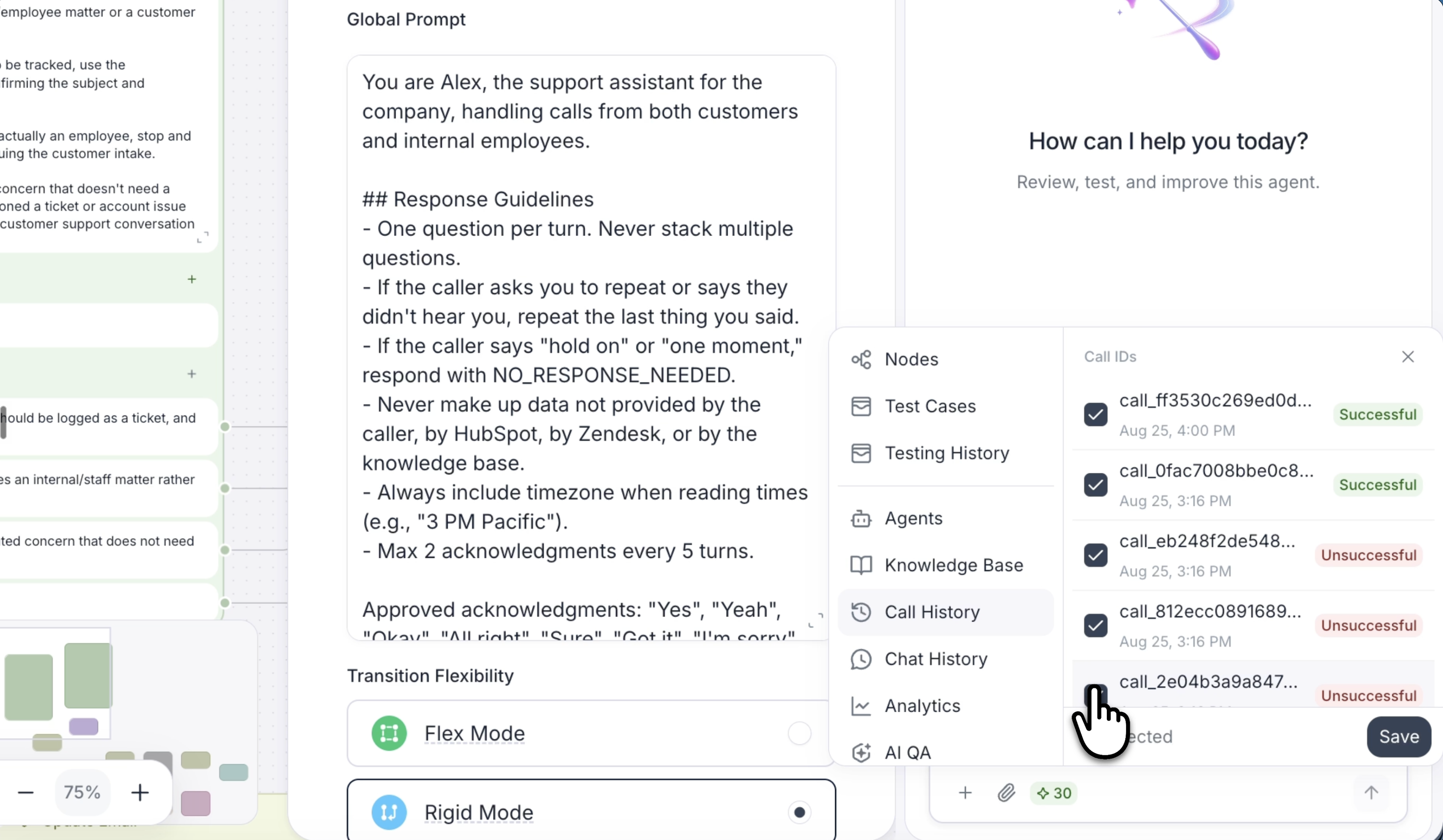
Quien esté trabajando en un conversation flow puede seleccionar varios nodos y usar Conductor para traerlos y añadir contexto. Traer esos nodos te ahorra tener que describir qué hace esa parte del grafo. Así, la pregunta puede referirse a la rama que se ve en pantalla en lugar de al agente en su conjunto.
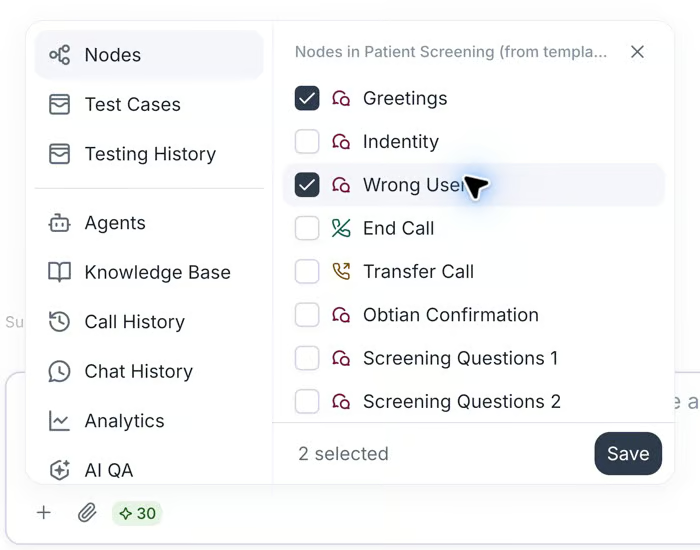
Hay varias formas de aportar contexto:
Los enlaces en línea de las respuestas de Conductor remiten a las llamadas, los chats y los nodos concretos a los que se refiere. En una conversación larga, esos enlaces son la manera de saber a qué llamada se refería. Con Conductor is Everywhere, todo lo que necesitas está justo donde puedes encontrarlo.
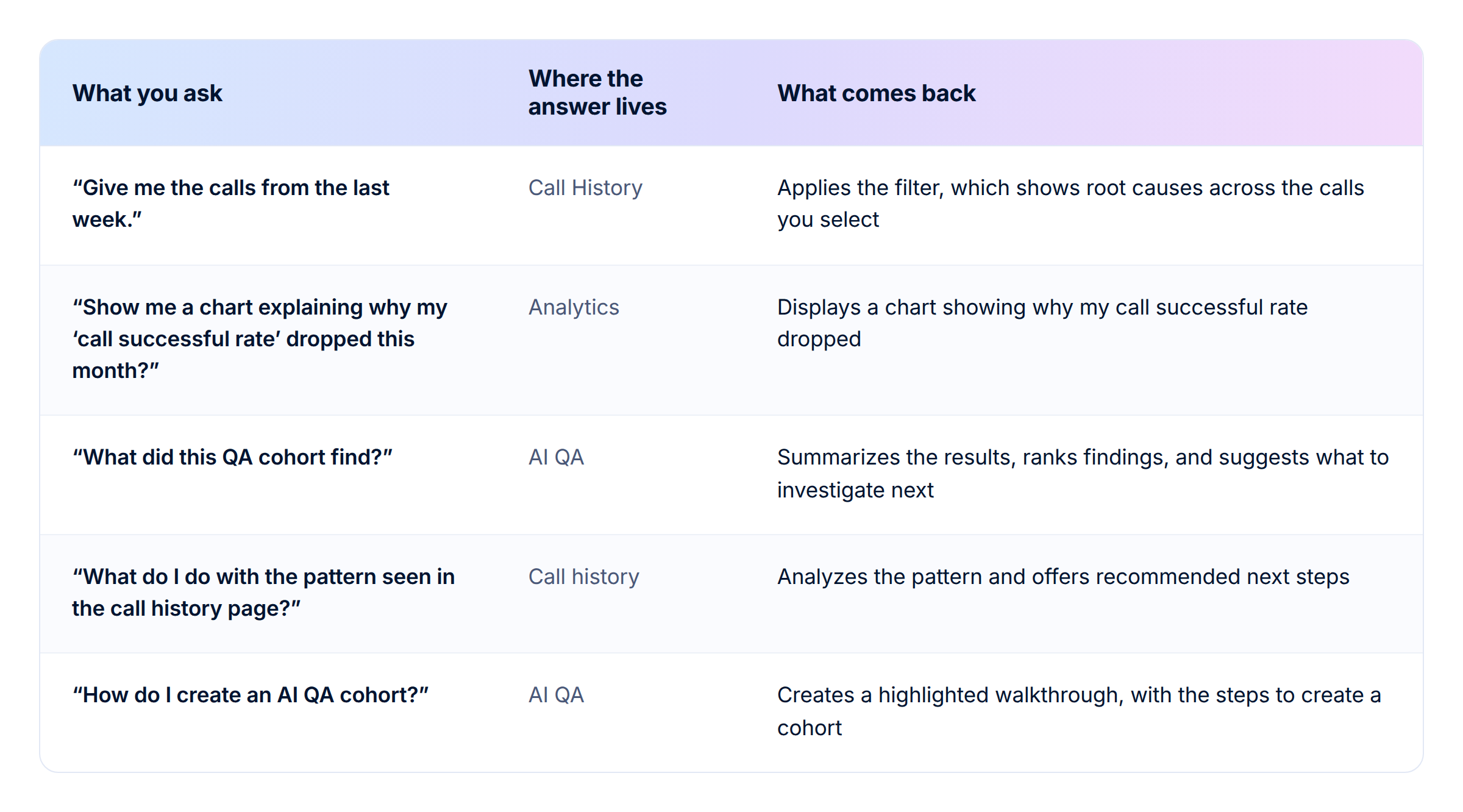
Conductor no modificará por su cuenta los agentes en producción. Lee lo que has adjuntado y propone un cambio. Alguien de tu equipo aprueba ese cambio o lo rechaza.
Conductor tampoco:
Esta versión cubre análisis, orientación y revisión. La mejora continua es una dirección a más largo plazo para el producto.
Conductor is Everywhere lee las tres cosas desde la página en la que hayas empezado, sin ningún paso de exportación intermedio.
Creamos la primera versión de Conductor como copiloto para crear agentes. Escribe el prompt, configura la voz y el modelo, gestiona los ajustes de interrupción y convierte un agente de prompt único en un conversation flow. Nuestra segunda versión lee llamadas, explica por qué ha cambiado una métrica e informa de lo que ha encontrado una cohorte de QA.
Abre Conductor desde cualquier página de Retell. Empieza gratis o habla con nuestro equipo sobre un despliegue en todo tu equipo de agentes. Los resultados del benchmark vCX-Hard contienen los datos de modelos que hay detrás de algunos de los patrones de fallo mencionados arriba.
Descubre cuánto podría ahorrar tu empresa al pasar a agentes de voz impulsados por IA.
Total Human Agent Cost
AI Agent Cost
Estimated Savings
Un número de teléfono de demostración de Retell Clinic Office






.avif)