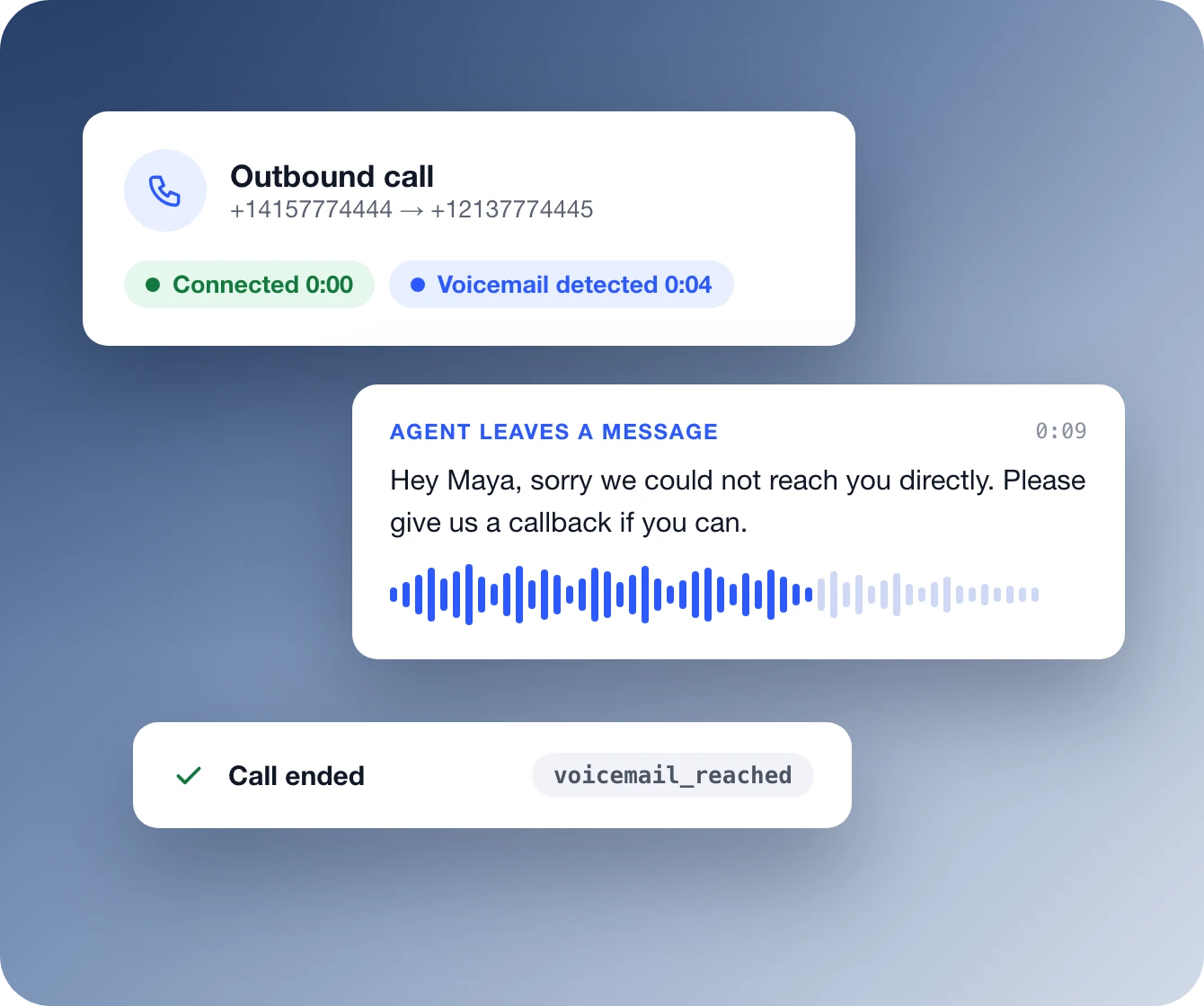
When an outbound call reaches a voicemail greeting instead of a person, your Retell agent can tell. It hangs up, or leaves a message you wrote or one it writes from your instructions. Detection runs during the first 3 minutes of each call, generally adds under 30 ms of latency, and every voicemail is logged as voicemail_reached.
Voicemail detection, also called answering machine detection (AMD), tells your agent whether a person, a voicemail greeting or a phone menu picked up an outbound call. Without it, an AI agent can deliver its whole opener to a recording. In Retell it is a setting on the agent, so the voicemail action happens on the same call.
Hang up
Wichtige Punkte
Disconnects as soon as voicemail is detected
Ends the call even if the greeting is still playing
Logged as voicemail_reached
Default for new blank dashboard agents
Leave a message
Wichtige Punkte
Waits for its turn to speak, then talks
Static sentence: fixed text you write
Prompt: a message written from your instructions
Dynamic variables work in both, like {{user_name}}
Phone menus and call screens
Key Points
IVR Hangup ends calls that reach a phone menu
Logged as ivr_reached
Call screen handling states who is calling and why
Leave IVR Hangup off to let the agent navigate the menu
Feature
Set the voicemail action once, or per call
Turn on Voicemail Detection in the agent's Call settings and pick an action. Retell checks for voicemail during the first 3 minutes after the call connects. If none is detected, detection stops and the conversation carries on. In the API the same setting is voicemail_option, and a single call or batch call can override it without changing the base agent.
Für Contact Center gebaut, nicht für Demos
Retell ist die KI-Sprachplattform, auf der Enterprise-Contact-Center laufen
Mit Retell entwickeln, testen und deployen Sie KI-Telefonagenten, die echtes Anrufvolumen bewältigen, damit sich Ihr Team auf die Gespräche konzentriert, die einen Menschen brauchen.
SOC 2 Type II- und HIPAA-konform. Im Einsatz bei Teams mit 1.000+ Anrufen pro Tag.
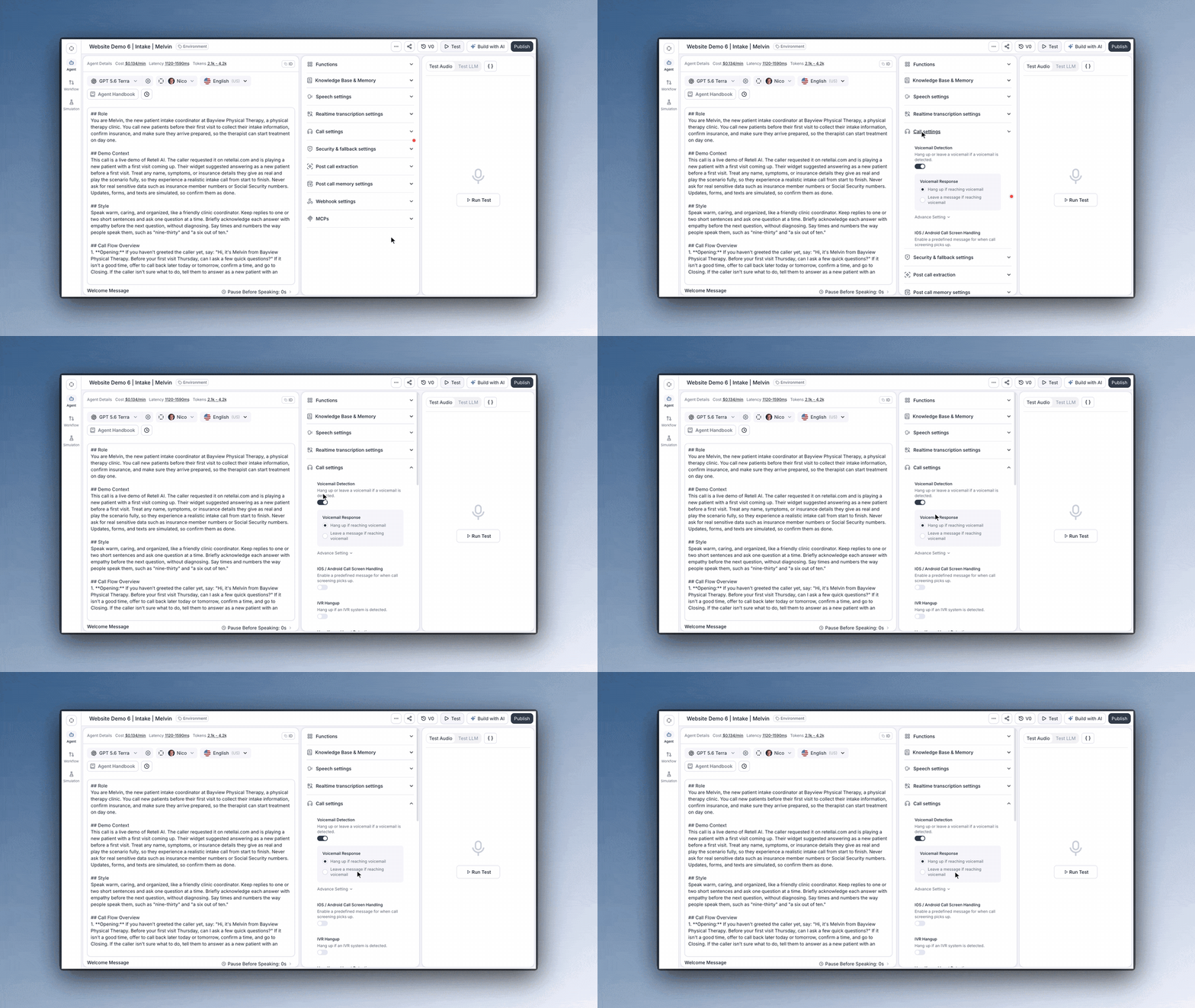
Open the agent editor and expand Call settings. For a conversation flow agent, select Global settings first. Then check Voicemail Detection. New blank dashboard agents start with it on and set to hang up. Agents created through the API need voicemail_option set explicitly.
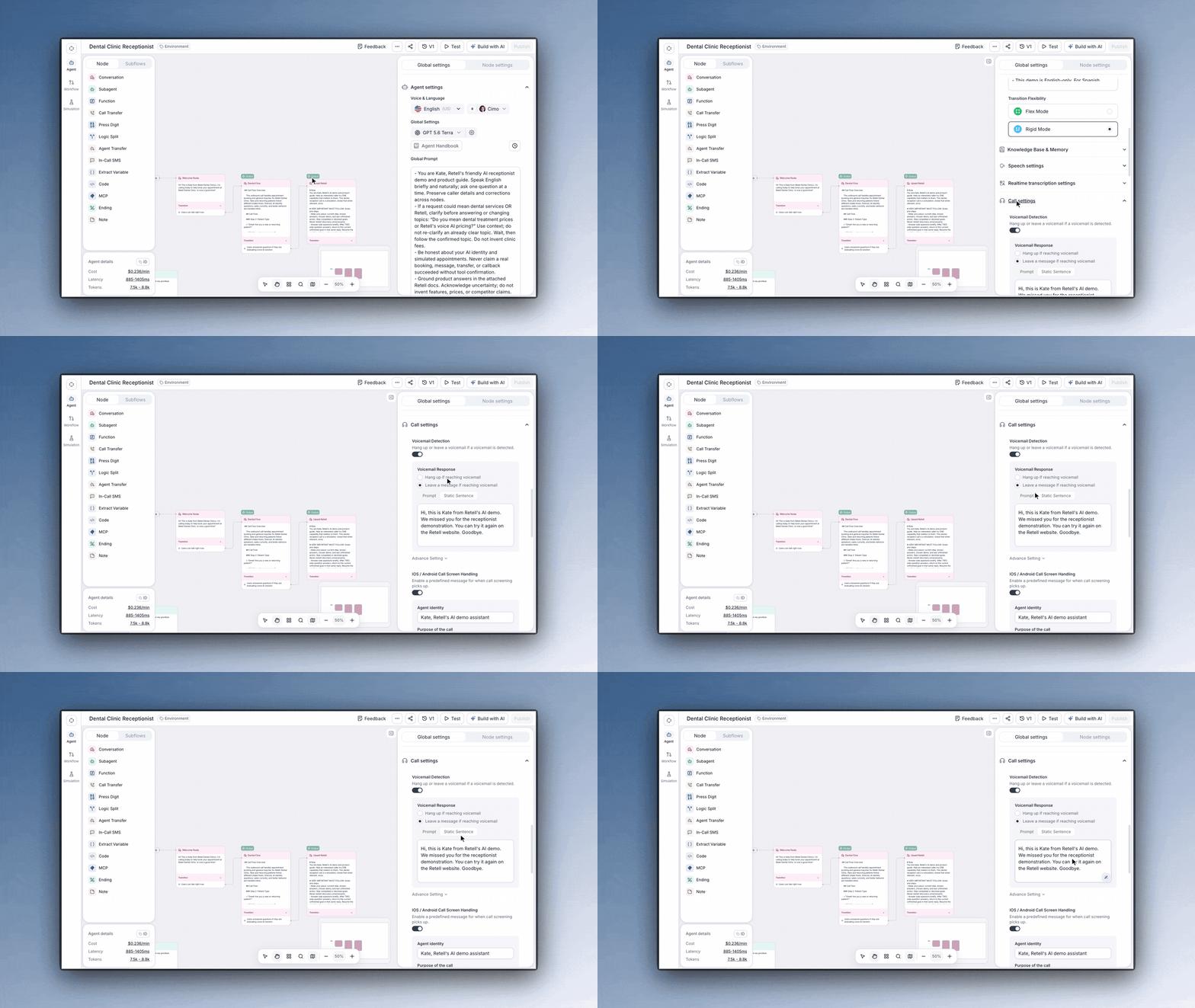
Choose what the agent does when it detects voicemail: Hang up: disconnect right away Static Sentence: say fixed text, such as "Hey {{user_name}}, sorry we could not reach you directly. Please give us a callback if you can." Prompt: say a message generated from instructions, such as "Summarize the call and ask the user to call back."
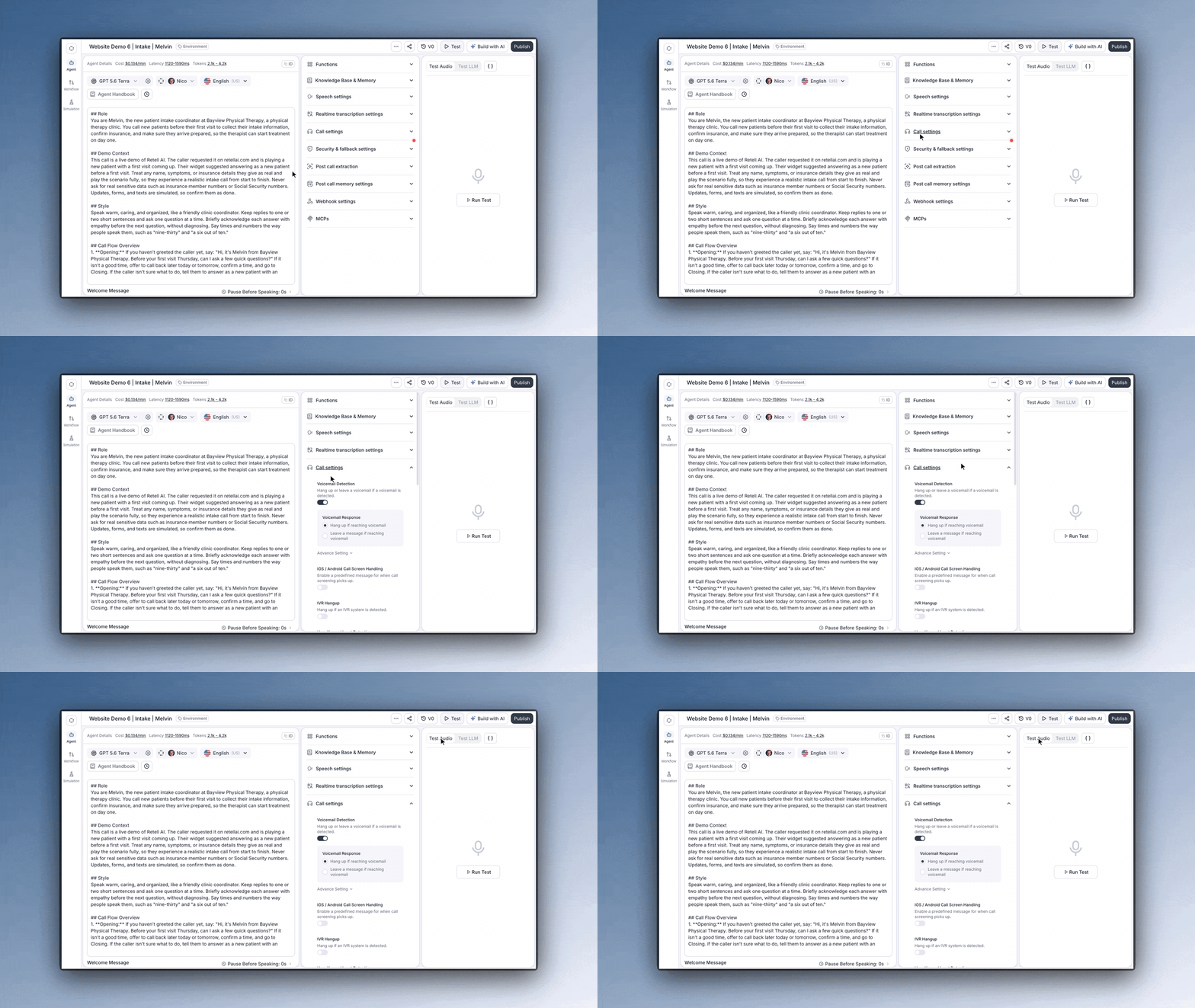
Start a web call and play a recorded voicemail greeting into your microphone. The agent runs the same detection and takes the action you set, without dialing anyone. Then place a real outbound test call to check the carrier audio path, and confirm the call ended with voicemail_reached.
Retell's docs say voicemail detection is optimized for real-time calls and generally adds under 30 ms of latency.
Every voicemail is on the record.
Detected voicemails end with the disconnection reason voicemail_reached, call analysis sets in_voicemail, and the analytics dashboard charts Voicemail Rate.
A message per call or attempt.
Override voicemail_option on one API call or batch call without changing the base agent. Campaign attempts can each hang up or leave their own message.
Phone menus handled separately.
IVR and voicemail are detected separately. Turn on IVR Hangup to end calls that reach a phone menu, or leave it off and let the agent navigate the menu.
Inbounds.com hat seine Anrufkampagnen skaliert und optimiert, ohne dabei die menschliche Aufsicht zu vernachlässigen, die für den Erfolg seiner Kunden entscheidend ist.
„Unsere frühe Adoption von Retell AI, kombiniert mit unserer Fähigkeit, es tiefgehend anzupassen und unsere eigene Infrastruktur darum herum zu bauen, verschafft uns wirklich einen Vorsprung in der Branche.“
Die Kosten unseres Kundensupport-Teams stiegen um 300 bis 400 Prozent pro Jahr. Durch die Einführung von Retell und den Aufbau von Lucas konnten wir diese Belastung um über 50 Prozent reduzieren, unsere SaaS-Margen drastisch verbessern und unsere Kunden weiterhin in Wachstums- und Notsituationen unterstützen.
Während wir in den letzten 18 bis 24 Monaten Wege erkundet haben, in unserem Geschäft mehr Effizienz zu erzielen, ist die Nutzung von KI-Technologien zu einem zentralen Bestandteil dieser Strategie geworden. Dadurch können wir die Kosten für die Gewinnung neuer Kunden senken und gleichzeitig die Kosten für deren Bindung und Betreuung über ihren gesamten Lebenszyklus mit uns hinweg halten oder sogar senken.
Entdecken Sie, wie Retell AI jeden Bereich Ihrer Anrufabwicklung transformieren kann. Erkunden Sie das vollständige Leistungsspektrum – entwickelt für intelligentere Automatisierung, höhere Effizienz und ein verbessertes Kundenerlebnis.
Voicemail detection, also called answering machine detection (AMD), is how an outbound caller tells whether a person, a voicemail greeting or an automated phone menu picked up. In Retell, detection runs inside the voice agent during the first 3 minutes after the call connects, so the agent can hang up or leave a message on the same call instead of talking to a recording.
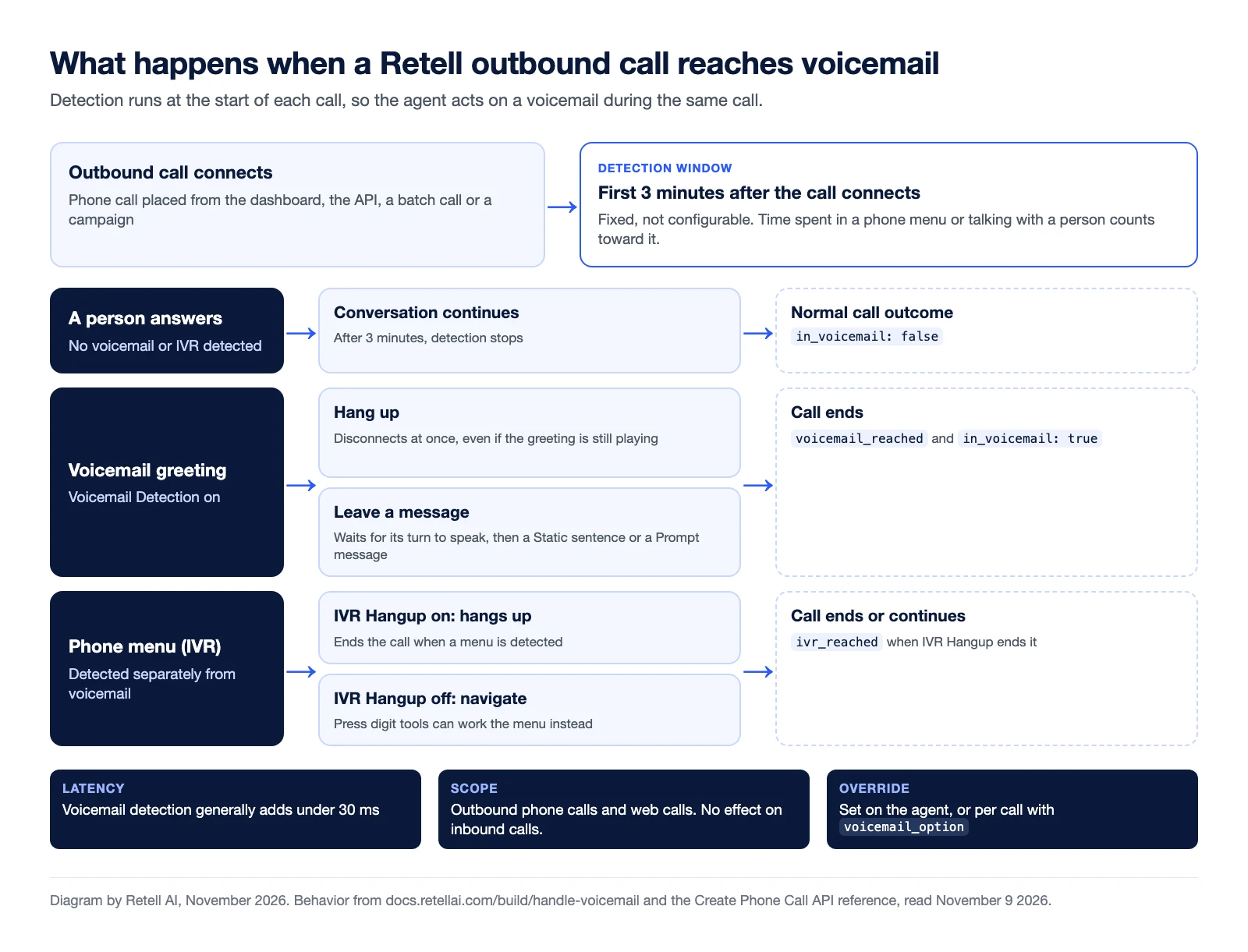
What a Retell agent does when an outbound call reaches a person, a voicemail greeting or a phone menu. Diagram by Retell AI, November 2026. Source: Retell voicemail and IVR docs.
Voicemail and IVR settings at a glance
Setting
What the agent does
In the API
What gets logged
Hang up if reaching voicemail
Disconnects as soon as it detects voicemail, even if the greeting is still playing
voicemail_option, action hangup
voicemail_reached
Leave a message: Static Sentence
Waits for its turn to speak, then says your fixed text, with dynamic variables filled in
voicemail_option, action static_text
voicemail_reached
Leave a message: Prompt
Waits for its turn to speak, then says a message generated from your instructions
voicemail_option, action prompt
voicemail_reached
IVR Hangup
Ends the call when it detects an automated phone menu
ivr_option, action hangup
ivr_reached
iOS / Android Call Screen Handling
Answers a phone's call screen with the identity and call purpose you set
call_screening_option
The call continues
Detection settings are in Call settings in the agent editor (for a conversation flow, open Global settings first). If you'd rather the agent work through a phone menu than hang up, leave IVR Hangup off and use IVR navigation.
Set it per agent, per call or per attempt
The agent's settings are the default. Through the API, voicemail_option can also carry a detection_prompt that describes what should count as voicemail. Create Phone Call and Create Batch Call accept an agent_override, so one call can use a different voicemail action without changing the base agent. That covers single API calls and batch calls. Retell's docs also describe per-attempt voicemail settings for outbound campaigns, and suggest leaving a message only on the last attempt or two.
Where voicemail detection fits in outbound calling
Human-staffed dialers face the same question. A parallel dialer, for example, rings several numbers for one rep and connects the rep to the first person who answers, so the rep spends less time on rings and voicemail. With an AI voice agent on the line, the agent itself decides what to do on each outcome. Our guide to answering machine detection for voice AI maps each call state to an action, a log entry and a retry rule, and 5 voicemail practices for AI voice agents covers what to say when you leave a message.
Voicemail messages and the TCPA
The FCC's rule at 47 CFR 64.1200 covers calls and messages that use an "artificial or prerecorded voice". Under 64.1200(b), those messages must state the identity of the business responsible for the call at the beginning, and a callback telephone number during or after the message. For telemarketing messages left on an answering machine or voice mail service, 64.1200(b)(3) also requires a toll-free number the person can call back to reach an automated opt-out. Consent rules in 64.1200(a) apply as well, and eCFR flags an amendment to the section published October 26, 2026. This is a summary, not legal advice. Check with counsel on how these rules apply to the messages your AI agent leaves before you turn on voicemail messages for a campaign.

Voicemail detection FAQ
What is voicemail detection?
Voicemail detection, also called answering machine detection (AMD), tells whether an outbound call was picked up by a person, a voicemail greeting or an automated phone menu, so the caller can act on the same call. In Retell it is a setting on the voice agent: when the agent detects a voicemail, it hangs up or leaves a message.
What can a Retell agent do when it reaches voicemail?
It can hang up or leave a message. Hang up disconnects immediately, even if the greeting is still playing. Leave a message waits for the agent's turn to speak, then delivers either a static sentence you write or a message the agent generates from your prompt. Both message types support dynamic variables such as {{user_name}}.
How long does voicemail detection run on a call?
During the first 3 minutes after the call connects. The window isn't configurable, and time spent in a phone menu or talking with a person counts toward it. If no voicemail is detected in that window, detection stops and the call continues normally.
Does voicemail detection work on inbound calls?
No. Voicemail and IVR detection run on outbound phone calls and on web calls. On an inbound call a person is calling your agent, so these settings have no effect.
Why doesn't my agent hang up when it reaches voicemail?
The call is most likely being classified as an IVR rather than a voicemail. The two are detected separately, so turn on IVR Hangup in the agent's Call settings to end those calls as well.
Do I pay for calls that reach voicemail?
Retell's pricing page says calls that reach voicemail are billed only for the time the AI agent is active on the line, and calls that fail to connect aren't billed. Voice agents start from $0.07 per minute.
Zeit, Ihr KI-Callcenter einzustellen
Something went wrong. Please try again, or email support@retellai.com if it keeps happening.