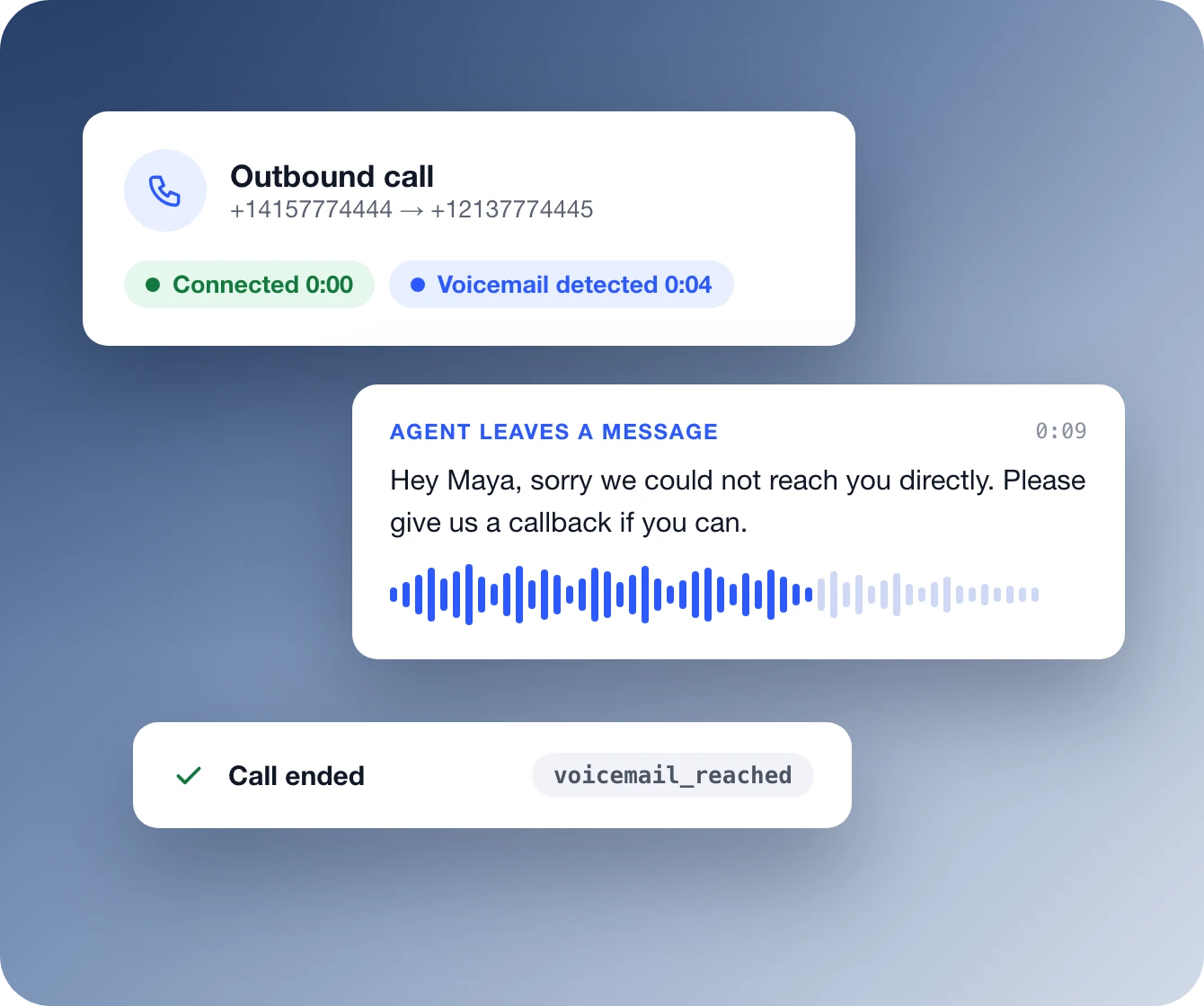
Illustration of a Retell outbound call that reaches voicemail: the call connects, a voicemail greeting is detected, the agent waits for its turn and leaves a static message asking the person to call back, and the call ends logged as voicemail_reached.

Voicemail detection for outbound AI calls

Know who picked up. Act on the same call.
When an outbound call reaches a voicemail greeting instead of a person, your Retell agent can tell. It hangs up, or leaves a message you wrote or one it writes from your instructions. Detection runs during the first 3 minutes of each call, generally adds under 30 ms of latency, and every voicemail is logged as voicemail_reached.
概要

Every outbound call needs a voicemail plan

Voicemail detection, also called answering machine detection (AMD), tells your agent whether a person, a voicemail greeting or a phone menu picked up an outbound call. Without it, an AI agent can deliver its whole opener to a recording. In Retell it is a setting on the agent, so the voicemail action happens on the same call.

Hang up
主なポイント
Disconnects as soon as voicemail is detected
Ends the call even if the greeting is still playing
Logged as voicemail_reached
Default for new blank dashboard agents
Leave a message
主なポイント
Waits for its turn to speak, then talks
Static sentence: fixed text you write
Prompt: a message written from your instructions
Dynamic variables work in both, like {{user_name}}
Phone menus and call screens
Key Points
IVR Hangup ends calls that reach a phone menu
Logged as ivr_reached
Call screen handling states who is calling and why
Leave IVR Hangup off to let the agent navigate the menu
機能

Set the voicemail action once, or per call

Turn on Voicemail Detection in the agent's Call settings and pick an action. Retell checks for voicemail during the first 3 minutes after the call connects. If none is detected, detection stops and the conversation carries on. In the API the same setting is voicemail_option, and a single call or batch call can override it without changing the base agent.
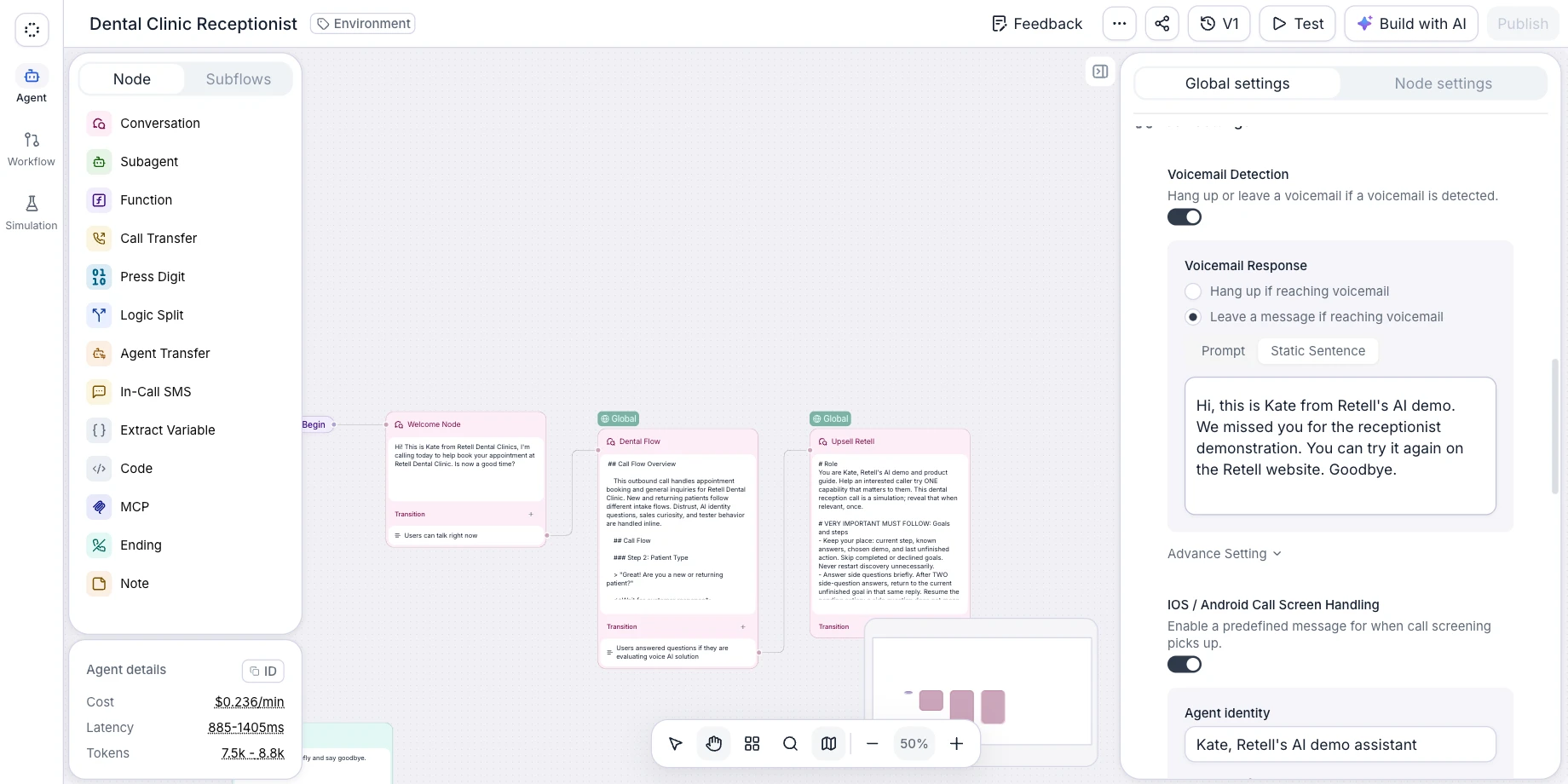
Retell agent editor, Global settings, Call settings: Voicemail Detection switched on, with Voicemail Response set to leave a message as a Static Sentence.
デモではなく、コンタクトセンターのために

Retell は、エンタープライズのコンタクトセンターを支える AI 音声プラットフォームです

Retell では、実際の通話量に対応する AI 電話エージェントを構築、テスト、デプロイできます。チームは人が必要な会話に時間を使えるようになります。
SOC 2 Type II および HIPAA に準拠。1 日 1.000+ 件の通話を扱うチームに選ばれています。
仕組み

How to set up voicemail detection

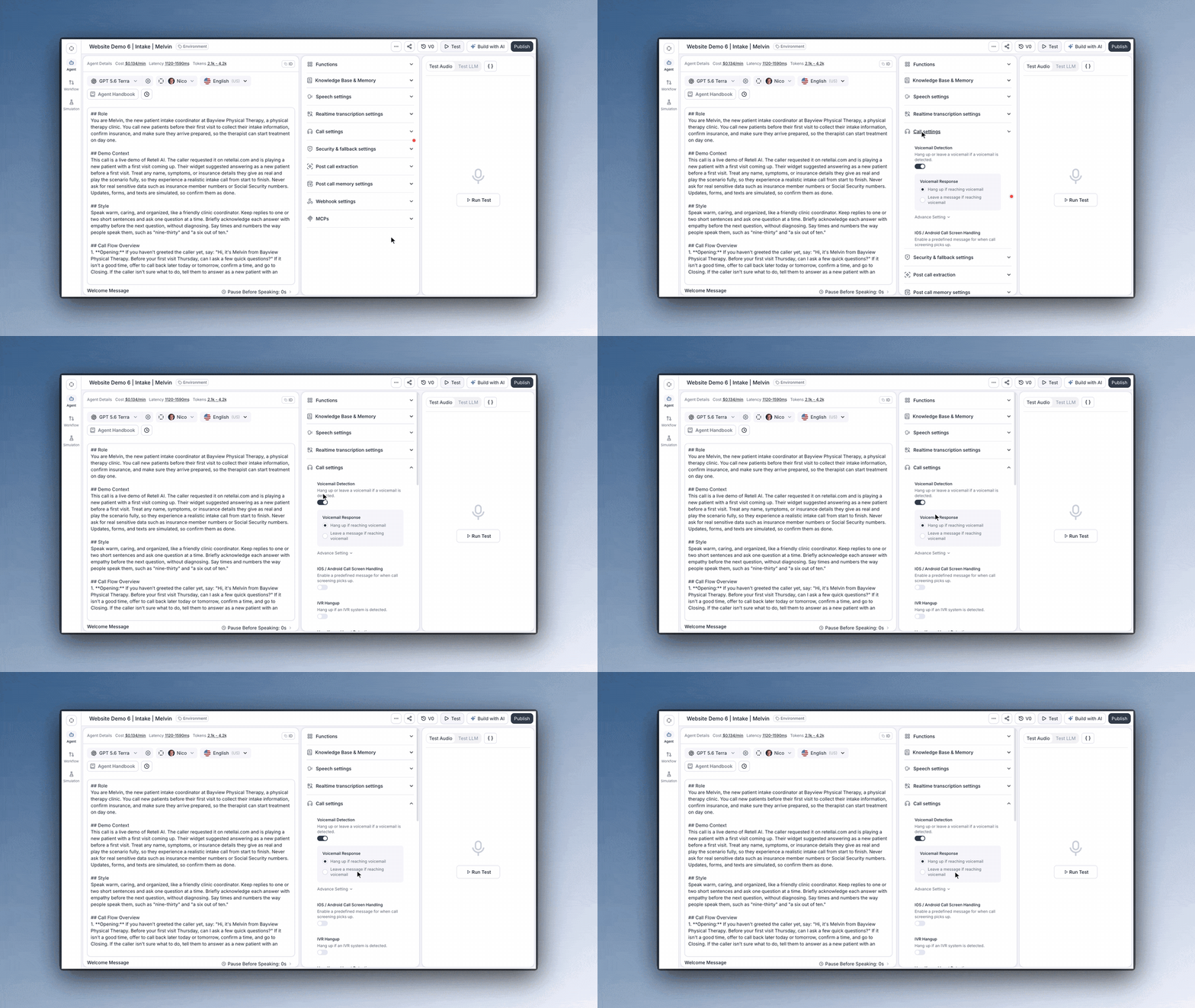
Retell agent editor: opening Call settings and pointing to the Voicemail Detection switch, which is on, and the Hang up and Leave a message options.
Turn it on
Open the agent editor and expand Call settings. For a conversation flow agent, select Global settings first. Then check Voicemail Detection.
New blank dashboard agents start with it on and set to hang up.
Agents created through the API need voicemail_option set explicitly.
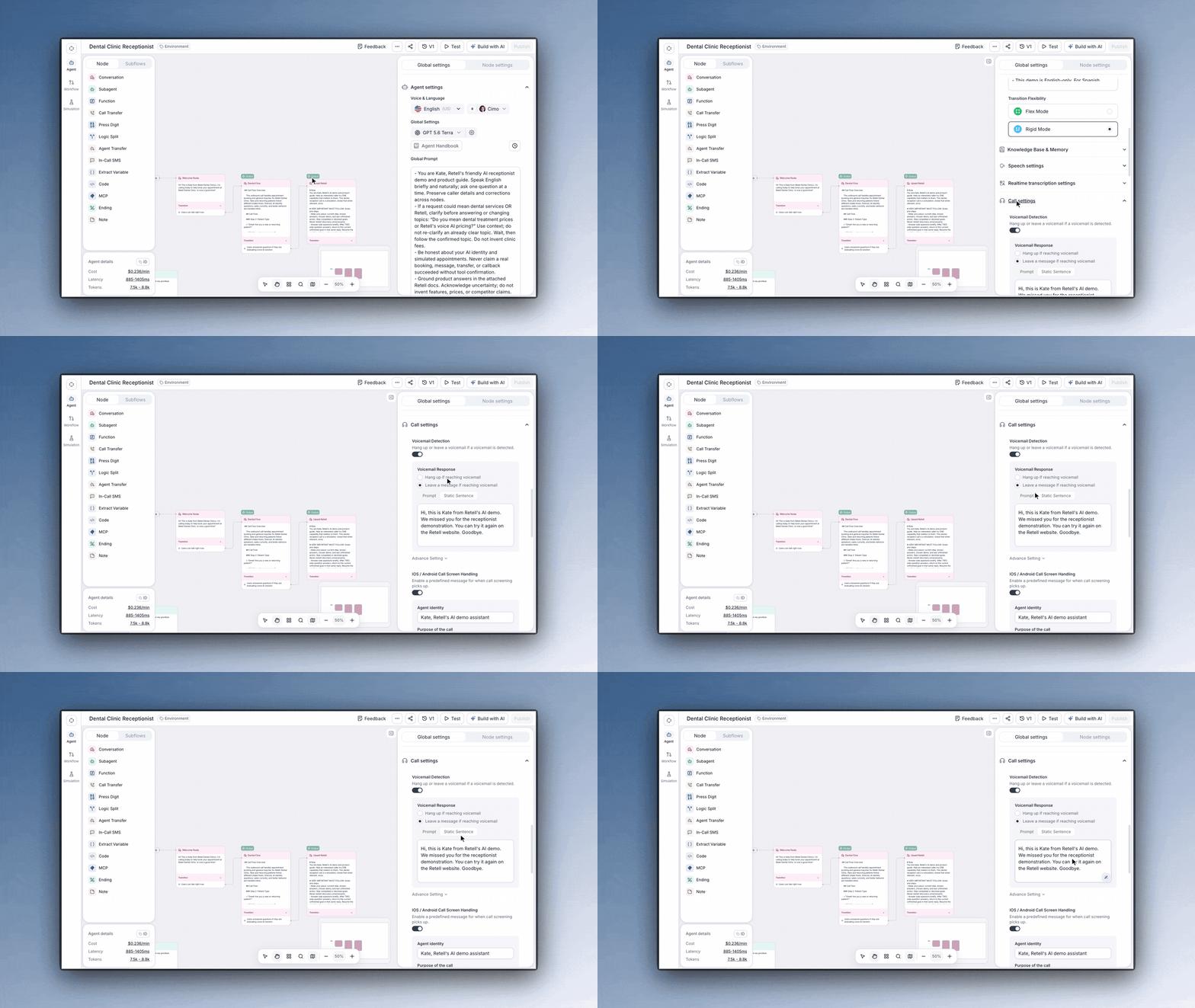
 
Retell conversation flow agent, Global settings: Voicemail Response options Hang up if reaching voicemail and Leave a message, with Prompt and Static Sentence and the message text.
Pick the action
Choose what the agent does when it detects voicemail:
Hang up: disconnect right away
Static Sentence: say fixed text, such as "Hey {{user_name}}, sorry we could not reach you directly. Please give us a callback if you can."
Prompt: say a message generated from instructions, such as "Summarize the call and ask the user to call back."
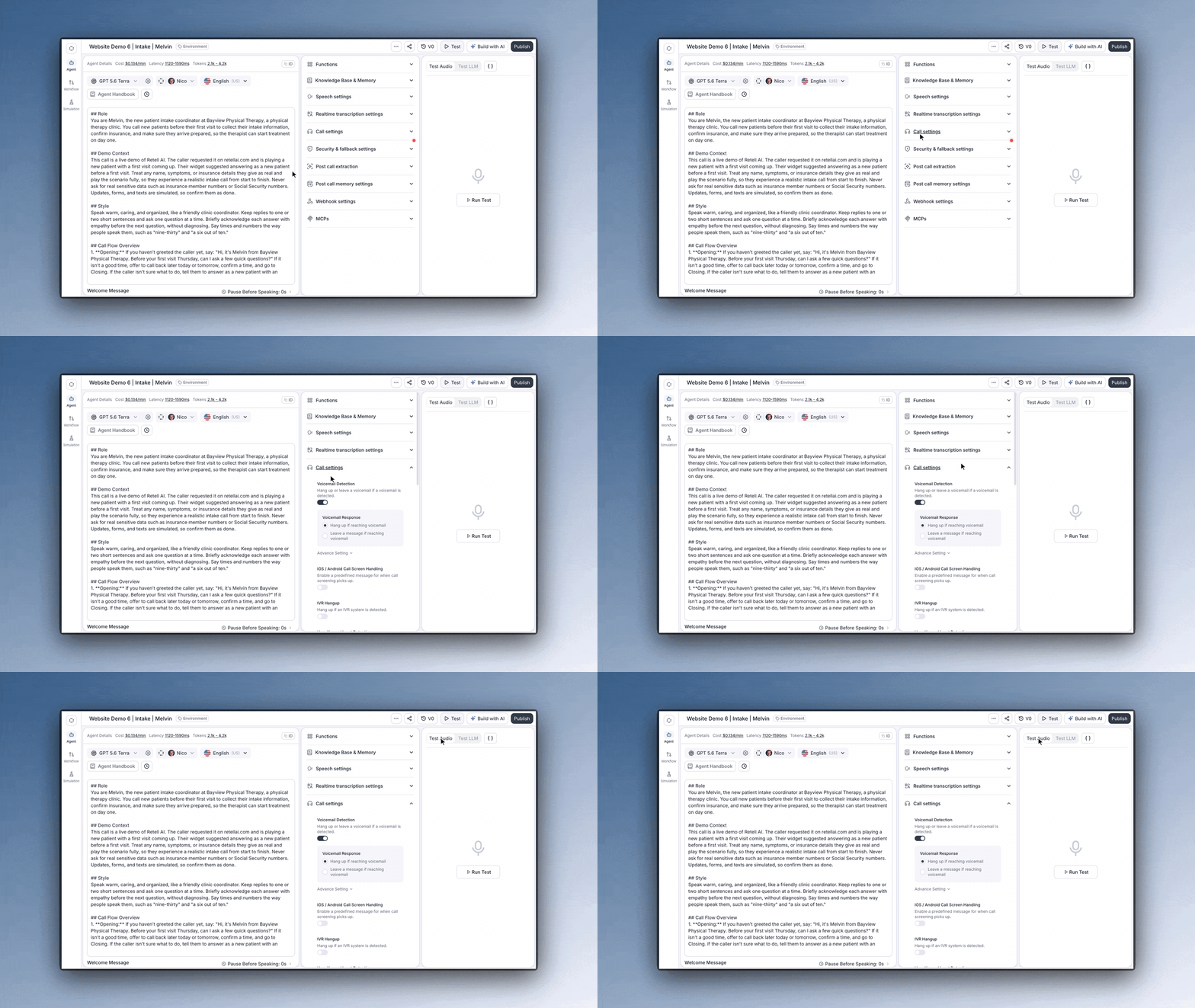
 
Retell agent editor: Voicemail Detection on in Call settings, then the Test Audio panel used to run a web call against the agent.
Test it
Start a web call and play a recorded voicemail greeting into your microphone. The agent runs the same detection and takes the action you set, without dialing anyone. Then place a real outbound test call to check the carrier audio path, and confirm the call ended with voicemail_reached.
 
製品ハイライト

現実の課題に対応できる設計

Under 30 ms of added latency.
Retell's docs say voicemail detection is optimized for real-time calls and generally adds under 30 ms of latency.
Every voicemail is on the record.
Detected voicemails end with the disconnection reason voicemail_reached, call analysis sets in_voicemail, and the analytics dashboard charts Voicemail Rate.
A message per call or attempt.
Override voicemail_option on one API call or batch call without changing the base agent. Campaign attempts can each hang up or leave their own message.
Phone menus handled separately.
IVR and voicemail are detected separately. Turn on IVR Hangup to end calls that reach a phone menu, or leave it off and let the agent navigate the menu.
活用事例

あらゆる業界で
実証済みの成果

Inbounds
Inbounds.comは、顧客の成功に不可欠な人間による監視を犠牲にすることなく、通話キャンペーンを拡大・最適化しています。
「Retell AI の早期採用と、それを深くカスタマイズし、その周りに独自のインフラを構築する私たちの能力が組み合わさって、業界で本当に優位性を与えてくれています。」
Leonardo Danconia
CEO and Cofounder, inbounds.com
Swtch Energy
私たちのカスタマーサポートチームのコストは、年に300〜400パーセント増加していました。Retell を導入して Lucas を構築することで、その負担を50%以上削減し、SaaS の利益率を大幅に改善し、それでも高成長と緊急の状況において顧客を支えることができました。
Matic Insurance
過去18〜24か月にわたってビジネスのさらなる効率化の方法を模索する中で、AI テクノロジーの活用はその戦略の重要な一部となりました。そうすることで、私たちは新規顧客の獲得コストを削減し、同時に、ライフサイクル全体を通じて顧客を維持しサービスを提供するコストを維持、あるいはさらに引き下げることができます。
Brian Barker
Product Manager
インテグレーション

お使いの
技術スタックと
シームレスに連携

すべてのインテグレーションを見る
  • Hubspot
  • Twilio
  • Vonage
  • Go High Level
  • n8n
  • Zapier
  • Salesforce
  • Hubspot
  • Twillio
  • Vonage
  • Go High Level
  • 8n8
  • Zapier
  • Salesforce
  • Avaya
  • Genesys
  • Five9
  • Amazon Connect
  • Telnyx
  • Make
  • Cal.com
  • Avaya
  • Genesys
  • Five9
  • Amazon Connect
  • Telnyx
  • Make
  • Cal.com
さらに詳しく

その他の機能を
見る

Retell AIが通話業務のあらゆる場面をどのように変革できるかをご覧ください。よりスマートな自動化、高い効率性、そして優れたカスタマーエクスペリエンスを実現するための幅広い機能をご確認いただけます。

競合比較

How voicemail detection works on a Retell call

Voicemail detection, also called answering machine detection (AMD), is how an outbound caller tells whether a person, a voicemail greeting or an automated phone menu picked up. In Retell, detection runs inside the voice agent during the first 3 minutes after the call connects, so the agent can hang up or leave a message on the same call instead of talking to a recording.
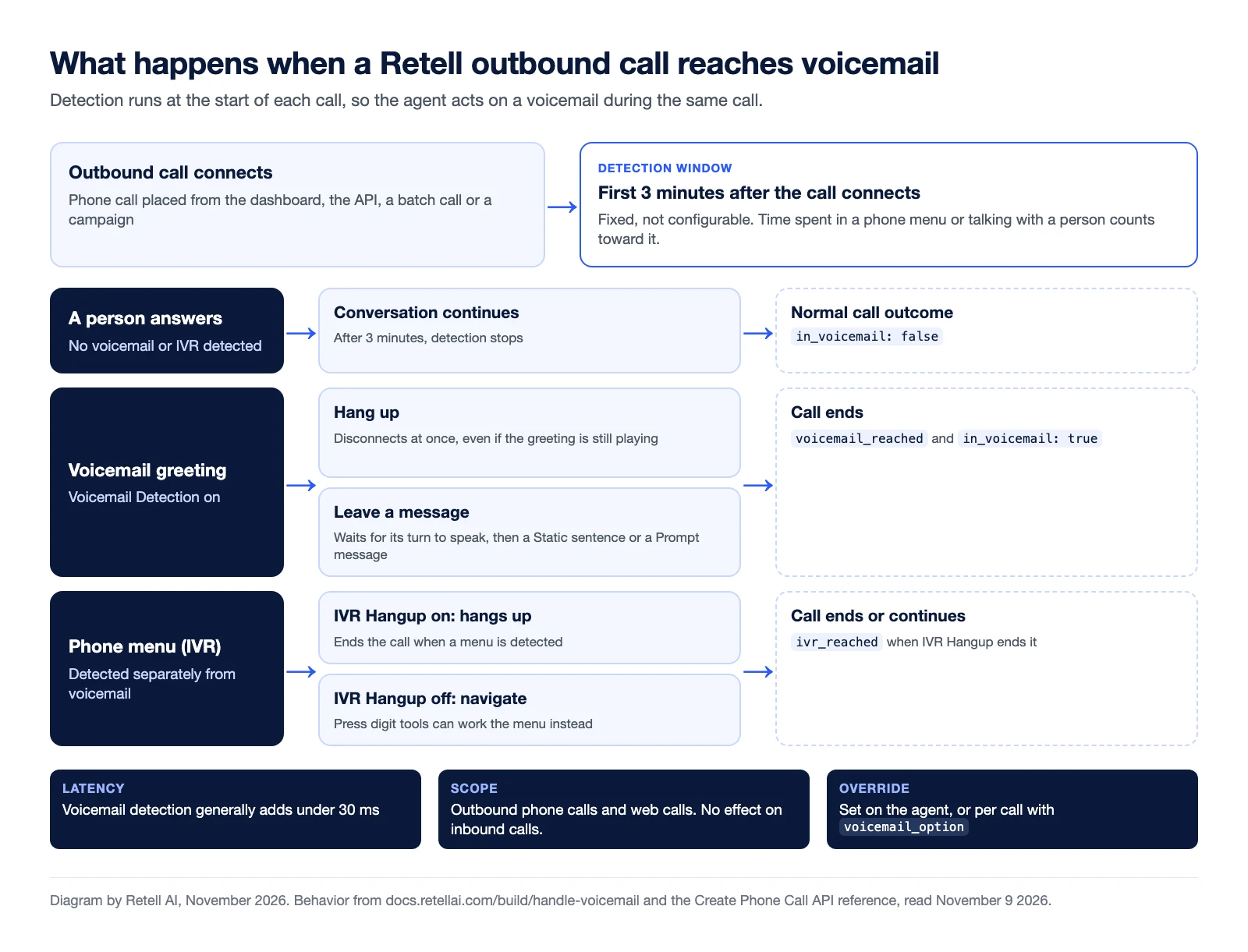
Diagram of what happens when a Retell outbound call reaches voicemail. After the call connects, detection runs for the first 3 minutes, a fixed window. If a person answers, the conversation continues and in_voicemail is false. If a voicemail greeting is detected, the agent either hangs up at once, even mid-greeting, or waits for its turn to speak and leaves a Static sentence or Prompt message; the call ends with voicemail_reached and in_voicemail true. If a phone menu is detected, IVR Hangup ends the call with ivr_reached, or with IVR Hangup off, press digit tools can navigate the menu. Voicemail detection generally adds under 30 ms of latency, works on outbound phone calls and web calls only, and can be set on the agent or per call with voicemail_option.
What a Retell agent does when an outbound call reaches a person, a voicemail greeting or a phone menu. Diagram by Retell AI, November 2026. Source: Retell voicemail and IVR docs.

Voicemail and IVR settings at a glance

Setting What the agent does In the API What gets logged
Hang up if reaching voicemail Disconnects as soon as it detects voicemail, even if the greeting is still playing voicemail_option, action hangup voicemail_reached
Leave a message: Static Sentence Waits for its turn to speak, then says your fixed text, with dynamic variables filled in voicemail_option, action static_text voicemail_reached
Leave a message: Prompt Waits for its turn to speak, then says a message generated from your instructions voicemail_option, action prompt voicemail_reached
IVR Hangup Ends the call when it detects an automated phone menu ivr_option, action hangup ivr_reached
iOS / Android Call Screen Handling Answers a phone's call screen with the identity and call purpose you set call_screening_option The call continues

Detection settings are in Call settings in the agent editor (for a conversation flow, open Global settings first). If you'd rather the agent work through a phone menu than hang up, leave IVR Hangup off and use IVR navigation.

Set it per agent, per call or per attempt

The agent's settings are the default. Through the API, voicemail_option can also carry a detection_prompt that describes what should count as voicemail. Create Phone Call and Create Batch Call accept an agent_override, so one call can use a different voicemail action without changing the base agent. That covers single API calls and batch calls. Retell's docs also describe per-attempt voicemail settings for outbound campaigns, and suggest leaving a message only on the last attempt or two.

Where voicemail detection fits in outbound calling

Human-staffed dialers face the same question. A parallel dialer, for example, rings several numbers for one rep and connects the rep to the first person who answers, so the rep spends less time on rings and voicemail. With an AI voice agent on the line, the agent itself decides what to do on each outcome. Our guide to answering machine detection for voice AI maps each call state to an action, a log entry and a retry rule, and 5 voicemail practices for AI voice agents covers what to say when you leave a message.

Voicemail messages and the TCPA

The FCC's rule at 47 CFR 64.1200 covers calls and messages that use an "artificial or prerecorded voice". Under 64.1200(b), those messages must state the identity of the business responsible for the call at the beginning, and a callback telephone number during or after the message. For telemarketing messages left on an answering machine or voice mail service, 64.1200(b)(3) also requires a toll-free number the person can call back to reach an automated opt-out. Consent rules in 64.1200(a) apply as well, and eCFR flags an amendment to the section published October 26, 2026. This is a summary, not legal advice. Check with counsel on how these rules apply to the messages your AI agent leaves before you turn on voicemail messages for a campaign.


Voicemail detection FAQ

What is voicemail detection?

Voicemail detection, also called answering machine detection (AMD), tells whether an outbound call was picked up by a person, a voicemail greeting or an automated phone menu, so the caller can act on the same call. In Retell it is a setting on the voice agent: when the agent detects a voicemail, it hangs up or leaves a message.

What can a Retell agent do when it reaches voicemail?

It can hang up or leave a message. Hang up disconnects immediately, even if the greeting is still playing. Leave a message waits for the agent's turn to speak, then delivers either a static sentence you write or a message the agent generates from your prompt. Both message types support dynamic variables such as {{user_name}}.

How long does voicemail detection run on a call?

During the first 3 minutes after the call connects. The window isn't configurable, and time spent in a phone menu or talking with a person counts toward it. If no voicemail is detected in that window, detection stops and the call continues normally.

Does voicemail detection work on inbound calls?

No. Voicemail and IVR detection run on outbound phone calls and on web calls. On an inbound call a person is calling your agent, so these settings have no effect.

Why doesn't my agent hang up when it reaches voicemail?

The call is most likely being classified as an IVR rather than a voicemail. The two are detected separately, so turn on IVR Hangup in the agent's Call settings to end those calls as well.

Do I pay for calls that reach voicemail?

Retell's pricing page says calls that reach voicemail are billed only for the time the AI agent is active on the line, and calls that fail to connect aren't billed. Voice agents start from $0.07 per minute.

AIコールセンターを導入する時が来ました