SSML (Speech Synthesis Markup Language) is an XML-based markup language that tells a text-to-speech engine how to say a piece of text: where to pause, how to pronounce a word, how to read a number or a date, and how fast, loud or high to speak. The engine reads the tags as instructions and does not speak them.
SSML is a World Wide Web Consortium (W3C) standard. The current version, SSML 1.1, became a W3C Recommendation on 7 September 2010 and was produced by the W3C's Voice Browser Working Group. The spec states its purpose as giving authors "a standard way to control aspects of speech such as pronunciation, volume, pitch, rate, etc. across different synthesis-capable platforms".
What does SSML look like?
An SSML document is XML with one root element, <speak>. This short example is valid SSML 1.1:
<speak version="1.1" xmlns="http://www.w3.org/2001/10/synthesis" xml:lang="en-US">
  Your code is <say-as interpret-as="characters">B7X4</say-as>.
  <break time="400ms"/>
  It ships to <phoneme alphabet="ipa" ph="ˌmænɪˈtoʊbə">Manitoba</phoneme>
  on <say-as interpret-as="date" format="yyyymmdd" detail="1">2026-11-19</say-as>.
  Questions go to <sub alias="Doctor">Dr.</sub> Lee.
</speak>
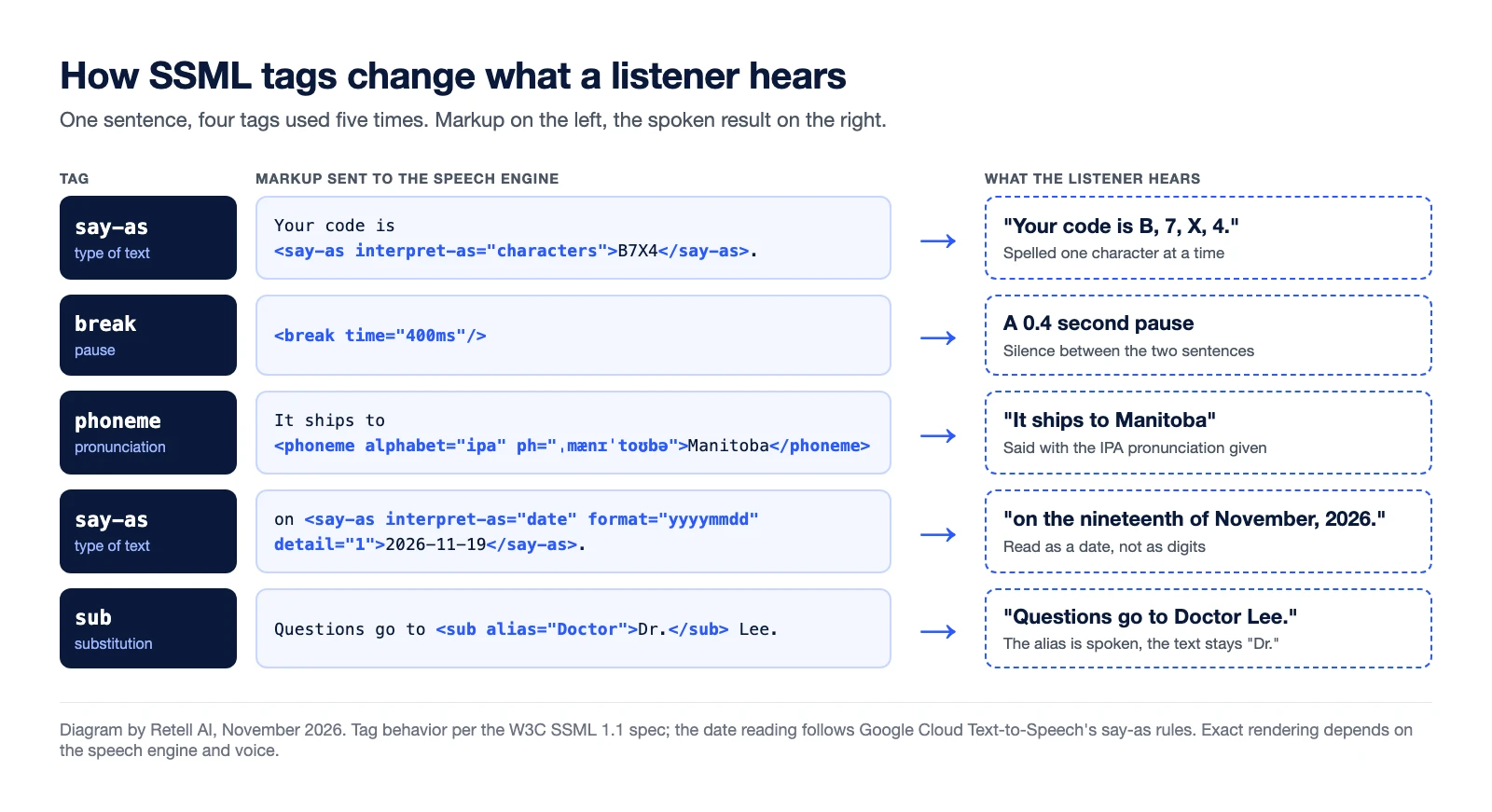
The figure shows what a listener hears for each tag when the engine supports it.
What are the most common SSML tags?
Descriptions follow the W3C spec.
| Tag | What it does | Example |
|---|---|---|
<speak> | Root element of every SSML document. In SSML 1.1 the version and xml:lang attributes are required, plus the SSML namespace. | <speak version="1.1" xml:lang="en-US"> |
<break> | Adds a pause or prosodic boundary, set by strength (none to x-strong) or by time. | <break time="400ms"/> |
<say-as> | Tells the engine what kind of text it is reading, such as a date, a time, a number or a currency amount. | <say-as interpret-as="characters">B7X4</say-as> |
<phoneme> | Gives a phonetic pronunciation for the enclosed text. The spec says engines should support the ipa alphabet. | <phoneme alphabet="ipa" ph="..."> |
<sub> | Speaks the alias value in place of the written text. | <sub alias="Doctor">Dr.</sub> |
<prosody> | Changes the pitch, speaking rate and volume of the enclosed text. | <prosody rate="slow"> |
<emphasis> | Asks for stress on a word or phrase, with a level of strong, moderate, none or reduced. | <emphasis level="strong"> |
Two details in the spec explain why results vary. First, it defines <say-as> but "does not enumerate the possible values for the attributes", so the list of interpret-as values is each vendor's own. Second, it calls prosody values "indicative" and lets the engine decide how to render emphasis.
Where does SSML support differ between speech engines?
Each engine implements its own subset, and newer voice models often support less markup than older ones. From each vendor's docs, read November 13, 2026:
- Google Cloud Text-to-Speech supports "a subset of the available SSML tags". Its Chirp 3: HD voices accept ten tags without
<emphasis>, other tags "will be ignored", and streaming requests take no SSML. - Amazon Polly lists tag support by voice type.
<emphasis>is not available on neural, long-form or generative voices, and an unsupported tag on standard, neural or long-form voices returns an error. - Azure AI Speech bases its implementation on SSML 1.0 and says its supported elements "can differ from the W3C standard". It adds its own
msttselements for speaking styles, and word-level emphasis works on three named English voices. - ElevenLabs supports two SSML tags on some models:
<break>for pauses up to 3 seconds, and<phoneme>on Flash v2 only. Eleven v3 and v4 do not support break tags. - Cartesia Sonic documents "SSML-like" tags of its own: speed, volume, emotion, break and spell.
The same document can be honored by one engine, silently ignored by another and rejected by a third. Test markup on the exact voice and model you will run.
Why does SSML matter for voice agents?
A caller cannot see the text. In voice AI, a wrong reading costs a repeat or a wrong record:
- Names. Brand, drug and surname pronunciations the voice guesses wrong.
- Numbers. A confirmation code read as one word, or an account number read as a quantity.
- Dates and times. A date such as 11/19 read as two separate numbers.
- Pauses. Time to write down each group of a phone number.
SSML suits scripted prompts, where a developer tags each line once. That fits an IVR menu. It fits a live AI voice agent less well.
How do LLM-driven voice agents handle pronunciation without SSML?
In an LLM-driven agent, a large language model writes each reply during the call and the text streams to the speech engine as it is generated (how the STT, LLM and TTS pipeline works). Nobody tags sentences by hand, and streaming adds a catch: Cartesia's docs warn that a speed or volume tag split across streamed tokens gets read aloud. Teams use four methods instead:
- Prompt for speakable text. Tell the model to write "four one five" in place of "415".
- Text normalization. A step before synthesis converts numbers, dates and currency to spoken form.
- A pronunciation dictionary. A word list with phonetic spellings, applied to every reply.
- Platform speech controls. Inline markers the platform translates for each voice provider.
How does Retell AI handle pauses and pronunciation?
Retell AI's documentation does not describe raw SSML input. It documents these controls:
- Pauses and spelling. Per the speech controls docs, a dash with a space on each side adds a pause, and
<spell>tags read a code or account number one character at a time. Retell converts the tag "to the format that works best for your agent's voice". - Pronunciation dictionary. Entries take a word and a phoneme in IPA, CMU, Pinyin or Jyutping. Retell platform voices take IPA and CMU, and some provider models take none.
- Speech Normalization. An Agent Handbook preset, off by default, that formats numbers, dates, money and phone numbers into spoken form.
See also how AI voice agents work on a call.
Frequently asked questions about SSML
What is SSML used for?
It controls how a text-to-speech engine reads text aloud: pauses, pronunciation, the reading of numbers and dates, and pitch, rate and volume.
Is SSML the same on every text-to-speech engine?
No. Each engine supports its own subset of the W3C spec and adds its own tags, so markup often needs changes between engines.
Does ElevenLabs support SSML?
Partly. Its docs describe break tags for pauses up to 3 seconds and phoneme tags on the Flash v2 model. Eleven v3 and v4 do not support break tags (as of November 2026).
What is the difference between SSML and a pronunciation dictionary?
SSML tags sit inside one piece of text and apply only there. A pronunciation dictionary is a separate word list that the engine or platform applies to every matching word.
Do AI voice agents use SSML?
Some do, where the speech engine accepts it. Many rely on prompting, text normalization and pronunciation dictionaries, because replies are generated live and some newer voice models accept little SSML.
Make every name and number sound right
Retell AI is an AI voice agent platform for contact centers. You can control pauses, spelling and pronunciation for each agent and hear the result in a web call test. Talk to the Retell team.
Security & compliance for regulated deployments
How Retell handles audits, data retention and access control.
Further Reading
Related terms
Table of contents